Known Participant
August 31, 2023
Answered

Issue with simple logo quality exporting to PNG 24

  • August 31, 2023
  • 2 replies
  • 1935 views

Hi!


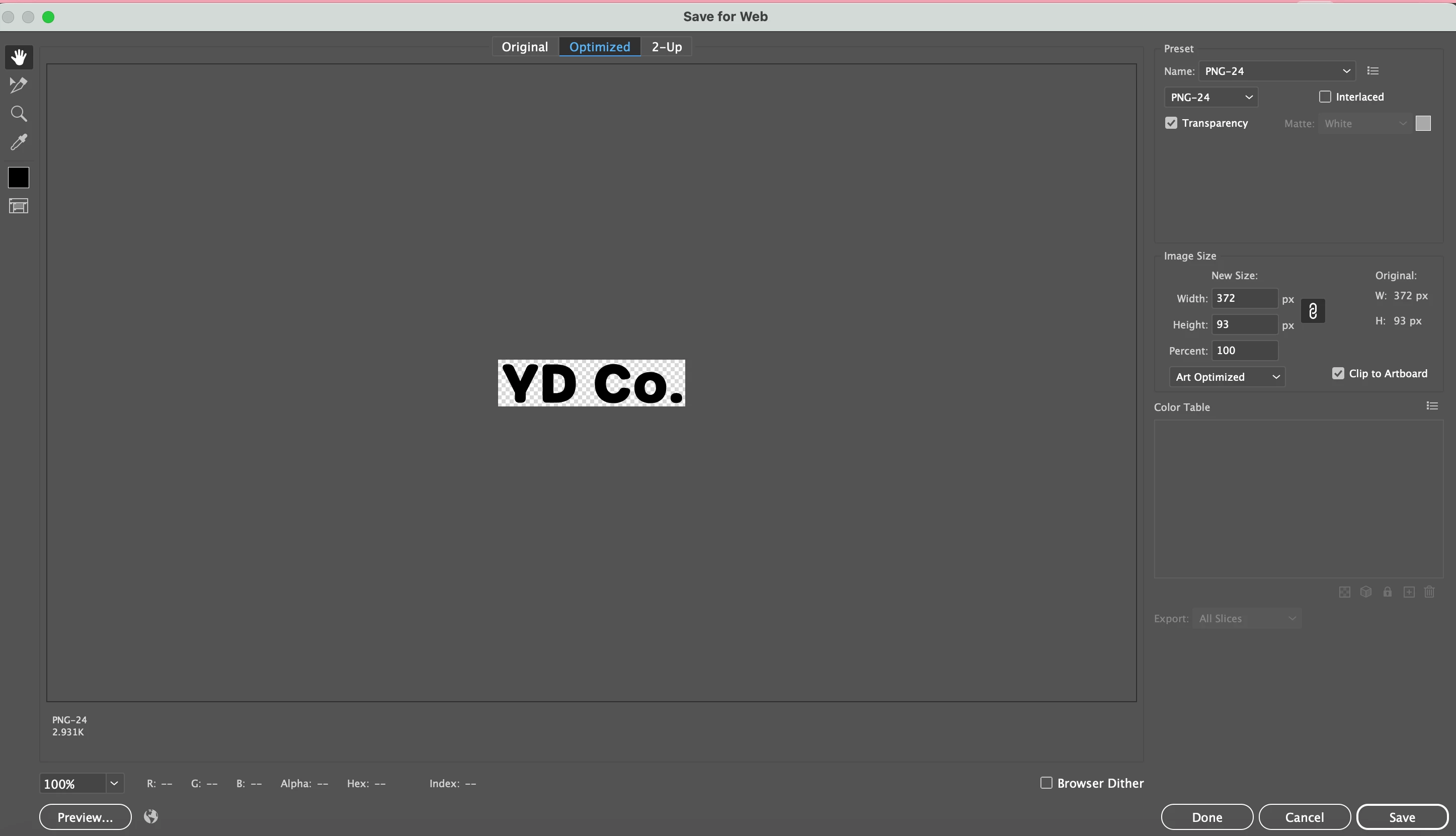
I created a simple logo design and when exporting it, the image quality looks poor and not crisp and clean. I exported it as PNG 24 with transparent background. The reason I did not export in SVG is because I am using it for letter head for documents and the file format is not supported. I have attached a screen shot of my export setting, and the image of the logo itself. I really hope the community can help me understand why this is happening, as it is fairly plain right now just including a typeface in black.

This topic has been closed for replies.
Correct answer Bobby Henderson

What is the target application where your "YD Co." graphic would serve as part of a letter head? Is it something like MS Word? I'm asking in case there is a possibility a better format than PNG can be used. The image in the export dialog box listed a resolution of 372px X 93px, which isn't enough for lettering that is intended to print sharp and clean.


Vector-based artwork will display and print in the best quality. The trick is whether the application where the letter head will be used can use vector-based artwork. Even if SVG could work in the target application the format isn't optimal since it is hard-wired for RGB use.


If a pixel-based image format has to be used, I'd recommend using something else besides PNG (and not use the Save for Web dialog box either). I would use a file format like TIFF since it supports CMYK, or use PSD if the image has to be CMYK and have a transparent background.


If your "YD Co." graphic is the only thing on the page/artboard (and it is sized how big you want it to be on the page), go to File>Export>Export As... When the Export dialog box pops up make sure "Use Artboards" is not checked, that way it will only export the lettering. When you click "OK" it will bring up a smaller options dialog box. The options vary depending on the file format picked. TIF and PSD will let you choose RGB, CMYK or Grayscale color models along with letting you choose standard or custom-defined image resolutions. You can export a high resolution, transparent PNG image from the Export>Export As... dialog box, but it will be a RGB-based image file (no options to save in CMYK).

2 replies

Bobby HendersonCommunity ExpertCorrect answer
Community Expert
August 31, 2023

What is the target application where your "YD Co." graphic would serve as part of a letter head? Is it something like MS Word? I'm asking in case there is a possibility a better format than PNG can be used. The image in the export dialog box listed a resolution of 372px X 93px, which isn't enough for lettering that is intended to print sharp and clean.


Vector-based artwork will display and print in the best quality. The trick is whether the application where the letter head will be used can use vector-based artwork. Even if SVG could work in the target application the format isn't optimal since it is hard-wired for RGB use.


If a pixel-based image format has to be used, I'd recommend using something else besides PNG (and not use the Save for Web dialog box either). I would use a file format like TIFF since it supports CMYK, or use PSD if the image has to be CMYK and have a transparent background.


If your "YD Co." graphic is the only thing on the page/artboard (and it is sized how big you want it to be on the page), go to File>Export>Export As... When the Export dialog box pops up make sure "Use Artboards" is not checked, that way it will only export the lettering. When you click "OK" it will bring up a smaller options dialog box. The options vary depending on the file format picked. TIF and PSD will let you choose RGB, CMYK or Grayscale color models along with letting you choose standard or custom-defined image resolutions. You can export a high resolution, transparent PNG image from the Export>Export As... dialog box, but it will be a RGB-based image file (no options to save in CMYK).

Known Participant
September 1, 2023

Hi Bobby,


Thank you for your response!  I am using the image in a google doc that will likely remain digital, although a client might print it.  How do I increase the resolution of the image from 372px X 93px to something higher?  I exported a TIFF file per your recommendation, however google docs says it is not a supported file format.  Do you know how I can export a high quality, crisp version of the logo that can be used in google docs, and supports a transparent background? 


Monika Gause
Community Expert
Community Expert
September 1, 2023

If you have to use a pixel-based format like PNG or WebP you can use the File>Export>Export As... dialog to create a high resolution pixel version of your vector lettering. The 372px X 93px size of your image is due to using the 72ppi default. In the Export As... dialog box you can define a different resolution, such as 300ppi or a custom setting, such as 600ppi for example. PNG and WebP can create images with transparent backgrounds.


@Bobby Henderson  schrieb:

PNG and WebP can create images with transparent backgrounds.


I just did some tests with WebP and the quality is quite disappointing when you apply compression (even when the quality is 100%) - without compression on the other hand there is no advantage compared to PNG.

Monika Gause
Community Expert
Community Expert
August 31, 2023

How do you want to use it in your letter head?

Print it?

Place it in Word?


For printing a PDF might be suited better.

For Word, a PNG is OK, but you need a larger size. Then place it and scale it down in Word.


You cannot zoom into a PNG. It's not scalable