
Issues trying to cut multiple shapes from a single imported PNG image and move after
Hi Everyone,
I'm having a small issue with the following:
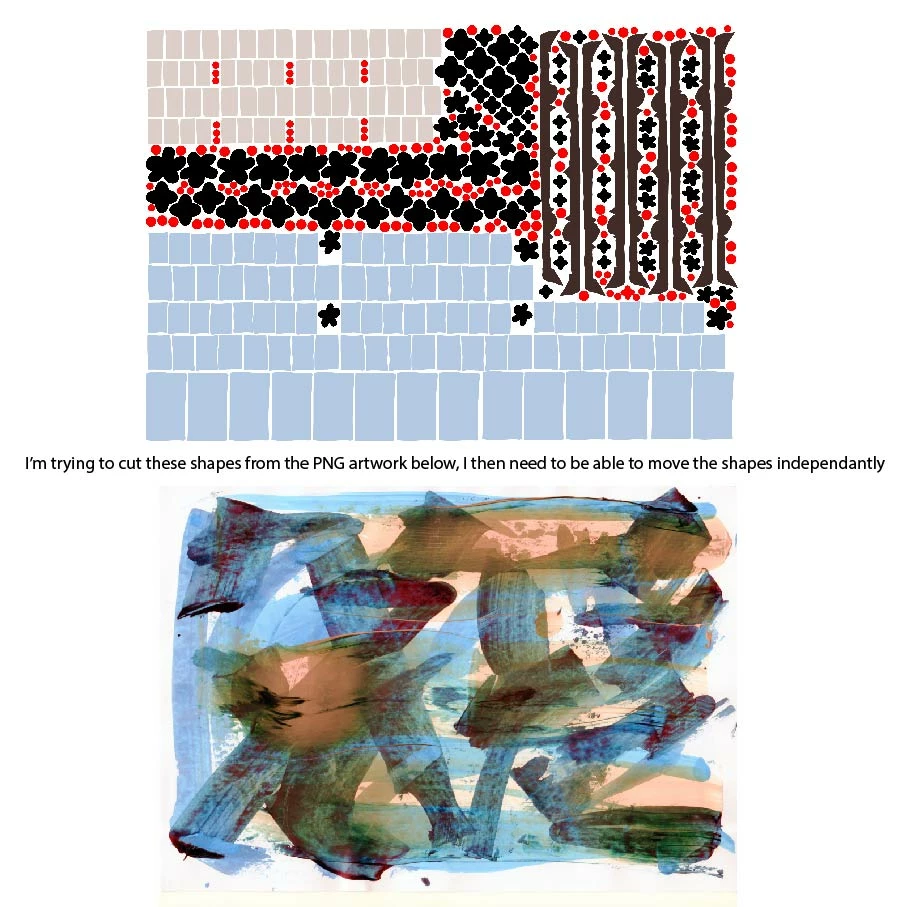
Context - I would like to cut out multiple shapes (perhaps 40+) from an imported PNG image (of my artwork) and then move/rotate/manipulate them independently afterward.
1. The artwork PNG is a large file. To import it 40 times in order to make a clipping mask for a each individual shape would work, but will take forever and I can't find a way to remove the excess (everything outside the clipping mask. I have tried pathfinder and other options which I can't seem to make work.) Therefore the file would be huge.
2. I have made a compound path from my 40+ shapes and successfully cut out from the original artwork, the only problem is, is I have not found a way to then disconnect them all from the path to allow me to use them independently (so that I can place/paste/rotate/repeat etc.)
Is there a way to cut the shapes from the compound path?
I suppose it's a bit like me making a jigsaw puzzle, but I need to be able to move the pieces around on their own within Illustrator.
Thank you for any advice
 AdChoices