
Participant
May 30, 2018
Answered

Issues with squished text

  • May 30, 2018
  • 3 replies
  • 17236 views

Hi, i have a problem with my squished text.

I don't know how to revert it back to normal like i was copying text from a google doc into illustrator and the text ended to be very long in length. So i resized it down so i could read it on a A3 document setup normally. ANNDDD..... i don't know why but my text got squished and there's nothing wrong with my spacing and size. Now every textbox and text i make in Illustrator ends up being squished. I need helpp
    This topic has been closed for replies.
    Correct answer Jeff Witchel, ACI

    Just a guess here.

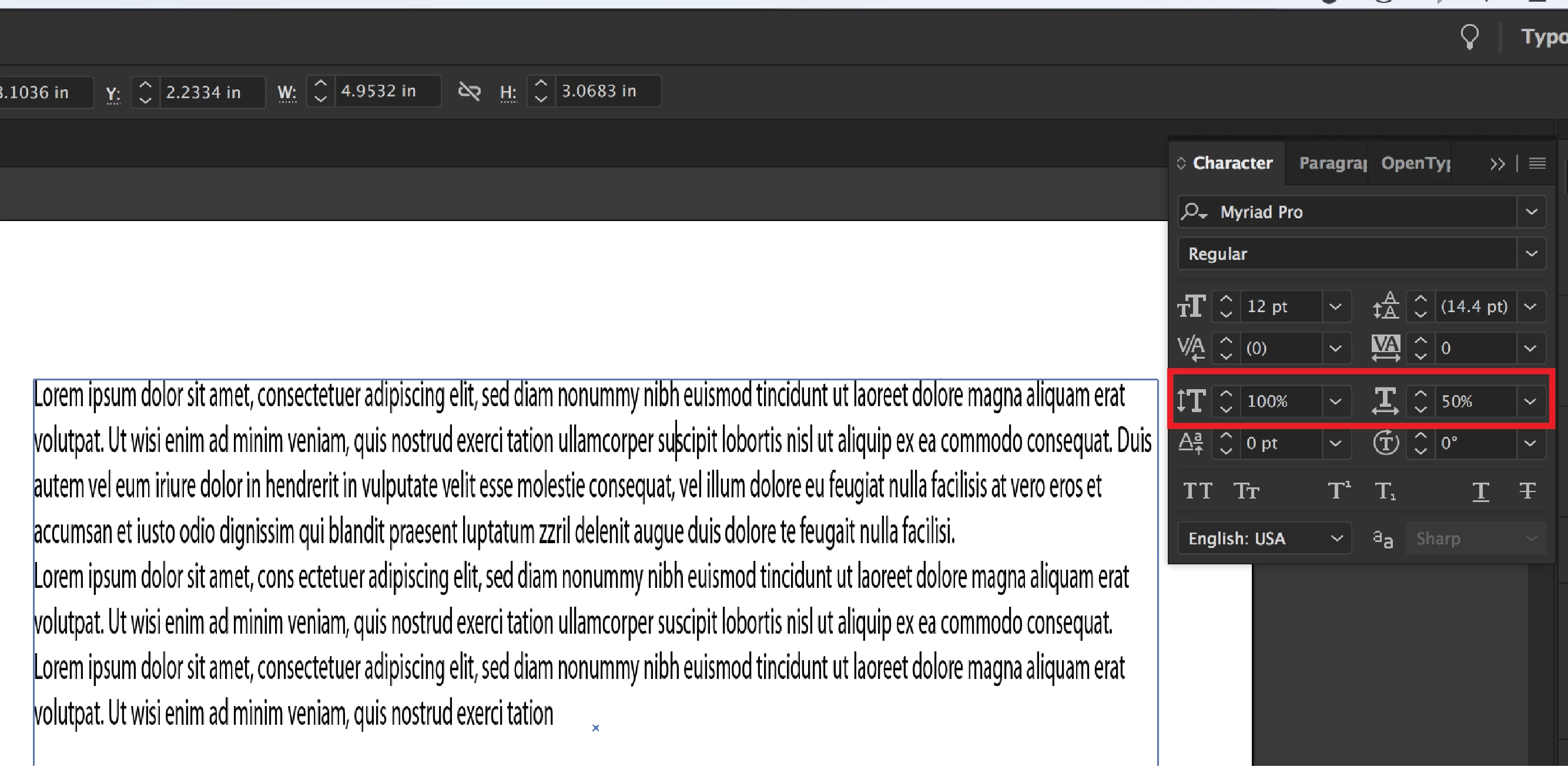
    Sounds like you're using Horizontal or Vertical Scale in the Character panel. Just change the Percent back to 100% and you'll be good to go. (see screenshot below)

    3 replies

    John Mensinger
    Community Expert
    Community Expert
    May 30, 2018

    I suspect Jeff has it right.^

    It's worth mentioning (and remembering) that any setting you change in Illustrator while nothing is selected becomes the default for all new items.

    Monika Gause
    Community Expert
    Community Expert
    May 30, 2018

    https://forums.adobe.com/people/John+Mensinger  schrieb

    It's worth mentioning (and remembering) that any setting you change in Illustrator while nothing is selected becomes the default for all new items.

    That would be in InDesign.

    Monika Gause
    Community Expert
    Community Expert
    May 30, 2018

    https://forums.adobe.com/people/Monika+Gause  wrote

    It has an effect when you apply brushes or dropshadows and other effects. Those won't be applied to new objects when the "Basic Appearance" setting is selected.

    Ah, thanks Monika. I do see now that Brushes and Effects are indeed available when nothing is selected, and that their application with nothing selected is indeed overridden by New Art Has Basic Appearance.

    I wouldn't say that necessarily negates any of my prior assertions in this thread, but I appreciate you pointing out something I'd have never discovered on my own during the logical progression of my typical workflows. I suppose I would simply never attempt applying effects, etc. without an active selection.


    https://forums.adobe.com/people/John+Mensinger  schrieb

    I suppose I would simply never attempt applying effects, etc. without an active selection.

    It's indeed not the typical workflow, but the question why it happens (or doesn't happen) comes up regularly inthe forums.

    Jeff Witchel, ACI
    Community Expert
    Jeff Witchel, ACICommunity ExpertCorrect answer
    Community Expert
    May 30, 2018

    Just a guess here.

    Sounds like you're using Horizontal or Vertical Scale in the Character panel. Just change the Percent back to 100% and you'll be good to go. (see screenshot below)

    ShakeN93
    Inspiring
    May 30, 2018

    Can you show a screenshot ? btw in my opinion every time when i copy a text from internet first time i paste in Notepad and after i copy again from Notepad and put in Ilustrator/PowerPoint/Word, etc.