
Exit
  • Global community
    • Language:
      • Deutsch
      • English
      • Español
      • Français
      • Português
  • 日本語コミュニティ
  • 한국 커뮤니티
0

[Javascript] How to choose gray stroke with the script?

Community Beginner ,
Dec 12, 2019 Dec 12, 2019

Hi all,

I'm writing an automatic dieline converter and I stuck on this part:

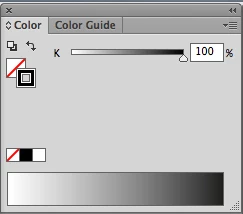
CMYK document, a line colored as [GrayColor] / 100%K (not CMYK 0 / 0 / 0 /100 !) like this: Screen Shot 2019-12-12 at 12.08.18.png.
The command:

alert (Math.round (app.activeDocument.pathItems[0].strokeColor.gray)) returns 100,

but the line:
if ( Math.round(sourceDoc.pathItems[x].strokeColor.gray) == 100 ) { ... 

changes nothing at all.

Any ideas what's wrong with my code?

cheers, RobWu
TOPICS
Scripting
712
Translate
Report
Community guidelines
Be kind and respectful, give credit to the original source of content, and search for duplicates before posting. Learn more
community guidelines

correct answers 1 Correct answer

Community Expert , Dec 13, 2019 Dec 13, 2019

I don't see anything wrong with your file either. 


after running your script look closely, did some of your paths change? and others didn't?

can you test your script with only 1 grayColor pathItem? it should work.


I suspect your dyeLyr is below your pathItems and the problem is due to stacking order. Some of you paths should be changed.


I changed my die color to green

grayDieLines.PNG

Translate
Adobe
LEGEND ,
Dec 12, 2019 Dec 12, 2019

Well, how is the x variable filled/ enumerated? Seems like you simply assume that AI would somehow magically iterate through all your paths and change them, which of course isn't the case. Unless there is a ton of extra code already that you haven't posted you need to write a specific loop an determine the criteria for the paths, e.g. based on a name, a specific style definition or an object selection state.


Mylenium

Translate
Report
Community guidelines
Be kind and respectful, give credit to the original source of content, and search for duplicates before posting. Learn more
community guidelines
Community Beginner ,
Dec 12, 2019 Dec 12, 2019

Hi Mylenium, thanks for answering. There is no magical thinking, I've just posted only a problematic line. Here is the whole loop:


for (x=0; x<sourceDoc.pathItems.length; x++) {
for (y= 0; y < cmykColArrLen; y++){

if(Math.round(sourceDoc.pathItems[x].strokeColor.cyan) == cmykColorArray[y][0] &&
Math.round(sourceDoc.pathItems[x].strokeColor.magenta) == cmykColorArray[y][1] &&
Math.round(sourceDoc.pathItems[x].strokeColor.yellow) == cmykColorArray[y][2] &&
Math.round(sourceDoc.pathItems[x].strokeColor.black) == cmykColorArray[y][3] ) {

if ( Math.round(sourceDoc.pathItems[x].strokeColor.cyan) == cmykColorArray[0][0] && // black defined as CMYK in the array: C = 91,
Math.round(sourceDoc.pathItems[x].strokeColor.magenta) == cmykColorArray[0][1] && // M = 79
Math.round(sourceDoc.pathItems[x].strokeColor.yellow) == cmykColorArray[0][2] && // Y = 62
Math.round(sourceDoc.pathItems[x].strokeColor.black) == cmykColorArray[0][3]) // K = 97

{ sourceDoc.pathItems[x].strokeColor = sourceDoc.swatches.getByName('Dieline - cut').color; // chooses and changes CMYK black strokes to the spot color }

else if ( Math.round(sourceDoc.pathItems[x].strokeColor.gray) == 100) {
sourceDoc.pathItems[x].strokeColor = sourceDoc.swatches.getByName('Dieline - cut').color; // chooses and changes nothing, why? } 

sourceDoc.pathItems[x].strokeWidth = 0.5;
sourceDoc.pathItems[x].strokeOverprint = true;
sourceDoc.pathItems[x].move(dieLyr, ElementPlacement.PLACEATBEGINNING); } } }


This loop compares each pathItem with the array of CMYK colors, if there is a match it changes the stroke color to one of the spot swatches created before that loop. This condition works perfectly when the initial stroke is a CMYK color, but it does nothing when the stroke is a grayColor. I have no idea how to choose those pathItems which are grayColor'ed.

Translate
Report
Community guidelines
Be kind and respectful, give credit to the original source of content, and search for duplicates before posting. Learn more
community guidelines
Community Expert ,
Dec 12, 2019 Dec 12, 2019

I don't see anything wrong with your code. Can you share a file where you can consistently replicate the problem?

Translate
Report
Community guidelines
Be kind and respectful, give credit to the original source of content, and search for duplicates before posting. Learn more
community guidelines
Community Beginner ,
Dec 13, 2019 Dec 13, 2019

Hi Carlos,

thank you for your reply. Here is a sample dieline.

If there is a bug in the AI, can the problem be worked around by changing the color space in the Illustrator's color palette before trying to access problematic pathItem?

Translate
Report
Community guidelines
Be kind and respectful, give credit to the original source of content, and search for duplicates before posting. Learn more
community guidelines
Community Expert ,
Dec 13, 2019 Dec 13, 2019

I don't see anything wrong with your file either. 


after running your script look closely, did some of your paths change? and others didn't?

can you test your script with only 1 grayColor pathItem? it should work.


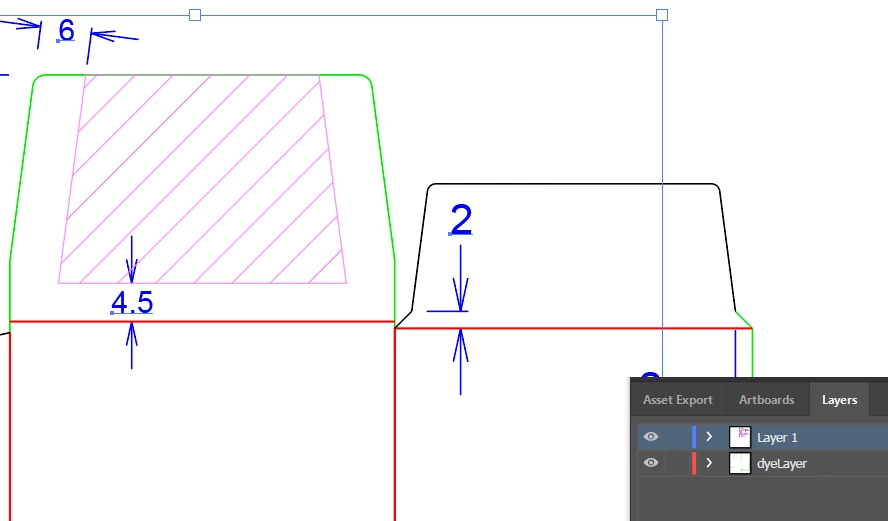
I suspect your dyeLyr is below your pathItems and the problem is due to stacking order. Some of you paths should be changed.


I changed my die color to green

grayDieLines.PNG

Translate
Report
Community guidelines
Be kind and respectful, give credit to the original source of content, and search for duplicates before posting. Learn more
community guidelines
Community Beginner ,
Dec 16, 2019 Dec 16, 2019
LATEST

I was able to change single pathItem using script, so after few tries I discovered that the conditon for grayColor should be moved out from the second loop to the first one, like this:


for (x=0; x<sourceDoc.pathItems.length; x++) {    
  if (  Math.round(sourceDoc.pathItems[x].strokeColor.gray) == 100 ) { 
    sourceDoc.pathItems[x].strokeColor = sourceDoc.swatches.getByName('Dieline - cut').color; 
     } 
  for (y= 0; y <  cmykColArrLen; y++){ 
    if(Math.round(sourceDoc.pathItems[x].strokeColor.cyan) == // here goes the rest of the code


I don't know why the second loop messed this condition, but it works now. Thank you Carlos for your help.

Translate
Report
Community guidelines
Be kind and respectful, give credit to the original source of content, and search for duplicates before posting. Learn more
community guidelines