Exit
  • Global community
    • Language:
      • Deutsch
      • English
      • Español
      • Français
      • Português
  • 日本語コミュニティ
  • 한국 커뮤니티
0

Joining inner outlines to outer outlines using rectangles?

New Here ,
Dec 12, 2020 Dec 12, 2020

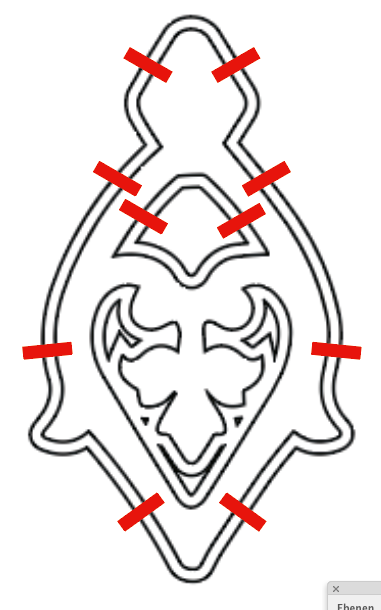
I want to connect the outer outlines to the inner outlines using rectangle bridges.  Image that I'm using is attached.  This is for a cookie cutter and this particular image will serve as the base of a two image composite where the other image is the actual cutting feature and does not need to have the bridges that I'm referring to.  I am new to Illustrator and have figured out how to get this far to create the outlines using the offset path function, but want to make the cutter so that the inner outlines connect to the outer outlines with rectangles that join them.  Using a wider offset path defeats the purpose of making the cutter, so is there another way to add rectangle objects and join them to the outlines some how?

TOPICS
Draw and design , Tools
304
Translate
Report
Community guidelines
Be kind and respectful, give credit to the original source of content, and search for duplicates before posting. Learn more
community guidelines

correct answers 1 Correct answer

Community Expert , Dec 14, 2020 Dec 14, 2020

You could just draw the rectangles and then subtract them from the shapes (using the pathfinder panel).


Bildschirmfoto 2020-12-15 um 00.26.41.png

Translate
Adobe
Community Expert ,
Dec 14, 2020 Dec 14, 2020
LATEST

You could just draw the rectangles and then subtract them from the shapes (using the pathfinder panel).


Bildschirmfoto 2020-12-15 um 00.26.41.png

Translate
Report
Community guidelines
Be kind and respectful, give credit to the original source of content, and search for duplicates before posting. Learn more
community guidelines