
MahaB82A
September 18, 2025
Answered

Keyboard Shortcuts to Expand & Expand Appearance

  • September 18, 2025
  • 3 replies
  • 216 views

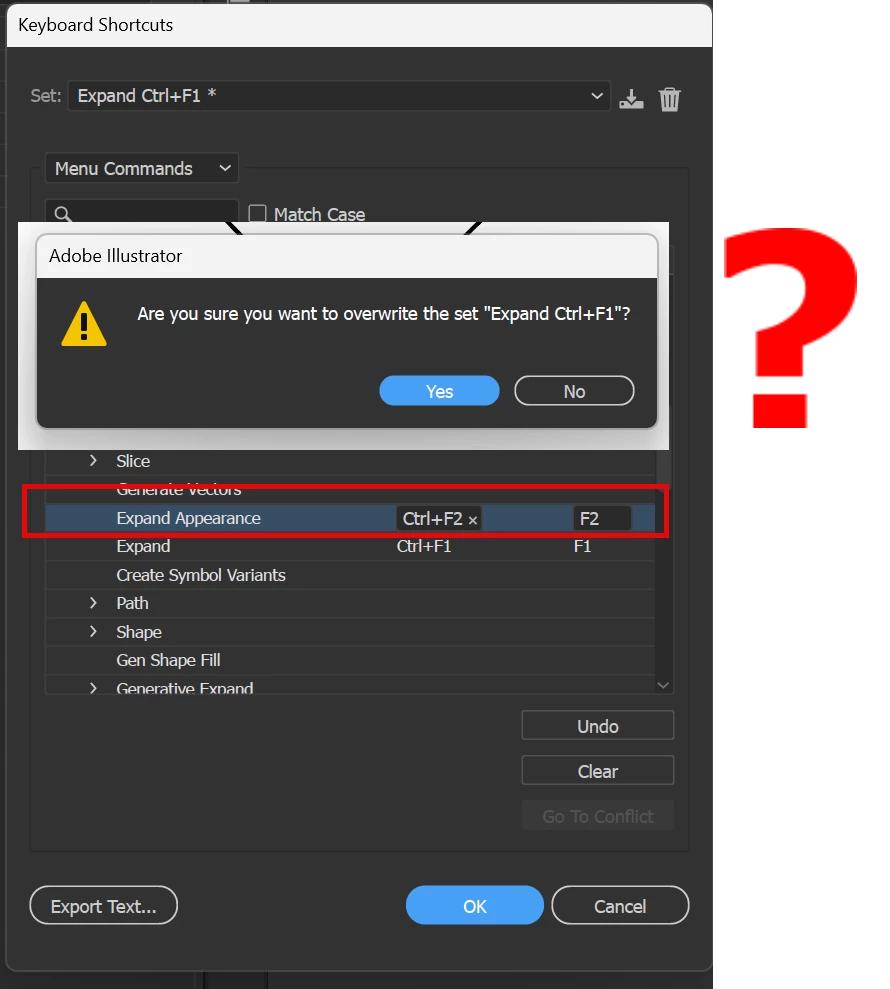
I tried assigned Keyboard Shortcuts to Expand & Expand Appearance. I have already assigned Ctrl+F1 to Expand. When I tried to assign Ctrl+F2 to Expand Appearance I got a warning sing. How to fix this?


Correct answer Abhishek Rao

Hi @MahaB82A,


Thanks for sharing the screenshot. The warning you're seeing appears because Illustrator is letting you know that you’re about to make changes to the custom set you created called 'Expand Ctrl+F1'. It doesn't mean the shortcut itself is invalid.

You can either create a new custom set starting from the "Illustrator Defaults" set at the top or go ahead and overwrite your existing 'Expand Ctrl+F1' custom set.

Please give this a try and let me know how it goes.


Looking forward to your update.

Abhishek

3 replies

MahaB82A
MahaB82AAuthor
September 18, 2025

Thanks for all.

Abhishek Rao
Community Manager
Abhishek RaoCommunity ManagerCorrect answer
Community Manager
September 18, 2025

Hi @MahaB82A,


Thanks for sharing the screenshot. The warning you're seeing appears because Illustrator is letting you know that you’re about to make changes to the custom set you created called 'Expand Ctrl+F1'. It doesn't mean the shortcut itself is invalid.

You can either create a new custom set starting from the "Illustrator Defaults" set at the top or go ahead and overwrite your existing 'Expand Ctrl+F1' custom set.

Please give this a try and let me know how it goes.


Looking forward to your update.

Abhishek

Doug A Roberts
Community Expert
Community Expert
September 18, 2025

You named your keyboard shortcut set 'Expand Ctrl+F1'. This is a file like any other. When you edit it and save, it will overwrite the original file.