Participant
October 4, 2017
Answered

Keyboard Zoom Shortcut

  • October 4, 2017
  • 2 replies
  • 32265 views

All of a sudden I cant use the keyboard shortcut to Zoom in or Out on my keyboard anymore ?

This topic has been closed for replies.
Correct answer Barb Binder

That's a custom shortcut. Illustrator usually uses Ctrl + and Ctrl - for zoom in and out.

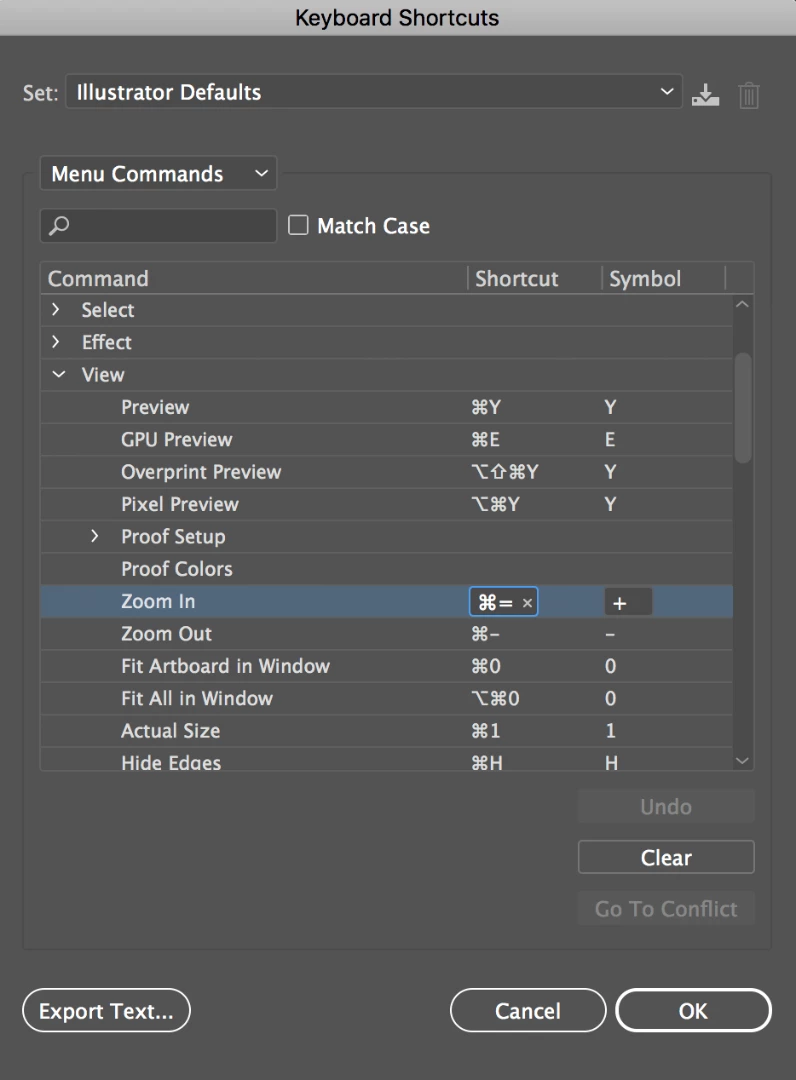
You can set this in Edit > Keyboard shortcuts. I wonder if you did something recently to reset your custom shortcuts? You can click on the Set menu in the dialog box to see if your custom list is still available, or you can redefine them by changing the product area to Menu Commands, and then scrolling all the way down to Zoom in and Zoom out.
2 replies

Participant
March 10, 2020

command - works however command + does not. I have tried to edit and I cannot seem to be able to enter command = I can only zoon in when using shift, command + 
I am on latest version.

Monika Gause
Community Expert
Community Expert
October 4, 2017

Which version?

Which system?

Which shortcut?

Have you already tried to restart your computer?

AzRoyalTzAuthor
Participant
October 4, 2017

CC

Windows 10

CONTROL LEFT or Right Arrows for ZOOM in and out

Barb Binder
Community Expert
Barb BinderCommunity ExpertCorrect answer
Community Expert
October 4, 2017

That's a custom shortcut. Illustrator usually uses Ctrl + and Ctrl - for zoom in and out.

You can set this in Edit > Keyboard shortcuts. I wonder if you did something recently to reset your custom shortcuts? You can click on the Set menu in the dialog box to see if your custom list is still available, or you can redefine them by changing the product area to Menu Commands, and then scrolling all the way down to Zoom in and Zoom out.

~Barb at Rocky Mountain Training