

Knocking out strokes
Hey, I have an applique plotting job to do on an old Mimaki plotter.
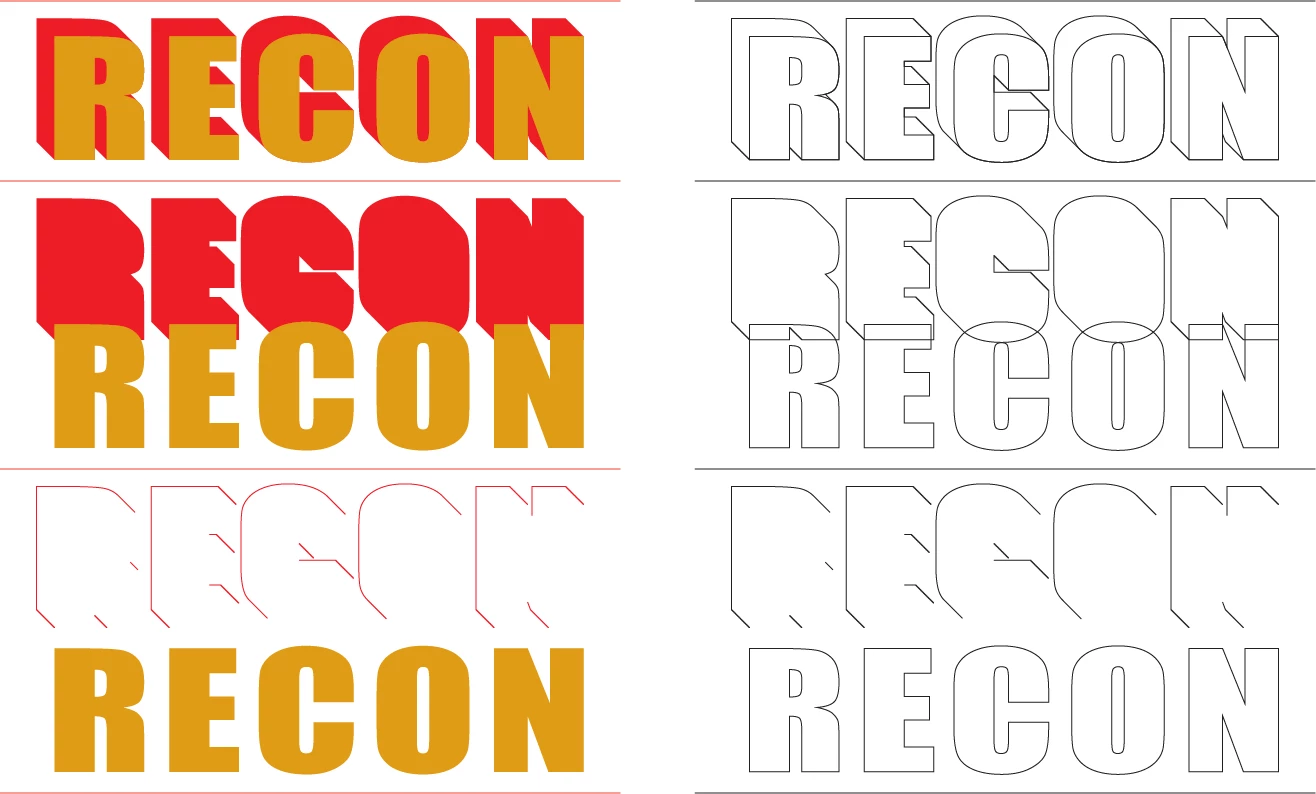
I used to be able to get away with plotting two shapes with the same overlapping outline on top of each other without it affecting the final line thickness, but my plotter is old and temperamental, so to get around the imprecision I can't have two outlines overlapping, the sewers don't know which one to follow, so I need to knockout the red stroke area from the gold.
Top is how it looks now, second is how that is made up, but I need it to look like the bottom. (Yes I know with the imprecision it won't look as good as this but it's better than what I'm getting with the double offset line, which is too confusing for them.)
I thought this would be easy with a combination of pathfinder and shape builder tool, but the clean-up after is taking longer than if I just did this by hand, and I'm just confusing myself with what needs deleting or not!
Let me know if this needs a better explanation.
Thanks.
 AdChoices