Participant
March 12, 2017
Answered

Lance Wyman Style Help

  • March 12, 2017
  • 3 replies
  • 997 views

I was wondering how you can create similar effects as what Wyman does with his posters. Transforming repeated lines into particular shapes or letters.

thanks

This topic has been closed for replies.
Correct answer Ton Frederiks

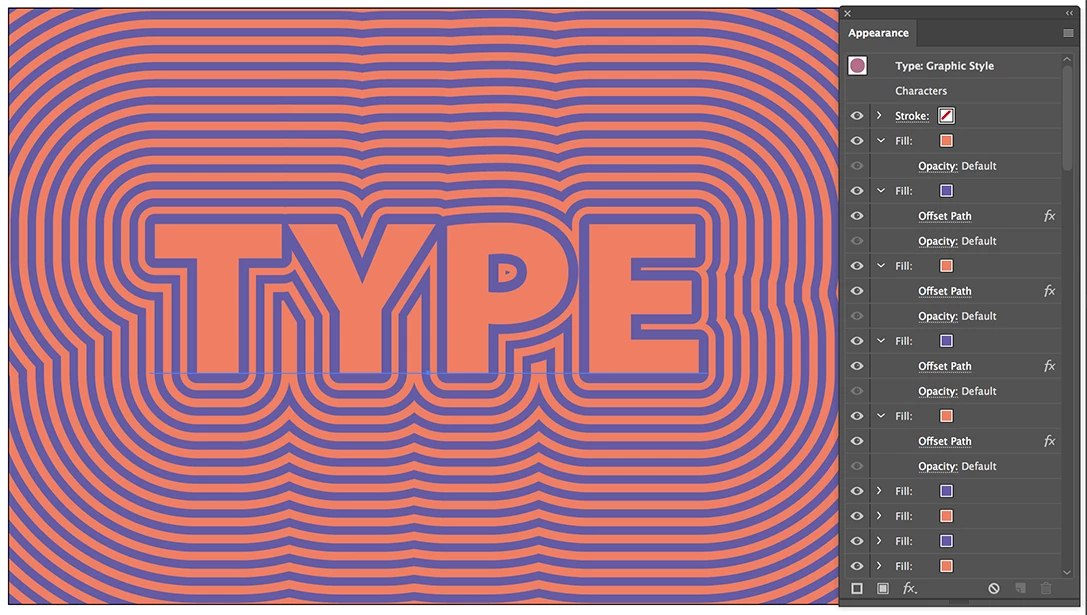
Multiple fills with Offset path applied (and saved as a Graphic Style).
3 replies

Ton Frederiks
Community Expert
Ton FrederiksCommunity ExpertCorrect answer
Community Expert
March 12, 2017

Multiple fills with Offset path applied (and saved as a Graphic Style).

Participant
March 12, 2017

I appreciate the help a lot, especially for the fast reply. I got it working exactly how I wanted.

Thank you.

Ton Frederiks
Community Expert
Community Expert
March 12, 2017

Good to hear that helped.

Ray Yorkshire
Participating Frequently
March 12, 2017

What do his effects look like ?

Participant
March 12, 2017

Like this, lines radiating from the original shape or letters.

Jacob Bugge
Community Expert
Community Expert
March 12, 2017

kentarom,

You may use Object>Path>Offset Path as the (basic/initial) operation for some, for others you may move copies of specific parts of the original shapes, maybe (starting) as an effect under Effect>Distort&Transform>Transform (which you may Object>Expand to have individual editable paths).

Participant
March 12, 2017

I've tried using Offset Path but it doesn't really do the whole, radiating around the object, sort of effect.

This is what happened when created the letter K and applied that effect.