
Known Participant
May 31, 2023
Question

Laser Cutting: Cannot Get Image to Cut & Engrave at the Same Time

  • May 31, 2023
  • 3 replies
  • 2199 views

Hello, Everyone. I'm learning a lot of new techniques from all the members here. Thank you SO MUCH. You've been a lifesaver. 


Most of my learning of AI has come through YouTube, and it's really great, but I can't find the answer to the following question. 


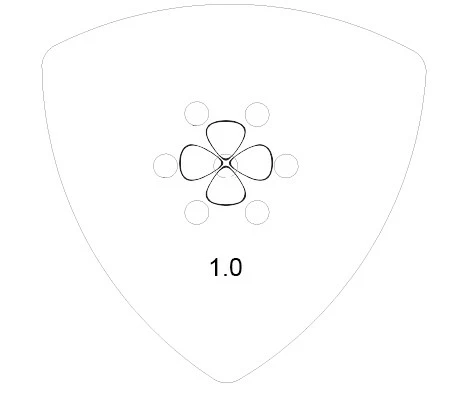
Below is the image I'm working with. The number and the clover / Shamrock are being engraved, the holes and the outside shape are for cutting.


Here is the issue. I cannot get this image to laser engrave and cut at the same time. It will perform either task perfecly on its own, but not simultaneously. What's weird is, it was working fine and doing that 48 hours ago with this exact same image, but now it won't. I assume I must have accidentally made some minor formatting change that has changed this. 


Any Ideas?


Thank You. 


3 replies

Participant
February 16, 2024

hey im having the same problum i was wondering if you could tell me how you fixed this problum if you ever did please this is a huge problum for me and my team thank you

Community Expert
January 31, 2025

Does the Epilog Laser have any documentation stating what kinds of fills or line strokes need to be applied to vector shapes in order for them to be cut successfully? Industry-specific devices can be very finnicky over the kinds of vector objects they prefer to see and may disregard vector shapes that don't meet those requirements.

Participant
March 5, 2025

I have had a problem when I import certain graphics into Illustrator that I place inside a shape that needs to be cut (.1 inch line width for Epilog). When I send to file to the Epilog, I see the engrave window (it includes the engraving and the cut as well all in the engraving window) but there is not cut window. So I tried selecting the graphic in AI and doing Object -> Rasterize. Seems to fix it and I get both windows now and  I don't see anything weird from rasterizing the image.

Community Expert
May 31, 2023

My first thought is some output setting must have been changed in your engraving software. Maybe that happened for another project and didn't get changed back?

Scott5F8FAuthor
Known Participant
May 31, 2023

Bobby, I imagine that's entirely possible, but I'm not knowledgeable enough about AI to know how to check this. Is it possible that I could post the AI-formatted version of the image in this discussion, then have someone download it and look through it in their program?


Thank You.

Scott5F8FAuthor
Known Participant
June 1, 2023

The setting might not be in Adobe Illustrator, but rather the application you may be using to do the actual laser cutting and engraving. Are you using a separate, stand-alone application to feed artwork into your engraving/cutting machine? Or are you outputting the artwork directly to the device from Adobe Illustrator? Usually there is some separate application involved to interface with such a machine. That's how it typically works with large format printing and cutting. Separate RIP applications are often involved. Sometimes plugins for Adobe Illustrator (or rival applications) are used to control things like vinyl cutters. We don't do engraving work at my shop, so I'm not very familiar with the software offerings for that product niche.


Based on how art preparation works for other kinds of industry-specific devices, I'm pretty sure certain color values and/or spot color names need to be applied to vector objects to be engraved or cut. It would probably be worth it to double check those details on what the engraving machine requires. If your existing art file was working properly before then it probably has the correct color fills or strokes applied. That would point to another cause, such as a changed setting. It's not likely, but it's possible an update to the operating system, device drivers in the computer (such as the graphics card) or other pieces of software could have corrupted something. In that case more serious issues, such as program crashes, might happen.


Bobby, hi again. Thank you for your comprehensive response. 


To specify: I own an Epilog laser cutter, one of the top brands in the industry. This machine has been so wonderful for my business. I bought it used but it only had 30 hours on it, so it was like brand new. The owner of the machine was moving out of town and needed to sell it fast and cheap. It's been a real workhorse.


To answer your question, no, I don't cut directly from AI. Epilog has their own proprietary software, so the images run through that program to the laser. The weird thing is, I've cut and engraved thousands of images on this machine and have never seen this problem before. 


I think you're right, though, Bobby; I suspect it’s something minor. I must have inadvertently clicked on the wrong button in AI, and now that error is preventing the machine from correctly identifying and cutting the complete image.


I will call Epilog phone support tomorrow morning. They’re terrific. However, last time I spoke to them they told me that I really needed to contact Abode, so here I am.


I’ll give you guys an update tomorrow. 


Thank You.  


Jacob Bugge
Community Expert
Community Expert
May 31, 2023

Scott,


Presuming you have made no changes in software/driver versions, my first thought was that it might be either some (non AI) issue with the equipment or some change in the artwork/corruption of the document.


Is the the engraving/cutting combination still working for other documents/artwork?


Scott5F8FAuthor
Known Participant
May 31, 2023

Jamie, hi. Yes, the engraving and cutting option works fine on every other image in AI. Really strange. And even stranger that this exact image in this exact format and design worked perfect less than two days ago.


I've tried rebuilding the cutting image multiple times from scratch -- same problem. 


I have a hunch. When I drag the Shamrock out of the center of the image and outside the outside cutting lines, everything works fine. Question: Is it possible the little Shamrock is somehow masking the image? In case that may be the problem, Jacob, is there a way to make the background to the Shamrock "transparent"? I've tried doing this in PS first, then bringing the image over to AI -- no luck.


Confused.


Thank You.