
Participant
October 23, 2020
Answered

Layer options panel no longer shows print option, how can I turn layers off for print?

  • October 23, 2020
  • 2 replies
  • 1246 views

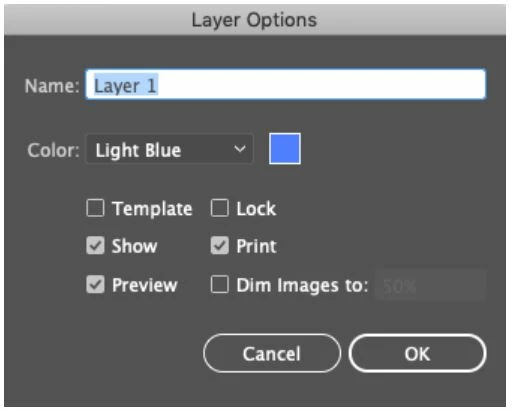
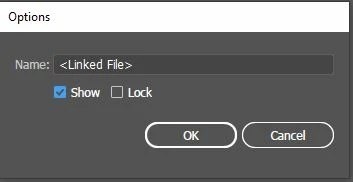
Ever since the Illustrator 2020 update my layer options panel now only shows "show" and "lock" switches. Is there another place I can turn off layers for print with the same function that button had? Attached show old option panel and new option panel.


old Options
 

illustrator2020


[ attachment inserted as inline image by moderator ]

This topic has been closed for replies.
Correct answer pixxxelschubser

Please make a layer active to see the layer options. Your second screenshot shows the options of a selected item --> a linked file.


IMHO print or no print is only available for layers and sublayers - but not for items.

2 replies

pixxxelschubser
Community Expert
Community Expert
October 23, 2020

No prob

Glad we could help.

😉

pixxxelschubser
Community Expert
pixxxelschubserCommunity ExpertCorrect answer
Community Expert
October 23, 2020

Please make a layer active to see the layer options. Your second screenshot shows the options of a selected item --> a linked file.


IMHO print or no print is only available for layers and sublayers - but not for items.

Brea5FF3Author
Participant
October 23, 2020

Wow boy do I feel stupid, I didn't notice that I was in individual items and not layers. You'd think after using this program for half my lifetime I'd have known. Thank you!