
Inspiring
March 30, 2025
Question

layers within a clipping group

  • March 30, 2025
  • 2 replies
  • 577 views

how can I keep all my layers I created and put them all in a clipping group

(a bounding box)

when I try, all layers go into the clipping group


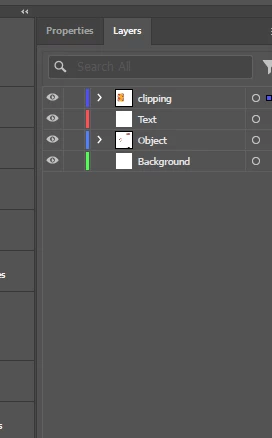
here is a snapshot of the groups I created and then the clipping after that - which all my layers went into
 

2 replies

Monika Gause
Community Expert
Community Expert
March 30, 2025

Put them all into another layer. Apply the clip mask to that layer with the clip mask button in the Layers panel.

Monika Gause
Community Expert
Community Expert
March 30, 2025

THis is how that works: https://youtu.be/-zX9WTkNwY0 

Community Expert
March 30, 2025

A clipping group is one logical object. It can't be spread across multiple layers. The only alternative is placing copies of the same clipping mask object across different layers and applying the clipping masks to objects on their respective layers.

Inspiring
March 30, 2025
Is there any simpler way than just to get all my objects to show only
within my artboard?
(other than a clipping mask)
Community Expert
March 30, 2025

Go to the View Menu and select Trim View. That should hide objects that are falling outside the art board.