
Learn tooltip window not closing in Illustrator
So, while I have seen this issue being asked about before, I didn't see a working solution, so I've made my own inquiry in hopes of answers.
It's my first time using Adobe Illustrator professionally, and I cannot help but feel the program is bugged somehow at the moment? When I get into the program, I'm faced with this prompt:
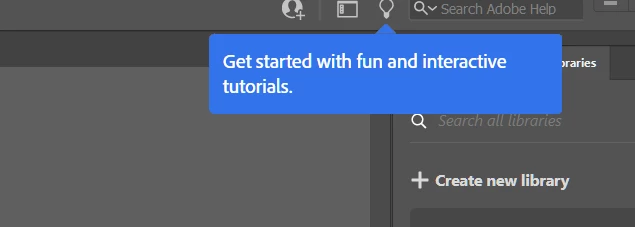
There doesn't appear to be an obvious way of removing or clicking off the message. I cannot get to the menus behind it. When I actually do try the learning exercise, there doesn't seem to be a way to properly advance either when trying to follow the steps. I've just been looking at the 1st step of creating the ellipse for Pac-Man with no seeming way to continue. lol
Lastly, and seemingly the most troublesome issue: when I do interact with that learning button/blue message prompt, my program gets stuck: clicking on menus at the top does nothing, clicking on tools on the left-hand side does nothing, I cannot even minimize or exit out of the program without force closing. I'd really appreciate a solution to this if anyone knows one. I kind of am in dire need of using an Adobe Illustrator that works, and when I've finally gotten it I cannot use it. lol Talk about divine intervention.
{Renamed by MOD}
 AdChoices