
Participant
May 25, 2022
해결됨

Left toolbar missing

  • May 25, 2022
  • 1 답변
  • 1056 조회

I've opened Illustrator and the left toolbar is gone. I've reset the workspaces, tried them all. Relaunched the software, rebooted the PC. The latest version on CC is installed.


From what I can tell from screenshots online, there should be a "Tools" option beneath the Control option. This makes me wonder if a plugin isn't loading correctly. The tools are available with keyboard shortcuts but I can't work without the toolbar.
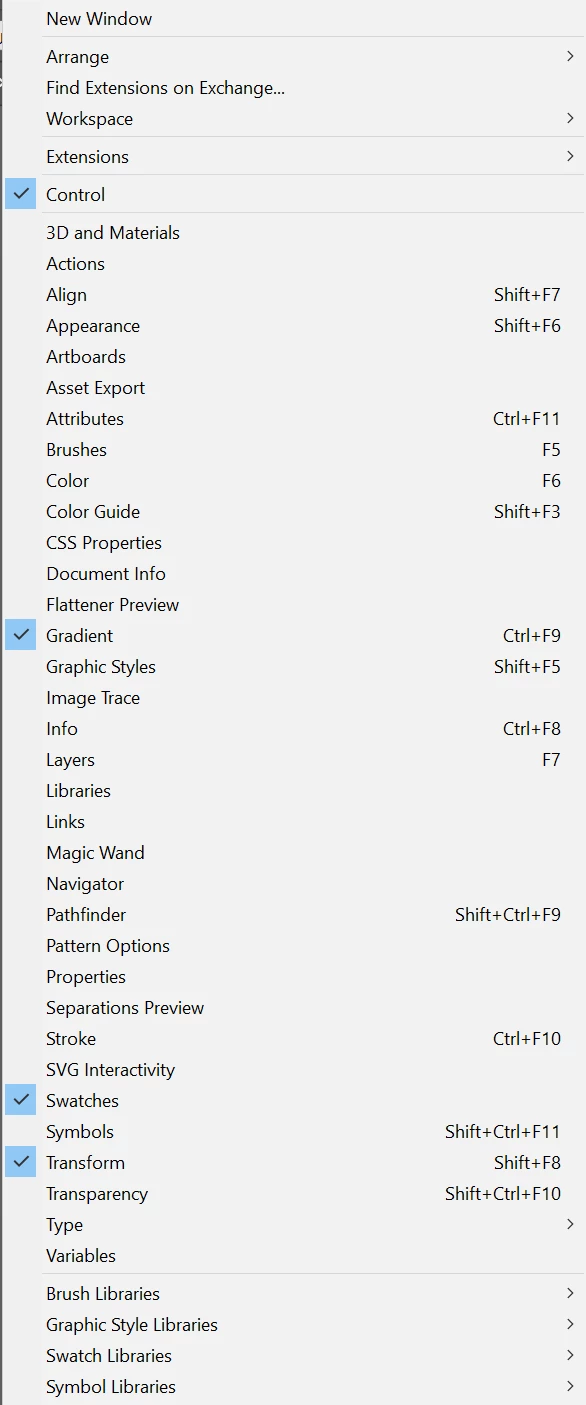
 

Thanks


이 주제는 답변이 닫혔습니다.
최고의 답변: James24596037l3d7

In the end I've uninstalled the software, removing all preferences and plugins when prompted, then reinstalled through CC. It's fixed the problem so hopefully that's the end of it.


Thanks for your suggestion anyway.

1 답변

Ares Hovhannesyan
Community Expert
Community Expert
May 25, 2022

Did you try to reset preferences? Preferences-General=Reset Preferences

James24596037l3d7작성자답변
Participant
May 25, 2022

In the end I've uninstalled the software, removing all preferences and plugins when prompted, then reinstalled through CC. It's fixed the problem so hopefully that's the end of it.


Thanks for your suggestion anyway.