
Participant
April 21, 2022
Question

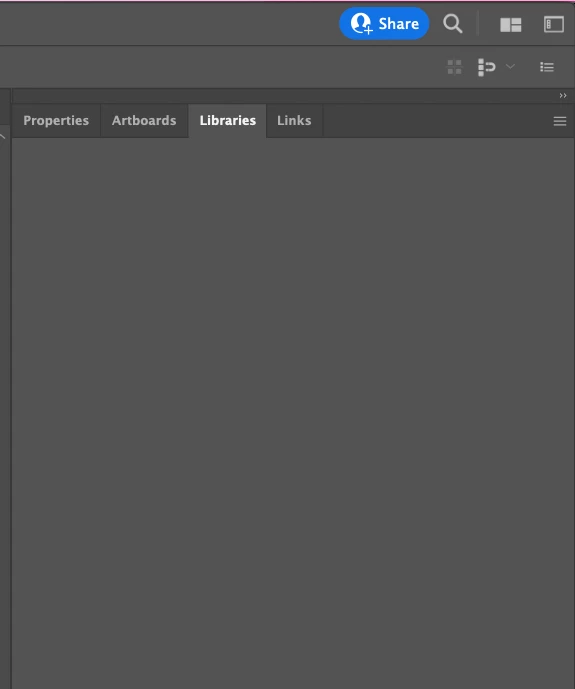
Library Panel contents invisible but clickable

  • April 21, 2022
  • 2 replies
  • 758 views

The Library Panel in Illustrator, Photoshop and AE is broken and doesn't render its contents, which remain invisible, but yet clickable. This is annoying and any number of updates or reinstalls does not help.

Appeared first on MaxOS Catalina and currently on a freshly installed Monterey.


The Problem:

The Library Panel appears empty, but in fact, it is not. The contents of it are just not rendered properly. I know, because going with the mouse over the "empty" contents shows mouse-over effect where a button is to be expected. The problem is seen in many adobe Apps, so it seems to be a global CC issue.


Machine:

Macbook Pro 2019 model.

Currently with an updated MacOS Monterey, but the issue appeared first on Calatina, so it is unlikely to be an OS problem.

No plugins or such.


Tried:

- reinstalling CC Libraries

- updating and reinstalling Illustrator

- fresh MacOS Install (means wiping the entire storage)


Theories:

- possible CC connection issue / port?

- GPU Driver level problem, but in that case, there should have been way more people like me


I couldn't get direct support from Adobe, so I hope the community hivemind can help 🙂 
 

This topic has been closed for replies.

2 replies

Participant
June 5, 2022

Same problem. Running Macbook Pro M1 2021. Tried all suggested fixes to no avail. I did find a perfect solution, however: just ordered a new external SSD. Goodbye Creative Cloud, and good riddance. What a complete waste of time. I don't share files so I never really needed it in the first place. Silly me, I just assumed I'd be able to access my files. This is a pretty big glitch, Adobe. If you can't access your files from the Import dialog, what's the point, really?

Anshul_Saini
Community Manager
Community Manager
June 13, 2022

Hi @jimw82700967,


We are sorry to hear about your experience. This is not the experience we want you to have. In addition to the steps suggested above, I would request you to re-install the Illustrator & Creative cloud app using the CC Cleaner tool and Creative Cloud uninstaller app, respectively. Let us know how it goes.


Kindly update the discussion if you still need assistance with it. We'd be happy to help.


Thanks & Regards,

Anshul Saini

Mike_Gondek10189183
Community Expert
Community Expert
April 21, 2022

Both Catalina & Monterey have the problematic dark mode.


Check to make sure  dark mode is disabled  in System preferences >> general

Participant
April 22, 2022

Hi Mike,

Thanks for the suggestion.

I'm not using Dark mode in MacOS.


Update:

I managed to fix this temporarily yesterday after reinstalling CC Libraries for the second time and rebooting.

Today, it is broken again and you can't see the panel contents as if Illustrator cannot render the UI elements inside.

The other panels render normally.


Mike_Gondek10189183
Community Expert
Community Expert
April 22, 2022

Do any of the library items have names with special characters? Colons and slashes can be problematic. Does this happen to all libraries, try making a new one to test.


Have you tried pulling the library window out of the other tab group?