
Participating Frequently
March 29, 2021
Question

lines appearing on screen in illustrator

  • March 29, 2021
  • 5 replies
  • 2130 views

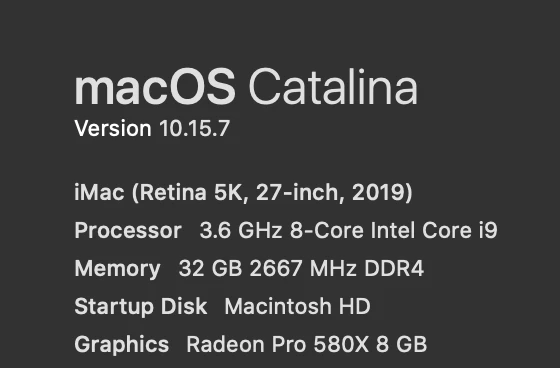
not sure if anyone can help me with this, but I have a brand new imac as of march 2020 (doomed from the beginning) and after about 1 week I started getting these white lines across my artwork, in all sorts of different files, then after a while I started getting blotches randomly all over hte artwork that would like like the rendering fell apart (not sure if describing it correctly) if I zoom in and out it would usually disappear, but sometimes get worse. I use a lot of patterns, gradients etc but this computer is brand new and it seems to struggle with everything. It also started displaying pantones and metallic foil swatches funny recently and way off like way too saturated. not sure if this is the an isolated case or what is going on but it's super annoying. anyone have any suggestions? also gets super slow and fan sounds like it's going to rocket off my desk  way more than it should...

This topic has been closed for replies.

5 replies

Jacob Bugge
Community Expert
Community Expert
March 29, 2021

Nicole,


Graphics cards are included in the system requirements:
https://helpx.adobe.com/illustrator/system-requirements.html


I am unsure whether yours fits in.


Apart from an inadequate card, the issue can be caused by lack of driver updating, lack of proper recognition of the card by the computer, and whatnot (including rifts in the space time, moon, weather, and the fact that Illy (job description Adobe Illustrator) sometimes moves in mysterious ways).


Kurt Gold
Community Expert
Community Expert
March 29, 2021

Nicole,


You may trust me or not, but the general issues with Illustrator's GPU preview certainly do not depend on outside or inside temperatures.


You may work in a research centre in the Antarctic, in Namibia or in Southern England: Illustrator's GPU preview will be sloppy, no matter where you are. At least at the moment.


Inspiring
March 29, 2021

Looks like a GPU issue to me. Does this only happen in Illustrator? Have you tried playing any moderately graphics demanding games?

Participating Frequently
March 29, 2021

just illustrator, but working in preview cpu is incredibly slow and zoom so choppy. never happened with older imac. no games no, work computer only. also doesn't happen on PC. Could it be a video card or hardware related issue? this is the first time I've dealt with it.

Inspiring
March 29, 2021

Yep, enabling the GPU Performance feature significantly reduces screen redraw time and makes real-time editing possible — using CPU only results in degraded performance. I suspect your GPU is overheating which is supported by the evidence your fans are going crazy during graphics demanding tasks.


Have you recently upgraded to macOS Catalina? Are you running the latest version of Adobe Illustrator? Is the ambient temperature high in the room?


If you have AppleCare+ I would talk to Apple about the fan noise and see if you get an appointment at the closest Genius Bar.

Kurt Gold
Community Expert
Community Expert
March 29, 2021

To put it in a nutshell: Illustrator's GPU preview has been and is an incredible problem child since it has been introduced.


It causes all kinds of weird and erratic preview issues.


Certainly a well-meant feature, but the entire implementation is still pretty bumpy.


Kurt Gold
Community Expert
Community Expert
March 29, 2021

Does it get better if you turn on the CPU preview in the View menu (instead of GPU)?


Participating Frequently
March 29, 2021

yeah it goes back to looking normal, but the zoom isn't the one I like and the app is just  a lot slower. what could be the issue do you have any insight?