
xoser18009762
Known Participant
September 11, 2018
Answered

Live paint problems

  • September 11, 2018
  • 5 replies
  • 5843 views

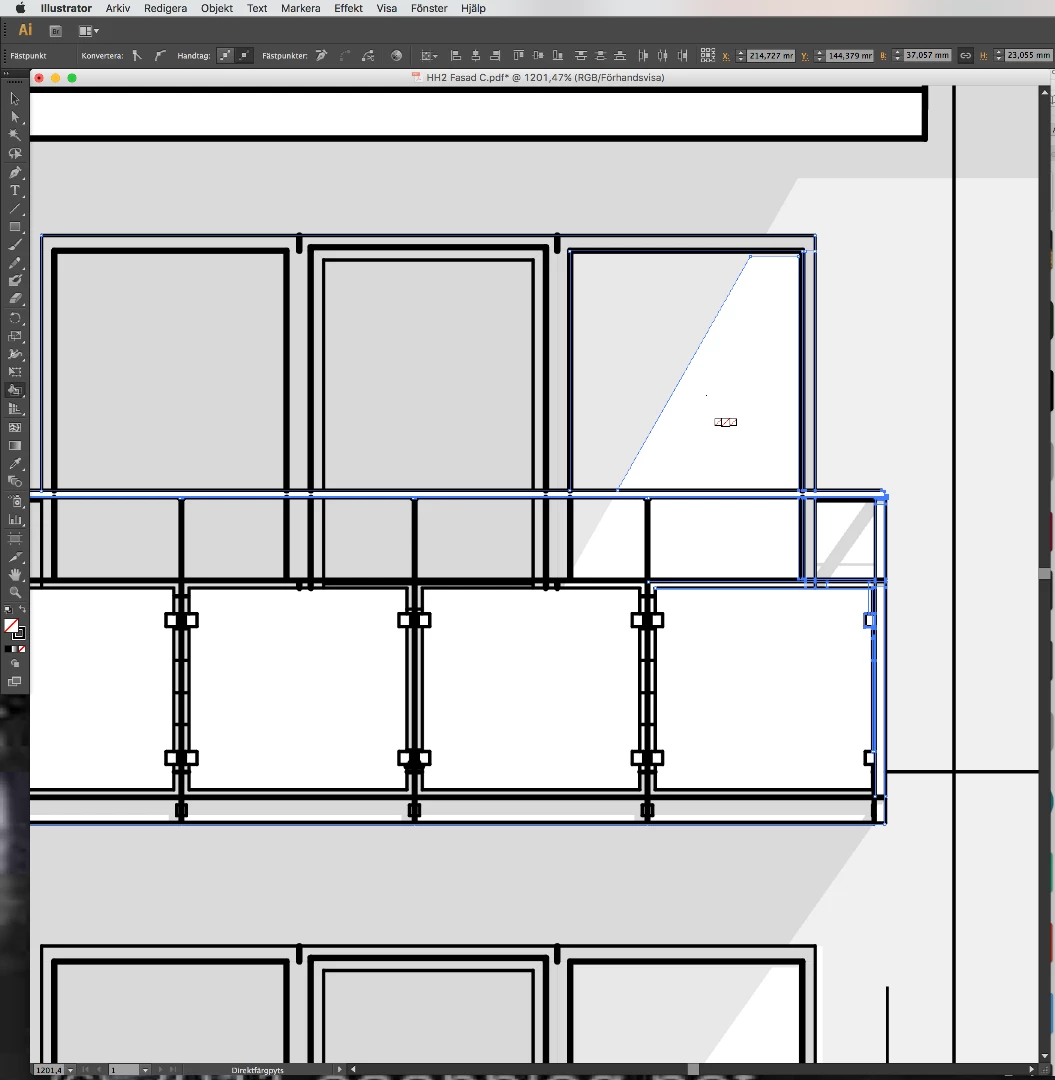
I find live paint group very useful, but sometimes it doesn't work. I can't find out why sometimes it work and sometimes it doesn't.

I am aware that it doesn't work with text and other entities but in this drawing I only have lines and fill ins.

I enclose a screen shot.
    This topic has been closed for replies.
    Correct answer Doug A Roberts

    a live paint is a single object with a single transparency setting, so any variations in opacity in separate objects will be lost when you make one. however, you can sort of cheat this if you create swatches that contain the opacity you need and use them to fill in the areas you want transparent. See my blog for full details:

    Varying Transparencies in Live Paint | dougfineart

    5 replies

    xoser18009762
    Known Participant
    September 13, 2018

    Thank Doug, very useful method and very understanding blog for the use of color paint groups. Regarding my drawing, is there a way where I can separate first between the original fillings in grey (opacity 15%) of the strokes and then convert only the strokes (contours) to color live paint group and work with the contours?

    Doug A Roberts
    Community Expert
    Community Expert
    September 13, 2018

    Use some combination of the Select > Same options to select all the 15% opacity fills. Group them or move them to their own layer, whichever works best for you.

    xoser18009762
    Known Participant
    September 12, 2018

    How can I uppload a file?

    Jacob Bugge
    Community Expert
    Community Expert
    September 12, 2018

    xoser,

    You can use the Insert Image button (only for an image, after the formatting buttons at the top of your posting window), or you can post a link to your own website or to a sharing site, wherever you have it to share.

    xoser18009762
    Known Participant
    September 12, 2018

    I do the following

    1 Embedded the drawing, I asume is the same that expand

    2 Ungroup if so

    3 Unclip mask

    4 Create live color group.

    As I result I lost opacity is there a better way to do it? I enclose the file with what I am trying to do

    Doug A Roberts
    Community Expert
    Doug A RobertsCommunity ExpertCorrect answer
    Community Expert
    September 12, 2018

    a live paint is a single object with a single transparency setting, so any variations in opacity in separate objects will be lost when you make one. however, you can sort of cheat this if you create swatches that contain the opacity you need and use them to fill in the areas you want transparent. See my blog for full details:

    Varying Transparencies in Live Paint | dougfineart

    KShinabery212
    Community Expert
    Community Expert
    September 11, 2018

    Live Paint....

    I have mastered this!

    First, for each line, shape or letter, make sure you expand it first.  Now this might Group things.  I always Ungroup each layer.

    Then I select everything and then use Live Paint! 

    I do this for characters!  So trust me I have so many lines to expand!  It makes it work perfectly!

    When I don't do this some times lines convert to the same basic shape without rounded ends.  Took me forever to figure out a way around that.

    Let's connect on LinkedIn. https://www.linkedin.com/in/kshinabery/
    Participant
    January 27, 2020

    Thank you. The problem I had was that the stroke styles are lost whenever I convert the group to live paint group. I did exactly what you wrote and voila - the stroke styles didnt change.


    Thank you thank you thank you.

    Doug A Roberts
    Community Expert
    Community Expert
    September 11, 2018

    So what's not working?

    xoser18009762
    Known Participant
    September 11, 2018

    The problem is that I can only work with live paint if I convert the drawing to a live paint group, for that I must turn back the cut mask. Then I experience issues with the opacity, all those grey fillings (15% opacity) changes to black. Is there a way to solve it? I can save the file, do my work on another file and then copy and paste, but when you are in a hurry and you have to make many fillings this is quite annoying and risky.

    Kurt Gold
    Community Expert
    Community Expert
    September 11, 2018

    Can you share a sample .ai file with some instructions about the main issues you are facing?