Inspiring
May 10, 2023
Answered

Live shape as clipping mask

  • May 10, 2023
  • 2 replies
  • 1434 views

Hi,

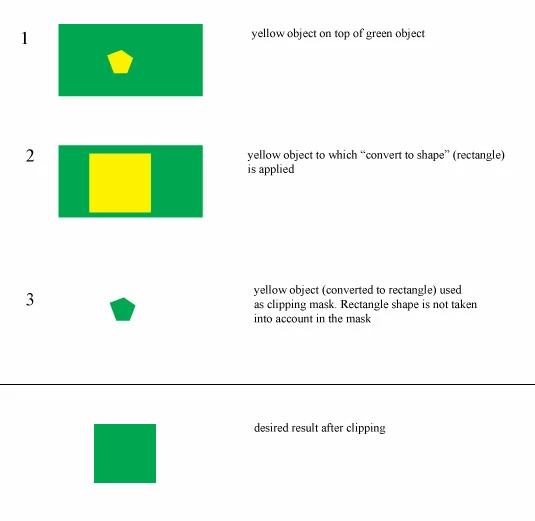
I have a yellow object that I convert to a rectangle shape using FX. I want to use that as a clipping mask on the green background object. While doing that, I would like to keep the yellow object and the rectangle shape applied to it as FX live.

I have not been able to achieve the desired result. I also looked at this thread but unless I did not understand it, that didn't work for me either.

https://community.adobe.com/t5/illustrator-discussions/clipping-mask-not-converting-into-shape-pathfinder-not-working/m-p/12096395


Attached is a picture of what I'm trying to do. This is for CS4. Thanks. 
This topic has been closed for replies.
Correct answer Ton Frederiks

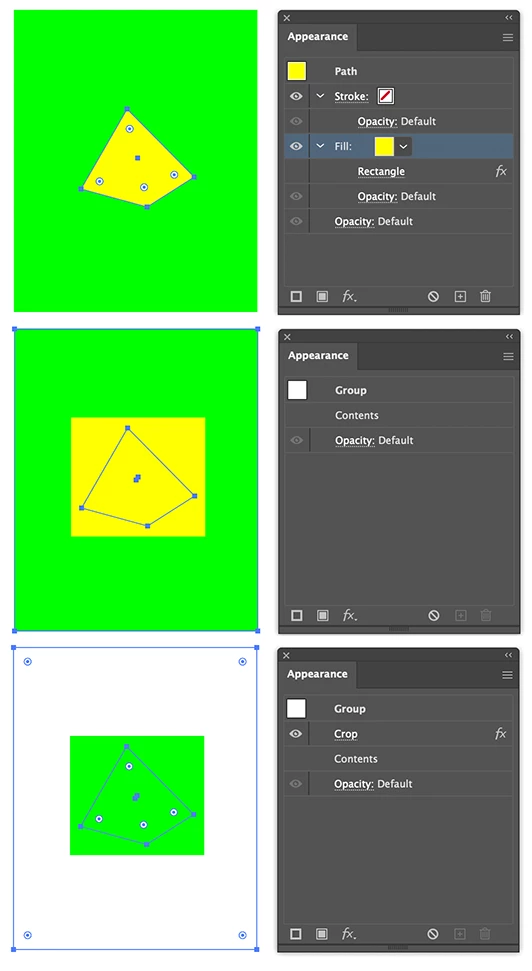
Create the 2 shapes and apply the rectangle effect to the top one.

Group both shapes and apply the Effects > Pathfinder >  Crop to the group.

2 replies

Ton Frederiks
Community Expert
Ton FrederiksCommunity ExpertCorrect answer
Community Expert
May 10, 2023

Create the 2 shapes and apply the rectangle effect to the top one.

Group both shapes and apply the Effects > Pathfinder >  Crop to the group.

sPretzelAuthor
Inspiring
May 10, 2023

Hi Ton. I ended up doing exactly that. However, I must say I still don't fully understand the Pathfinder behaviour.

Ton Frederiks
Community Expert
Community Expert
May 10, 2023

Yes it is sometimes difficult to visualize. Pathfinder as an Effect it must be applied to a group or used below the other items in the Appearance panel.

CarlosCanto
Community Expert
Community Expert
May 10, 2023

select both and create an opacity mask instead, would that work for you?

sPretzelAuthor
Inspiring
May 10, 2023

Hi CarlosCanto. No, opacity masks wouldn't work. I can't have transparency in the artwork.

Also, I don't want to expand the artwork (so it stays live).