
Live text distorted when used as a clipping mask
Hi all! I haven't been able to find any references to this problem online, but I've had a few friends all able to reproduce it on their computers. This seems to happen on both CS6 and CC (haven't tested earlier versions).
The issue we're seeing is that when we use live text as a clipping mask, the letterforms take on slightly distorted shapes. In this example, the black text is live text with a normal fill, and the blue text is the same live text with a clipping mask applied. The issue is especially obvious on the dot over the "i", but you can also see that the curve of the "e" has changed and other inconsistencies.
This appears to be a rendering issue vs. an issue of the shape of the text actually changing (in outline mode, they look the same). Also, it seems to depend on the size of the text - at larger point sizes, the issue is minimized. The first example below is at 24pt, the second is at 9pt.
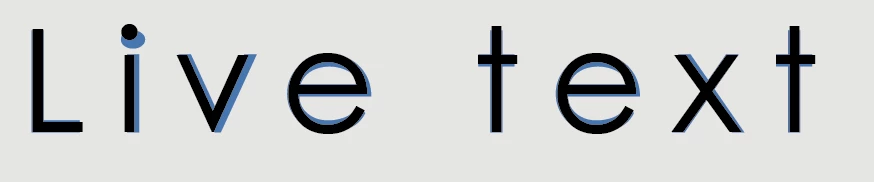
In some fonts / sizes the issue becomes even more obvious:

The same text in outline mode (showing that it appears to be a rendering issue):
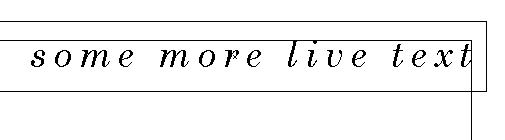
And the same text at 16pt:

All I've done here is copied the line of text, pasted it in place, added a blue rectangle under one of the copies and created a clipping mask.
I know there are some workarounds I could do, like creating outlines or using opacity masks instead of clipping masks, but I'm wondering why this is happening with clipping masks. My understanding was that live text is supposed to work fine as a clipping mask. Has anyone experienced this and/or know of any solutions? Many thanks!


 AdChoices