
Known Participant
March 21, 2018
Answered

Looking for"Asset Export" panel icon in CC Ai 2015

  • March 21, 2018
  • 2 replies
  • 2466 views

I am studying for the Illustrator Certification exam which covers 2015 version of Illustrator CC.

I was watching this Lynda.com tutorial:

https://www.lynda.com/Illustrator-tutorials/Prepare-graphics-web/486814/517218-4.html?autoplay=true

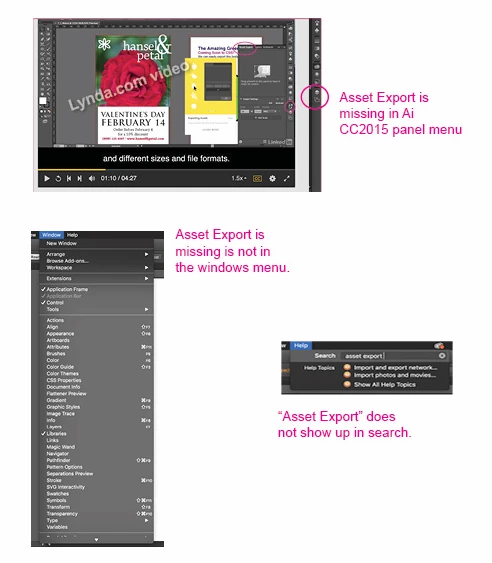
I am trying to figure out where I can find the “Asset Export” icon that should be in my panel menu according to the video. Suggestions?
This topic has been closed for replies.
Correct answer Srishti Bali

Hi reecewithac,

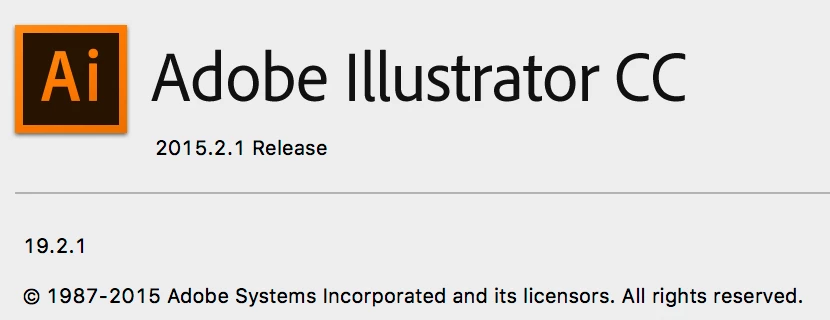
As per the screenshot you are using CC 2015.2.1.

Export Asset feature is not available in CC 2015 and below versions, it was introduced in CC 2017(October release).

Regards,

Srishti

2 replies

Srishti Bali
Srishti BaliCorrect answer
Legend
March 21, 2018

Hi reecewithac,

As per the screenshot you are using CC 2015.2.1.

Export Asset feature is not available in CC 2015 and below versions, it was introduced in CC 2017(October release).

Regards,

Srishti

Doug A Roberts
Community Expert
Community Expert
March 22, 2018

  wrote

Hi reecewithac,

As per the screenshot you are using CC 2015.2.1.

Export Asset feature is not available in CC 2015 and below versions, it was introduced in CC 2017(October release).

Regards,

Srishti

not according to this:

Feature summary | Illustrator CC | 2015 releases

Srishti Bali
Legend
April 20, 2018

Hi Doug,

Thanks for correcting me. You are right it was introduced in CC2015.3. It will not be available in below versions.

Regards,

Srishti

Doug A Roberts
Community Expert
Community Expert
March 21, 2018

i believe that was introduced in 2015.3, which was the 2016 release. 2016 didn't exist in Adobe world though...

Known Participant
March 21, 2018

Thank you. I see that it is in the current version so I will study it there just to be safe.