
Participating Frequently
July 31, 2017
Answered

Looking for the "ignore white" button when importing drawings from PS to Ai

  • July 31, 2017
  • 4 replies
  • 3761 views

I'm working on finding good techniques for transferring drawings that I have scanned in Photoshop into Illustrator, and found some old notes from a teacher that said

"Trace", then Advanced Panel, then Ignore White, then Expand, but I can't remember how to find "ignore white".
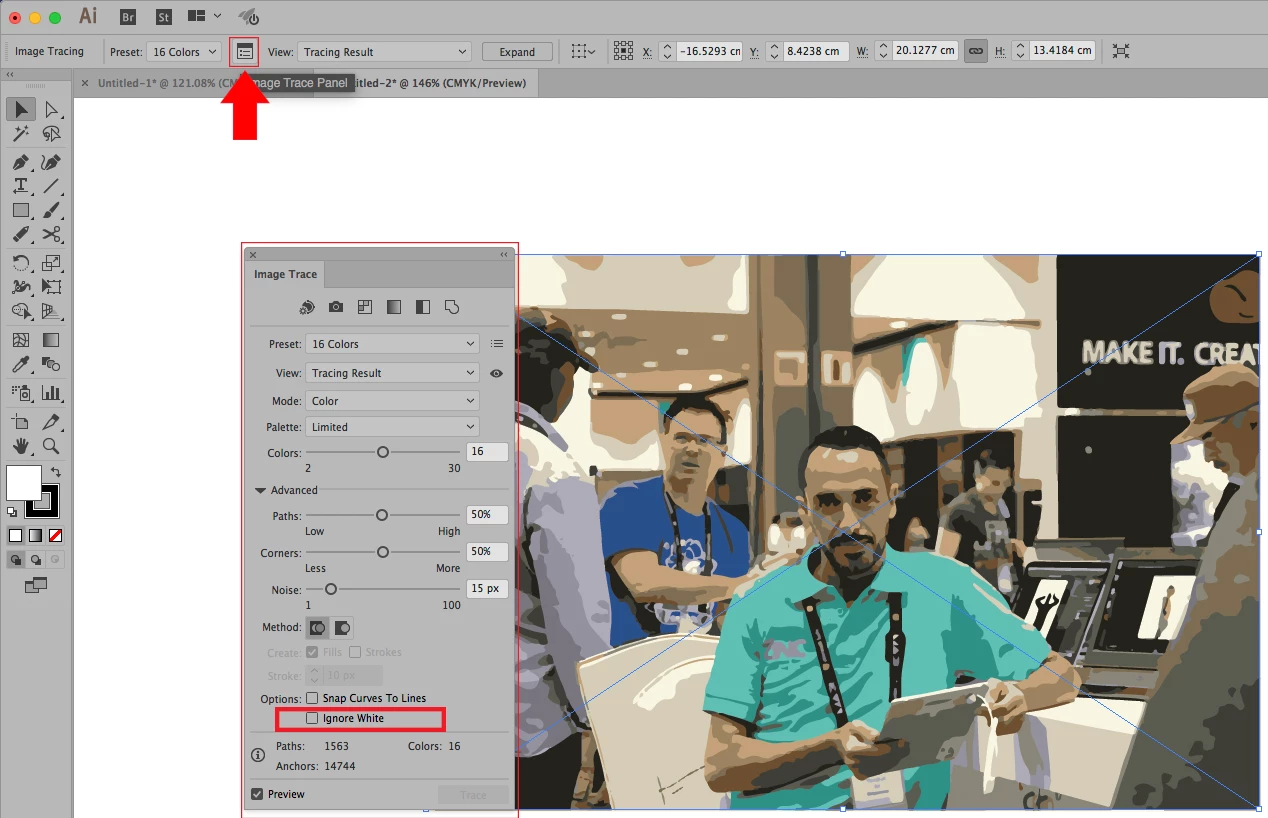
Correct answer MEDHAT EID

4 replies

Participant
May 13, 2025

I am attempting a repeat pattern and cannot get rid of the whie border. Help

Anubhav M
Community Manager
Community Manager
May 13, 2025

Hello @papertiguer,

Could you share more details, like the version of the OS/Illustrator installed, if Illustrator behaves this way with all assets, and a small screen recording of your problem, so I can better assist you?

Looking forward to hearing from you.


Anubhav

MEDHAT EIDCommunity ExpertCorrect answer
Community Expert
August 1, 2017

Sheena Kaul
Legend
August 1, 2017
davescm
Community Expert
Community Expert
August 1, 2017

Hi I've moved this to the Illustrator forum where you will get advice on the image trace function which is part of Illustrator.

Dave

Mylenium
Legend
July 31, 2017

Please read the help on the Image trace function. The tracing functions have been completely changed and refering to notes on older versions is not useful.

Mylenium