
Participant
May 19, 2020
Answered

Lost gradients after saving my files in Illustrator

  • May 19, 2020
  • 4 replies
  • 4675 views

Hello, I use illustrator 24.1.2 and I apply a gradient in a form like this: 
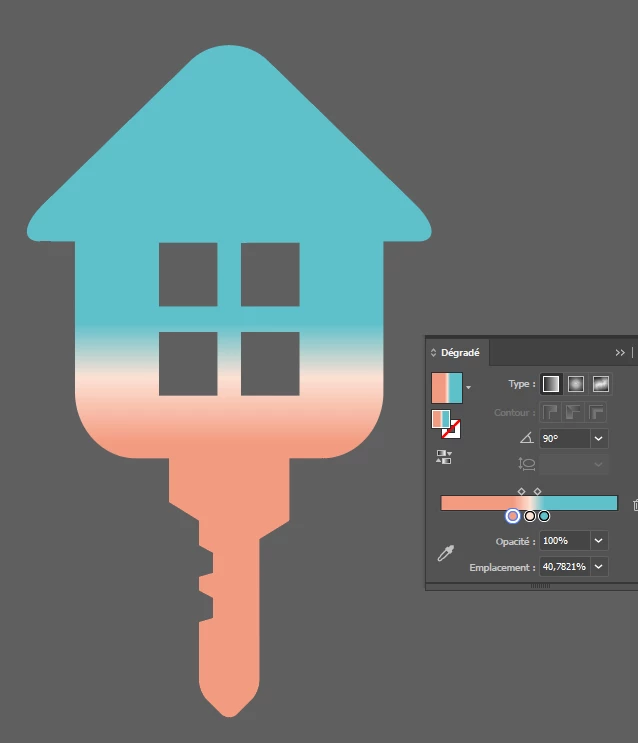
& when I save it and open it later, the gradient disappear, and I have only black color:

 

I don't know why I lost it, I don't know what I have to do (in options maybe?) to keep it in my .ai or .svg file.


Can anyone help me on this?

This topic has been closed for replies.
Correct answer Praneet2767232705m3

I had a same issue, what worked for me was, there was small path left alone, invisible path that ain't connected to anything, i deleted that. And then I saved it. And boom gradient was there

4 replies

Praneet2767232705m3Correct answer
Participant
April 20, 2023

I had a same issue, what worked for me was, there was small path left alone, invisible path that ain't connected to anything, i deleted that. And then I saved it. And boom gradient was there

Participant
April 5, 2022

Hey, I encountered this problem myself.

What i found is that in the compound path there was a floating bezier point.

What i think is happening is that Illustrator can't calculate how to apply a gradient to an object with no 2D parameters, so ends up having to set the entire shape to black.

When i released the compound shape, deleted the floating bezier and then remade my compound path, it was able to apply the gradient upon saving and reopening.

Hope this helps future people like me.

Participant
December 28, 2023

This worked for me, and for anyone who doesn't know how to get rid of them: Object > Path > Clean Up

Participant
October 27, 2020

The gradient was applied to a compound path element. Once the compound path released. The gradient will appear as usual.


In short,

1. Release the compound path

2. Add a gradient to all the objects of your icon

3. Now you can merge the compound elements


Participant
December 16, 2020

Same problem here. Create compund path-apply gradient-save- reopen- gradient is gone, replaced with black.

I've created a swatch before saving and that doesn't work.

I've released the compund path but then Illustrator wants to apply the gradient to every item separately.


Anyone else?

Monika Gause
Community Expert
Community Expert
December 16, 2020

I can't reproduce that issue.

Please tell us which version, system and hardware you use and exactly which kind of file you save, exactly which kind of gradient and please show a screenshot with gradient panel and gradient.


Anna Lander
Inspiring
May 19, 2020

what does Appearance panel show?

Can you repeat a gradient now? If yes, add the gradient to Swatces panel (just click New Swatch button when the object is selected). At least, you'll keep the gradient safe in Swatches.
But to say something more, it's needed to see Appearance panel screenshot.

Participant
May 19, 2020

Hello, thanks for your answer; here is the screenshot of my appearance panel:


I can add it to the swatces panel but anytime I save my file et re-open it, it has lost the gradient. It is a probleme because I can't use my form in after effect

Anna Lander
Inspiring
May 19, 2020

well, it's strange, indeed.

But to use it as a form (shape) in AfterEffects, it's better to save AI with a flat color and add a gradient in AE, when you'll create a shape from a vector layer. This command converts all original gradients to a flat color (gray). 

So the better way is

1. to save AI with any flat color

2. in AE "Create a shape from a vector layer" to animate it like you wish

3. Add a gradient to the shape.

BTW, in this case you will be able to animate a gradient as well.