Exit
  • Global community
    • Language:
      • Deutsch
      • English
      • Español
      • Français
      • Português
  • 日本語コミュニティ
  • 한국 커뮤니티
0

LTR and RTL Paragraph Directions in Illustrator's Paragraph panel are Missing (27.7 version)

New Here ,
Jul 05, 2023 Jul 05, 2023

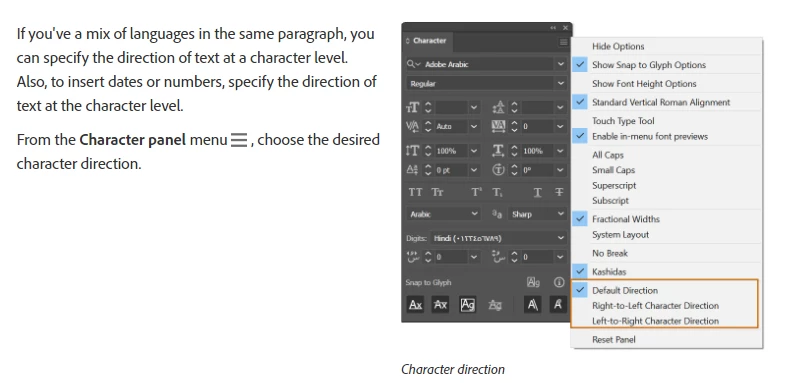
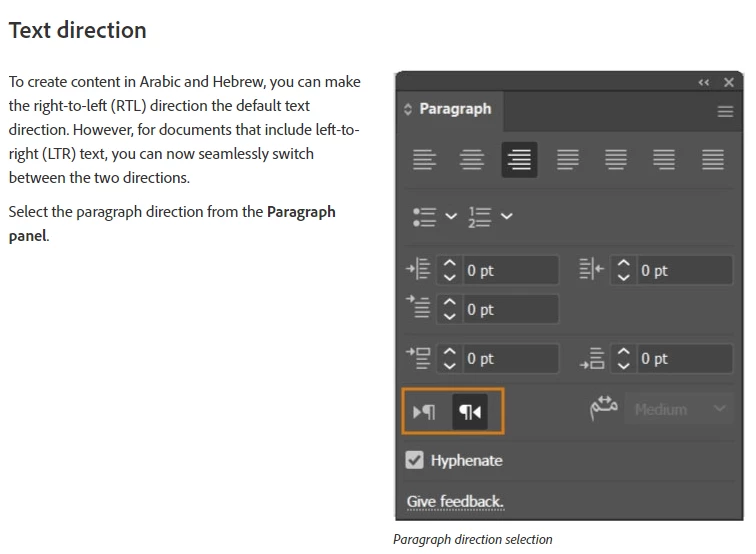
I'm having trouble using the Arabic language in AI. Ludmila293500103nrr_0-1688556932535.png

Ludmila293500103nrr_1-1688556939140.png

This option doesn't appear in the newest versions of Illustrator. Looking for an answer I came across that people said to try the CC version. I can't install and oldest version of AI because the oldest version that it allows is Illustrator 26.0 which also doesn't appear the Paragraph Directions.

TOPICS
Bug , How-to , Performance , Tools
5.4K
Translate
Report
Community guidelines
Be kind and respectful, give credit to the original source of content, and search for duplicates before posting. Learn more
community guidelines

correct answers 1 Correct answer

Community Expert , Jul 06, 2023 Jul 06, 2023

You have two options to have the Middle Eastern (ME) version, the first option is to remove the existing non-ME version and then install the ME version.

The other option is to have multiple copies of Illustrator installed on your machine, one of which is the ME version.
1.jpg

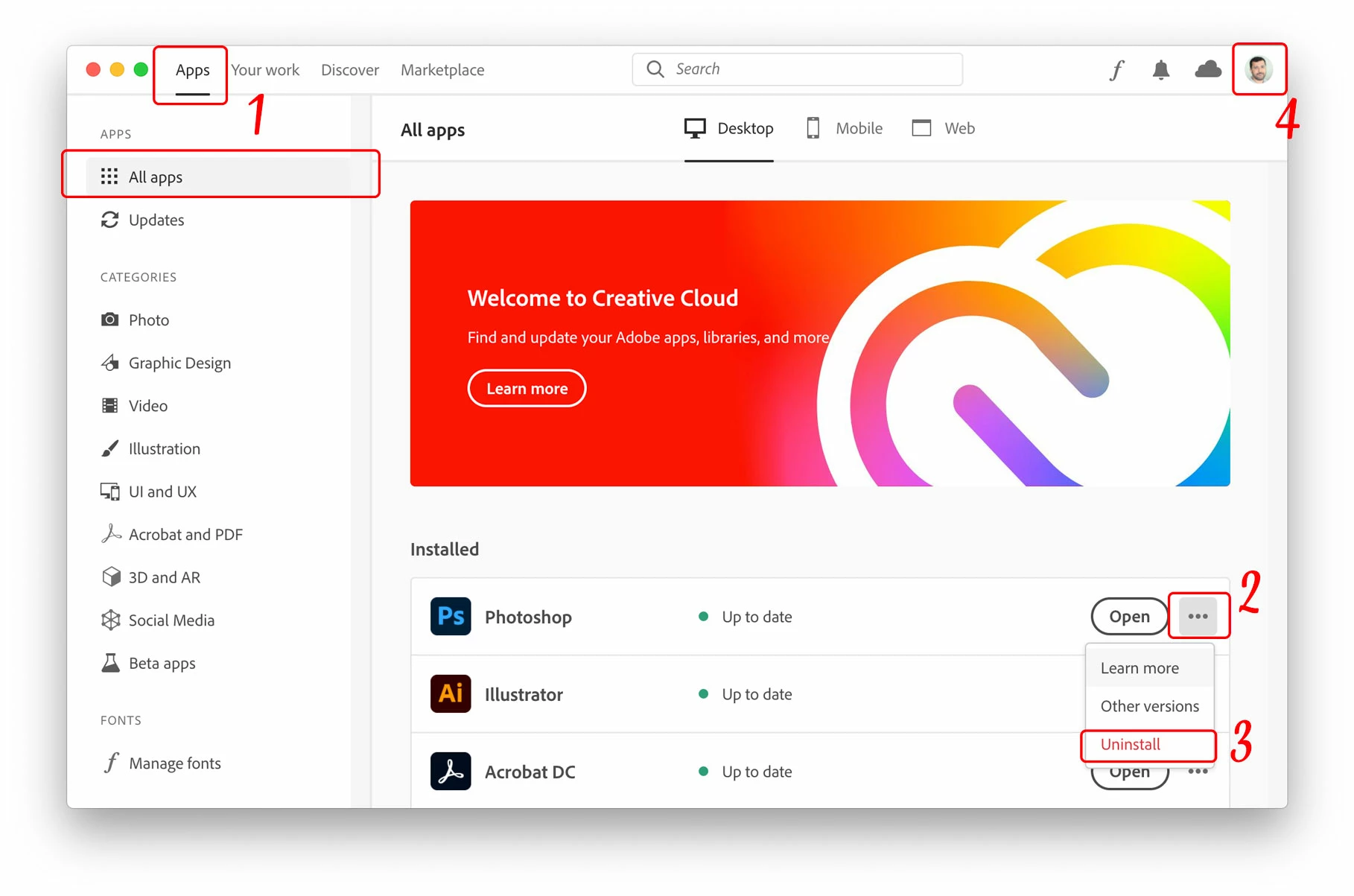
  1. From the Adobe Creative Cloud Desktop menu, click on All Apps to view a list of installed Adobe applications
  2. Click the three ellipses shown beside each installed application
  3. Choose Uninstall to remove the non-Arabic application
...
Translate
Adobe
Community Expert ,
Jul 05, 2023 Jul 05, 2023

What's your install language?

Translate
Report
Community guidelines
Be kind and respectful, give credit to the original source of content, and search for duplicates before posting. Learn more
community guidelines
New Here ,
Jul 05, 2023 Jul 05, 2023

I have both languages installed (English and Arabic) so I can use the Options LTF but it doesn't appear. I also have the checkbox in Show Indic options

Translate
Report
Community guidelines
Be kind and respectful, give credit to the original source of content, and search for duplicates before posting. Learn more
community guidelines
New Here ,
Jul 05, 2023 Jul 05, 2023

*I mean RTL

Translate
Report
Community guidelines
Be kind and respectful, give credit to the original source of content, and search for duplicates before posting. Learn more
community guidelines
Community Expert ,
Jul 06, 2023 Jul 06, 2023

The controls you're looking for is available in Adobe Illustrator CC since 2014, and still are.

The copy of Illustrator which you have is not the Middle Eastern version, to verify this, check if you have this Type tool "Right-To-Left Type tool", if it is not there, then you didn't install the Middle Eastern version.


Screenshot 2023-07-06 at 5.18.10 PM.png

Translate
Report
Community guidelines
Be kind and respectful, give credit to the original source of content, and search for duplicates before posting. Learn more
community guidelines
Community Expert ,
Jul 06, 2023 Jul 06, 2023

You have two options to have the Middle Eastern (ME) version, the first option is to remove the existing non-ME version and then install the ME version.

The other option is to have multiple copies of Illustrator installed on your machine, one of which is the ME version.

1.jpg

  1. From the Adobe Creative Cloud Desktop menu, click on All Apps to view a list of installed Adobe applications
  2. Click the three ellipses shown beside each installed application
  3. Choose Uninstall to remove the non-Arabic application and remove Preferences when prompted
  4. Once ALL existing applications have been uninstalled/removed successfully, click on the “Account” icon found on the top-right corner of the Creative Cloud desktop application and choose “Preferences”
2.jpg5

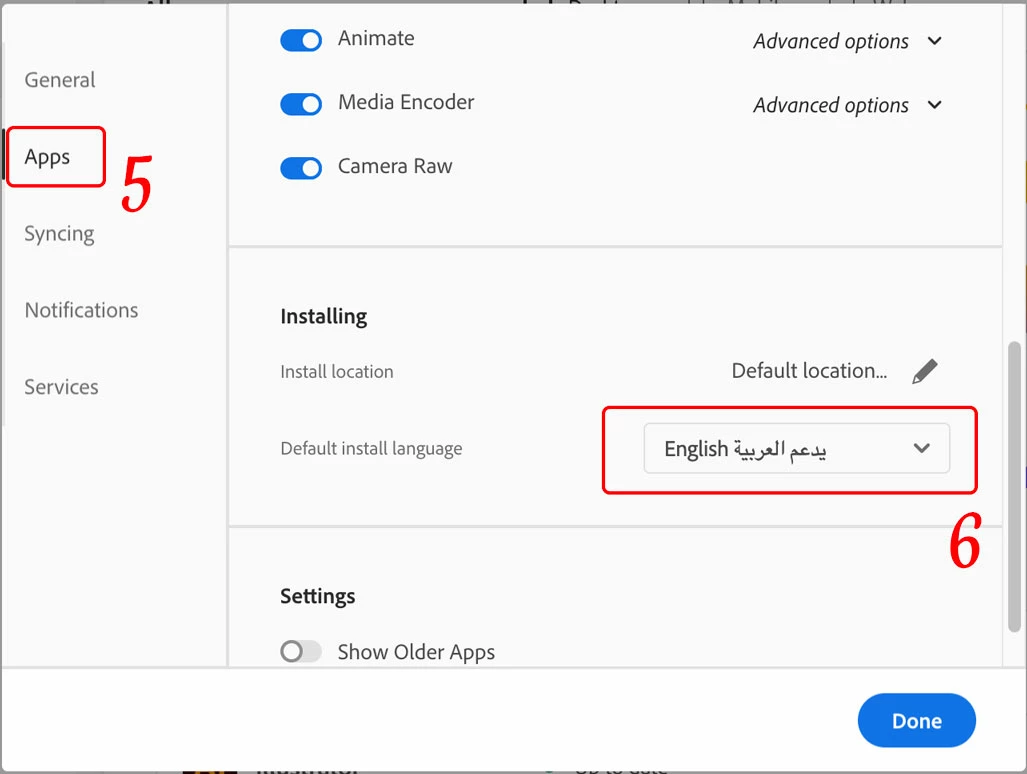
5. In the newly opened Preferences dialogue window, click on “Apps” on the left pane

6. Scroll down to the bottom of the window, from the “Default install Language” drop menu choose "English يدعم العربية" in order to have Arabic support in Adobe applications, then click the “Done” button.

Now you may proceed to install the ME applications.


Note. Only Photoshop, Illustrator and InDesign are considered ME applications, while other Adobe applications will still have limited or no Arabic support.

Translate
Report
Community guidelines
Be kind and respectful, give credit to the original source of content, and search for duplicates before posting. Learn more
community guidelines
New Here ,
Jul 06, 2023 Jul 06, 2023

Thank you! It worked. 

Translate
Report
Community guidelines
Be kind and respectful, give credit to the original source of content, and search for duplicates before posting. Learn more
community guidelines
Community Expert ,
Jul 06, 2023 Jul 06, 2023
LATEST

You're welcome 🙂

Translate
Report
Community guidelines
Be kind and respectful, give credit to the original source of content, and search for duplicates before posting. Learn more
community guidelines