Exit
  • Global community
    • Language:
      • Deutsch
      • English
      • Español
      • Français
      • Português
  • 日本語コミュニティ
  • 한국 커뮤니티
0

macOS Monterey 12.3 Error code - cannot save anything to external HD

New Here ,
Mar 25, 2022 Mar 25, 2022

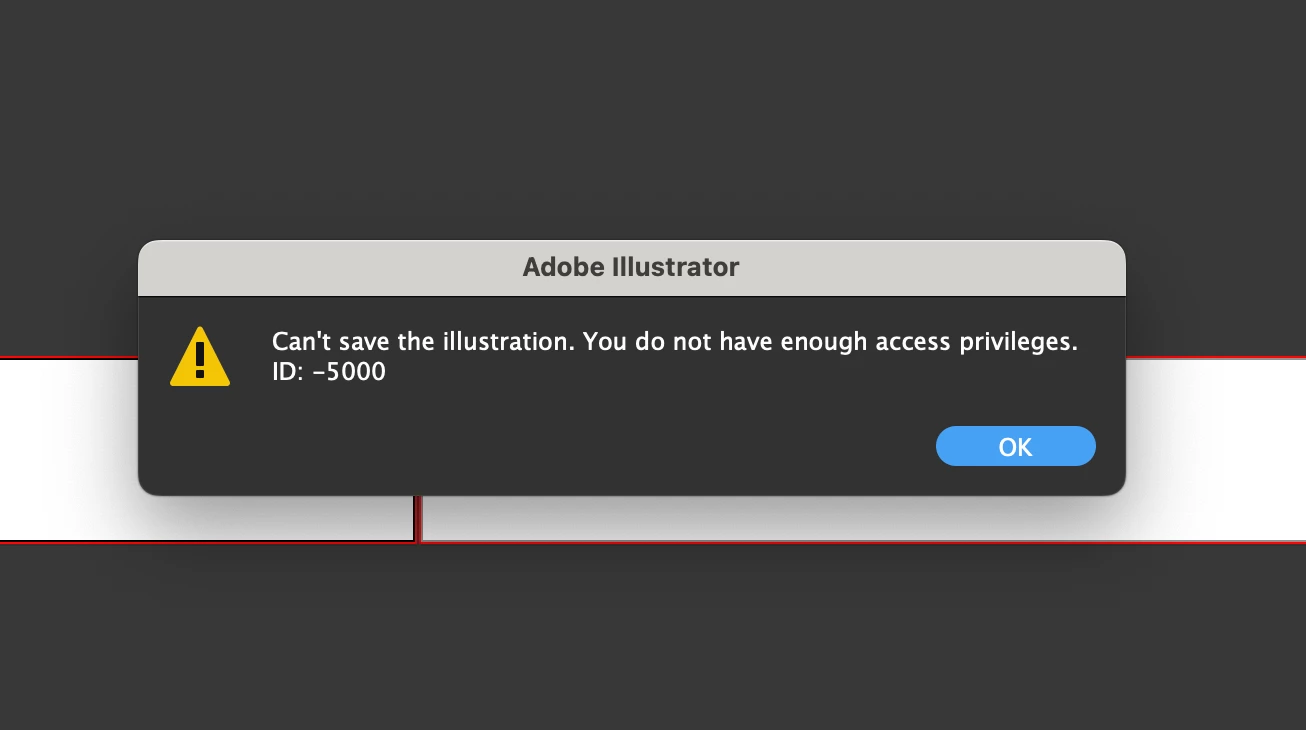
After updating to macOS Monterey 12.3 I cannot save ANY Adobe files to my external hard drive. Only to my desktop only? When I open any Adobe files from my external all I get is gray boxes and constant error codes. For instance - try to save to my external ID:-5000. It's across the board for InDesign, Illustrator, Photoshop.


Screen Shot 2022-03-25 at 5.12.23 PM.png


TOPICS
Bug , Performance , Sync and storage
4.0K
Translate
Report
Community guidelines
Be kind and respectful, give credit to the original source of content, and search for duplicates before posting. Learn more
community guidelines

correct answers 2 Correct answers

Adobe Employee , May 09, 2022 May 09, 2022

Hello @Denise24365448c96x@feliciap95706144@joedeviant,


Sorry to hear about this experience. Kindly follow the steps shared in this third-party help article (https://support.avast.com/en-in/article/Allow-Mac-full-disk-access/) to give Full Disk Access permission to Illustrator & other Adobe apps instead of Avast.


If that does not help, kindly follow these steps to add permissions to a specific folder:

1. Go to Finder.

2. Find the folder you're trying to save to.

3. If you're using a MacBo

...
Translate
Community Expert , Jun 13, 2022 Jun 13, 2022

The short answer is that Monterey has tightened down security on access to external drives, so if you installed the new system over an existing install, Monterey has probably reset your Adobe apps to a more restrictive setting.

Check System Preferences > Security & Privacy > Full Disk Access (on the left). If your Adobe apps are listed but not checked, check them. If they aren't there at all, add them. The easiest way is to drag each app into that window.

This issue has also been causing people

...
Translate
Adobe
Community Expert ,
Mar 25, 2022 Mar 25, 2022

Is it happening with other apps as well?

Translate
Report
Community guidelines
Be kind and respectful, give credit to the original source of content, and search for duplicates before posting. Learn more
community guidelines
New Here ,
Mar 25, 2022 Mar 25, 2022

ANY Adobe files to my external hard drive.

Translate
Report
Community guidelines
Be kind and respectful, give credit to the original source of content, and search for duplicates before posting. Learn more
community guidelines
Community Expert ,
Mar 26, 2022 Mar 26, 2022

Yes, you said so already. Can you save anything to that drive? Other applications?

Translate
Report
Community guidelines
Be kind and respectful, give credit to the original source of content, and search for duplicates before posting. Learn more
community guidelines
New Here ,
Mar 26, 2022 Mar 26, 2022

Yes. I can. It is ONLY Adobe files. I'm gone in and went through the Read & Write process. Still not working.  I open InDesign all my files are blanked out grey squares and READ ONLY and my files are damaged when they aren't.  Photoshop, Illustrator. Nothing but error codes. 

Screen Shot 2022-03-26 at 9.58.38 AM.png

Screen Shot 2022-03-26 at 9.58.21 AM.png


Screen Shot 2022-03-25 at 5.12.23 PM.png


Translate
Report
Community guidelines
Be kind and respectful, give credit to the original source of content, and search for duplicates before posting. Learn more
community guidelines
Community Expert ,
Mar 26, 2022 Mar 26, 2022

Can you save to the internal harddisk?


You probably need to give your apps access to that disk in the system.

Translate
Report
Community guidelines
Be kind and respectful, give credit to the original source of content, and search for duplicates before posting. Learn more
community guidelines
New Here ,
Mar 26, 2022 Mar 26, 2022

Monica - 


I can save it to my Internal yes, the desktop. I gave apps all access. De-installed, and reinstalled. No Progress. same problems. 

Translate
Report
Community guidelines
Be kind and respectful, give credit to the original source of content, and search for duplicates before posting. Learn more
community guidelines
Community Expert ,
Mar 26, 2022 Mar 26, 2022

You will have to get a Mac expert and have them set up your system for you.

It's definitely not a problem to save to an external disk from Illustrator 26.1 on Monterey 12.1 (which is the version I use).


Maybe Customer Care can look into the issue. https://helpx.adobe.com/contact.html


Translate
Report
Community guidelines
Be kind and respectful, give credit to the original source of content, and search for duplicates before posting. Learn more
community guidelines
New Here ,
Mar 26, 2022 Mar 26, 2022


<meta http-equiv="Content-Type" content="text/html; charset=us-ascii" />


I fixed it myself, thanks


Liz Atchley


SHIMANO NORTH AMERICA 


BIKE, MARKETING 


Translate
Report
Community guidelines
Be kind and respectful, give credit to the original source of content, and search for duplicates before posting. Learn more
community guidelines
New Here ,
Mar 30, 2022 Mar 30, 2022

how'd you fixed it? i have the same problem here and i dont find any clues of what to do 

Translate
Report
Community guidelines
Be kind and respectful, give credit to the original source of content, and search for duplicates before posting. Learn more
community guidelines
New Here ,
Mar 31, 2022 Mar 31, 2022

I'm having this issue, too - how was this resolved?

Translate
Report
Community guidelines
Be kind and respectful, give credit to the original source of content, and search for duplicates before posting. Learn more
community guidelines
New Here ,
May 08, 2022 May 08, 2022

HELP! This is so annoying - Please share how this was resolved - I cannot find any solution.


Translate
Report
Community guidelines
Be kind and respectful, give credit to the original source of content, and search for duplicates before posting. Learn more
community guidelines
Adobe Employee ,
May 09, 2022 May 09, 2022

Hello @Denise24365448c96x@feliciap95706144@joedeviant,


Sorry to hear about this experience. Kindly follow the steps shared in this third-party help article (https://support.avast.com/en-in/article/Allow-Mac-full-disk-access/) to give Full Disk Access permission to Illustrator & other Adobe apps instead of Avast.


If that does not help, kindly follow these steps to add permissions to a specific folder:

1. Go to Finder.

2. Find the folder you're trying to save to.

3. If you're using a MacBook, put the cursor over "Drive" and double-finger tap. If you're using a desktop Mac Control / mouse click.

4. Select Get Info.

5. Go to bottom of box to Sharing & Permissions.

6. Look to the bottom right and find the lockClick on the lock to unlock it. Enter in your user password.

7. Select the + symbol at the bottom left of box below Sharing & Permissions.

8. Add "Administrator" and set permission to Read & Write.

9. If your name is also an Administrator you can add that too, but not necessary.


Kindly update this thread if you need further assistance.


Thanks,

Anubhav

Translate
Report
Community guidelines
Be kind and respectful, give credit to the original source of content, and search for duplicates before posting. Learn more
community guidelines
New Here ,
Jun 13, 2022 Jun 13, 2022

Hello, Can you explain to me why the avast app is included in this answer? I have the same problem but do not have (or intend to) the Avast app installed.

All good before I jumped from OSX 10.3 to 12.4

Translate
Report
Community guidelines
Be kind and respectful, give credit to the original source of content, and search for duplicates before posting. Learn more
community guidelines
Community Expert ,
Jun 13, 2022 Jun 13, 2022

The short answer is that Monterey has tightened down security on access to external drives, so if you installed the new system over an existing install, Monterey has probably reset your Adobe apps to a more restrictive setting.

Check System Preferences > Security & Privacy > Full Disk Access (on the left). If your Adobe apps are listed but not checked, check them. If they aren't there at all, add them. The easiest way is to drag each app into that window.

This issue has also been causing people problems with linked files not behaving properly if they are also on an external drive. Giving the apps Full Disk Access should resolve this as well.

Translate
Report
Community guidelines
Be kind and respectful, give credit to the original source of content, and search for duplicates before posting. Learn more
community guidelines
New Here ,
Jul 01, 2022 Jul 01, 2022

You SAVED ME!!! Thank you!!!

Translate
Report
Community guidelines
Be kind and respectful, give credit to the original source of content, and search for duplicates before posting. Learn more
community guidelines
New Here ,
Nov 28, 2022 Nov 28, 2022

Thank YOU! Your reply saved the day! I upgraded to Monterey 12.6.1 today and was suddenly unable to save anything to my external drive (where all of my client files live), or export a PDF (images for the PDF are on the external drive and were coming up as 'inaccessible'). Your suggestion fixed both problems. Wishing wonderful things for you in ALL areas of life... REALLY appreciate you taking the time to share your knowledge.

Translate
Report
Community guidelines
Be kind and respectful, give credit to the original source of content, and search for duplicates before posting. Learn more
community guidelines
Community Expert ,
Nov 28, 2022 Nov 28, 2022
LATEST

Glad it helped!

Translate
Report
Community guidelines
Be kind and respectful, give credit to the original source of content, and search for duplicates before posting. Learn more
community guidelines