


- Inicio
- Illustrator
- Hilos de conversación
- Re: Maintaining stroke weight proportionally in sc...
- Re: Maintaining stroke weight proportionally in sc...

Copiar vínculo al Portapapeles
Copiado
when i give a path a stroke weight and then scale and then scale it down, the stroke weight remains in the same. how can i get the stroke weight to scale proportionally too.
example: when I make a logo, I assign a stroke of 2 pts to the graphic. then I scale it down to a business card size and the stroke weight remains 2 pts which is too much for a tiny graphic. also when I scale it up, the stroke weight proportionally appears to be too thin... please help


 1 respuesta correcta

General prefs. Check Scale Strokes & Effects.


Examinar y buscar tutoriales y artículos relacionados
 9
réplicas
9
9
réplicas
9

Copiar vínculo al Portapapeles
Copiado
General prefs. Check Scale Strokes & Effects.
Copiar vínculo al Portapapeles
Copiado
thanks. it works fine!

Copiar vínculo al Portapapeles
Copiado
Hi!
How can I do that in Photoshop CC version? I have the same problem!
Thank you!

Copiar vínculo al Portapapeles
Copiado
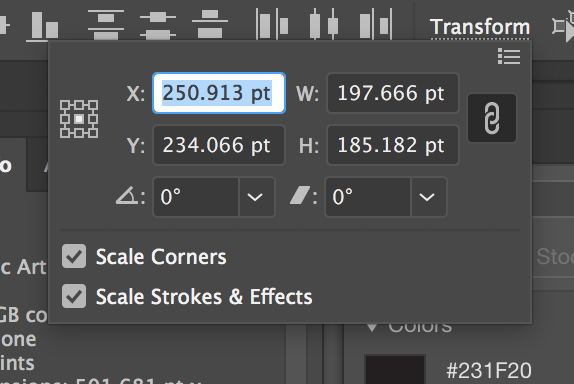
It's from AI. You can select options when transforming objects. I'm not sure if it's the same in PS.
Copiar vínculo al Portapapeles
Copiado
correct answer.


Copiar vínculo al Portapapeles
Copiado
You can also make that change in the flyout menu in the Transform Panel.
Peter

Copiar vínculo al Portapapeles
Copiado
awesome! this helped me, ive been goin to path>create outlines

Copiar vínculo al Portapapeles
Copiado
Super helpful. Thanks! 
Copiar vínculo al Portapapeles
Copiado
You're welcome.


Encuentra más inspiración, eventos y recursos en la nueva comunidad de Adobe
Explorar ahora
 AdChoices