
Illist
Participating Frequently
January 1, 2017
Question

Making selections in 'Intersection' mode

  • January 1, 2017
  • 1 reply
  • 967 views

Hi all,

I would like to ask if there is anyway to use the Lasso (or any other) tool to intersect existing selections so I'm left with only those in lasso?

See example below, where I have TWO paths (green and blue) but I only want the anchor points on the blue path AND within my Lasso tool to be selected.
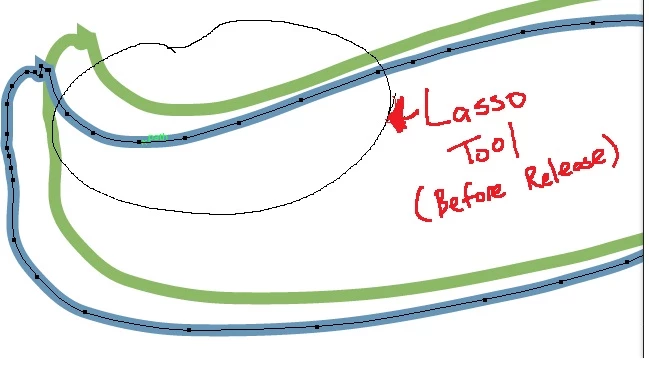
If i were to release the lasso tool now, the anchor points on green path will also be selected. I know I can lock the green layers but in the actual situation, its more complex and I was wondering if there is such a tool (Photoshop has this selection 'Intersection mode') available in illustrator.

    This topic has been closed for replies.

    1 reply

    rcraighead
    Legend
    January 1, 2017

    It seems you would need to "Option/Alt" drag around the area you want to "de-select" instead of the area you want to "remain" selected.

    Illist
    IllistAuthor
    Participating Frequently
    January 2, 2017

    Thanks for the suggestion. But in actual usage with many layers and fill selected, that would mean I have to "de-select" alot of layers, hence not feasible for my needs.

    rcraighead
    Legend
    January 2, 2017

    I offered a solution for the question you stated. If your needs or more complex please explain further.

    Another solution is to temporarily lock all unselected elements (Shift-Option/Alt-Cmd+2). Then you can make any selection on unlocked element(s). This works regardless of how many groups/layers there may be in the file. Press "Option/Alt-Cmd+2" to unlock all.

    "Shift-Option/Alt-Cmd+3" will hide unselected elements. "Option/Alt-Cmd+3" will un-hide all.

    Edit: Had to correct my shortcuts. Search "Lock all deselected artwork" here.