
Participant
November 4, 2021
Answered

Map Art button gone in new 3D and Materials

  • November 4, 2021
  • 3 replies
  • 24706 views

Just updated Ai a couple days ago. The new 3D and Materials window does not have the Map Art button. It does not show up when I search for it in the Help dropdown, either. Map Art was so simple, and it's exactly what I need right now. Is it gone forever? Is there a work around? I'm trying to map a jpeg to a 3D object.
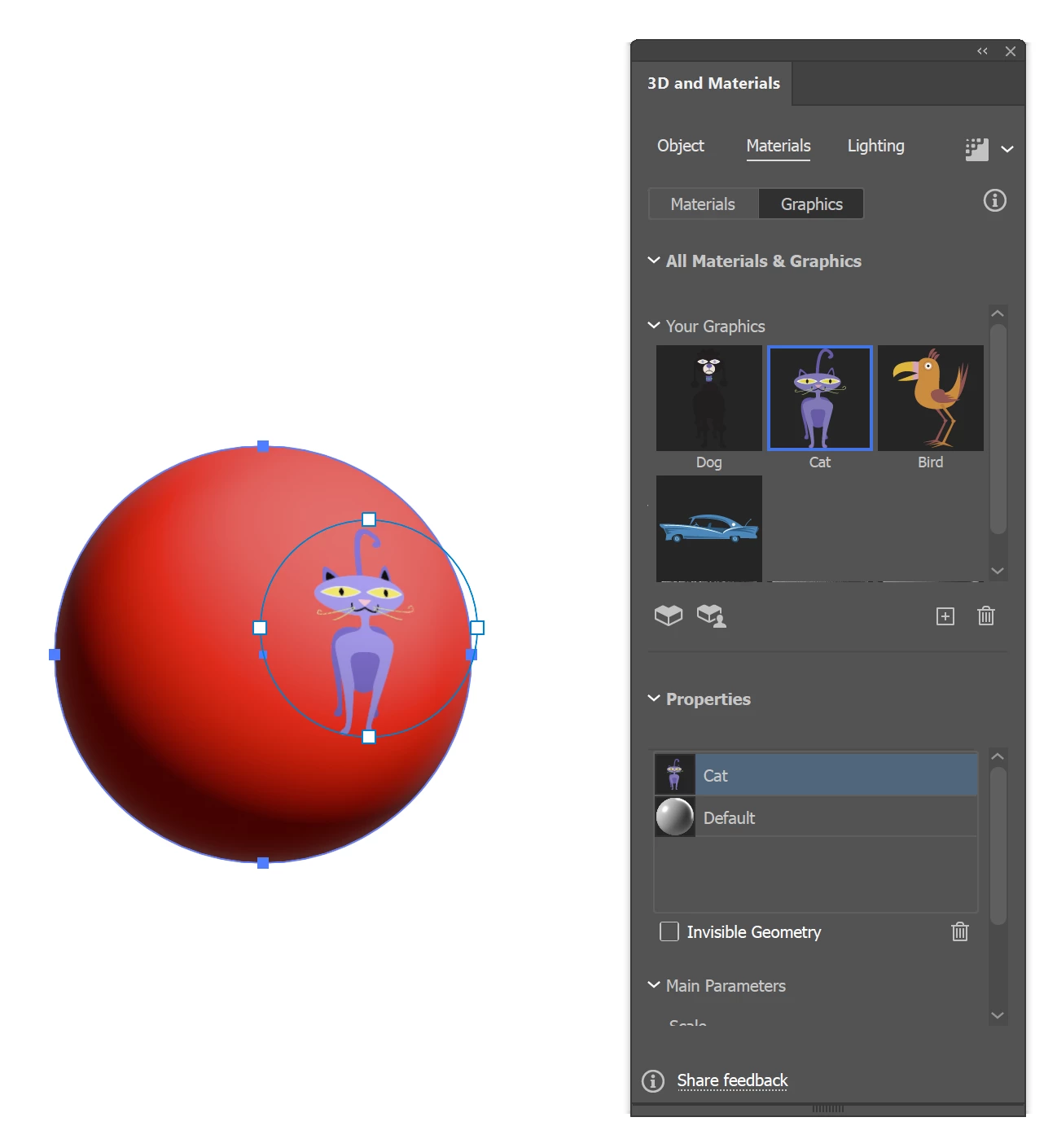
Correct answer Doug A Roberts

New readers should note that this was added to the new 3D effects during this year, under 'Materials':


3 replies

Doug A Roberts
Community Expert
Doug A RobertsCommunity ExpertCorrect answer
Community Expert
October 18, 2022

New readers should note that this was added to the new 3D effects during this year, under 'Materials':


Participant
February 1, 2022

Please add the map art function to the new extrude and bevel option! 

In Illustrator Help, is says to click on the Map Art button, but there isn't one.... Am I missing something?


Ton Frederiks
Community Expert
Community Expert
February 1, 2022

See the correct answer above.

Ton Frederiks
Community Expert
Community Expert
November 4, 2021

Use the Effect > 3D and materials > 3D (Classic)

Participant
November 13, 2021

Absolutely ridiculous that the mapping feature has been taken away from this now.

MarkReynolds
Known Participant
January 29, 2022

It is a work in progress. 

   3D and Materials (Technology Preview)

Adobe continues to invest in new capabilities that would enhance the Illustrator experience. We would like you to participate and try out 3D and Materials feature and provide feedback. Please note that the feature is in Technology Preview, and hence some of the capabilities would evolve including performance. 


PLEASE, bring back the 3D-mapping feature.  I know it's in the "Classic 3D" menu-link, but PLEASE put it the new 3D functionality. 

Obviously the term "Classic..." mean Adobe is about to get rid of it.  So please add 3D mapping back to the new 3D tool.   I use 3D mapping with Symbols ALL THE TIME.