
Exit
  • Global community
    • Language:
      • Deutsch
      • English
      • Español
      • Français
      • Português
  • 日本語コミュニティ
  • 한국 커뮤니티
0

Map art to a tapered cylinder

New Here ,
Feb 14, 2025 Feb 14, 2025

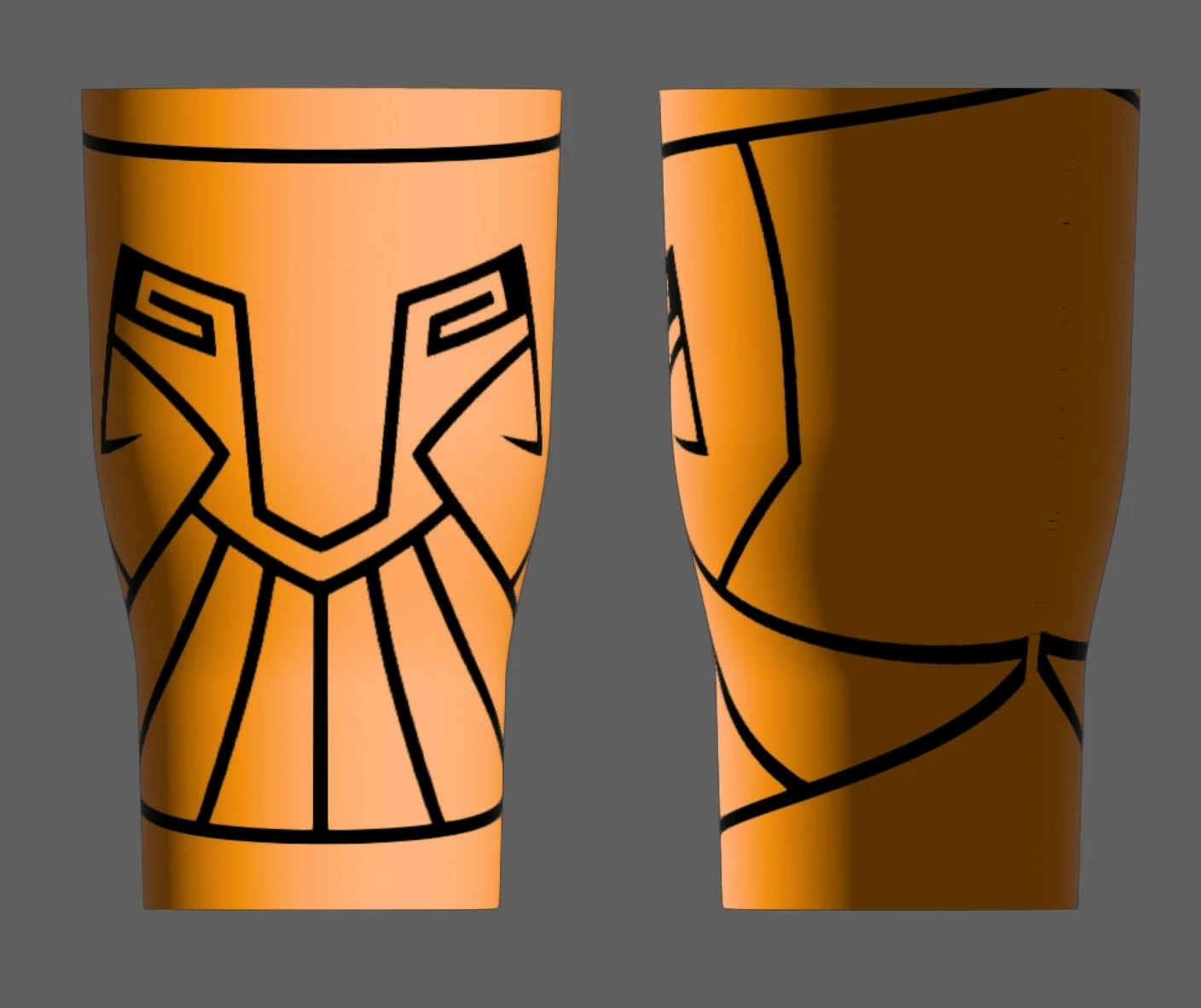
I've looked everywhere for an answer to this, but I'm trying to map art onto a tapered coffee thermos. Every answer I've seen uses a straight object without curves, which, smart. That would save me a lot of hastle, but this is the bed I've made and I need to figure out how to map something to it.
Screenshot 2025-02-14 143209.jpg

The line at the bottom and the top of the image should follow the curve of the thermos. Instead the image is curved like it's a square sticker being applied to a round shape (which it is, I get that).

Is there a way to pre warp an image to correctly map top a 3D surface?

TOPICS
Draw and design , How-to , Tools
409
Translate
Report
Community guidelines
Be kind and respectful, give credit to the original source of content, and search for duplicates before posting. Learn more
community guidelines

correct answers 1 Correct answer

Community Expert , Feb 14, 2025 Feb 14, 2025

WIth the Classic 3D effect you usually get better results in such a situation.

Translate
Adobe
Community Expert ,
Feb 14, 2025 Feb 14, 2025

WIth the Classic 3D effect you usually get better results in such a situation.

Translate
Report
Community guidelines
Be kind and respectful, give credit to the original source of content, and search for duplicates before posting. Learn more
community guidelines
New Here ,
Feb 15, 2025 Feb 15, 2025
LATEST

I'll give that a shot. I wasnt aware it was even still available.

Translate
Report
Community guidelines
Be kind and respectful, give credit to the original source of content, and search for duplicates before posting. Learn more
community guidelines