Participant
September 19, 2017
Answered

Margins Issue - Adobe Illustrator

  • September 19, 2017
  • 4 replies
  • 3523 views

When I print my AI files through AI or as a .pdf , the left and right margins appear uneven. I have the blue box extended on the left and right side of the pages in the file. However, when I went into settings, it looks as if all margins are set to zero.

(See Below). Wondering if anyone knows how to fix this

This topic has been closed for replies.
Correct answer Mike_Gondek10189183

Printers have a gripper that grabs the paper so that edge can have more of a gap, the other gap is due to the design of the printer so  excess ink does not fall onto the fuser or inkjet assembly and harden/destroy your printer. There are new borderless printers, so we need to know your model number to see if you have that feature.

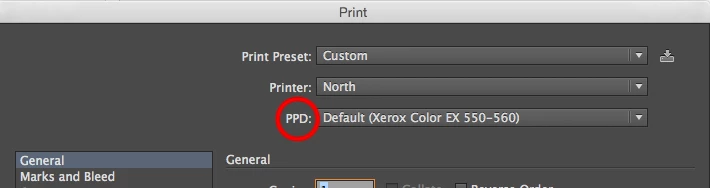
You can see your margins, if the correct ppd is chosen, then click done to lock that in.

The dotted lines should come from the .ppd of your printer to show you your imageable area. View >> show print tiling if needed.

As already suggested keep you art within the dotted lines/print tiling. Also make sure your paper is loaded evenly.

4 replies

Mike_Gondek10189183
Community Expert
Mike_Gondek10189183Community ExpertCorrect answer
Community Expert
September 19, 2017

Printers have a gripper that grabs the paper so that edge can have more of a gap, the other gap is due to the design of the printer so  excess ink does not fall onto the fuser or inkjet assembly and harden/destroy your printer. There are new borderless printers, so we need to know your model number to see if you have that feature.

You can see your margins, if the correct ppd is chosen, then click done to lock that in.

The dotted lines should come from the .ppd of your printer to show you your imageable area. View >> show print tiling if needed.

As already suggested keep you art within the dotted lines/print tiling. Also make sure your paper is loaded evenly.

Bill Silbert
Community Expert
Community Expert
September 19, 2017

Almost all printers need extra white space on at least one side. You will have to allow for that in your design. In this case that would involve increasing the margin on the right side to match what is happening on the left side and then recentering text and art accordingly.

John Mensinger
Community Expert
Community Expert
September 19, 2017

Doug's suggestion is likely correct; due to a printer's sheet-handling requirements and limitations, the "printable area" of a page is often not the same distance from the edge of the page on all 4 sides.

christineb31294278  wrote

I have the blue box extended on the left and right side of the pages in the file.

...it looks as if all margins are set to zero.

Wondering if anyone knows how to fix this.

Don't extend the blue rectangle to the edges of the artboard. Set guides at equal distance (equal to or greater than the larger of those printed margins) from each edge and butt the left and right edges of the rectangle against them.

Doug A Roberts
Community Expert
Community Expert
September 19, 2017

perhaps those are the limits of your printer's printed area.