varxtis
Inspiring
October 6, 2020
Answered

Match Paragraph style to PDF/acrobat?

  • October 6, 2020
  • 1 reply
  • 1288 views

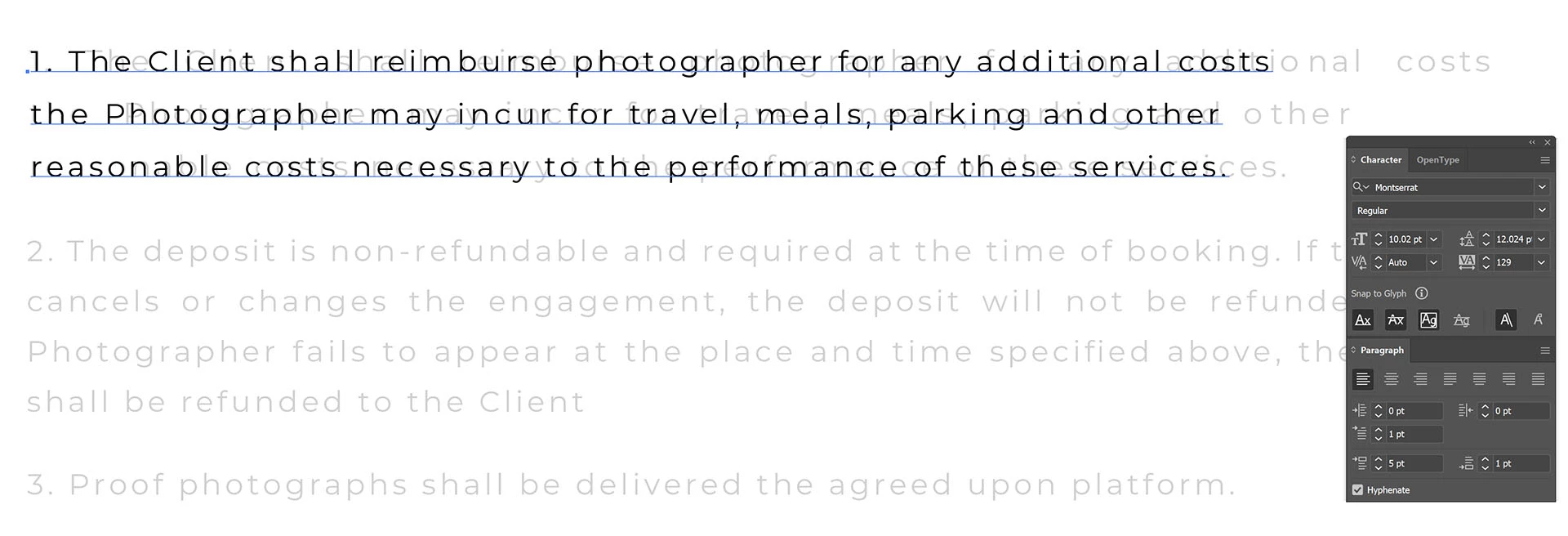
A whileback I made a contract for my wifes photography business. I was kind of dumb, making the border/trim and top banner in Illustrator, but typing the actual contract out in Acrobat. It looked perfect. Was pretty happy with myself. But now I see my folly and need to remake it in Illustrator. But the text (as in kerning and paragraph spacing) is coming out very very different. Direct import just leads to fractured sylables as seperate objects/groups.


What in the actual heck is going on. I've matched everything up to the best of my ability using the settings in Acrobat for the select text, But this is the closest I get.


Does anyone know what I'm missing or doing wrong?


This topic has been closed for replies.
Correct answer varxtis

the space and alignment was just perfect. It allowed us to keep the text relatively small, spaced out enough to avoid to much space the governing can cause, while not looking space and empty. there not a whole lot of text, so I needed to balance it out where it didn't left 1/4page looking empty and wasted. There's 3 sets of text boxes aligned on the left and right, and the words reaching to the boxes boarders tighter makes the whole page look clean. I've been playing with the exact same content, exact same text/font, for the past 2 days in Illustrator and I can NOT get it to look right. I've done plenty of text shapes and boxes, and I've usually had more room to play with it because it was still in the process of "being" made, where has already been made and now I'm having to translate it to Illustrator while preserving the document that the client (my wife) really like. I mean, its not the end of the world if it has to change. But is that really something a designer should jump to if it was a client that was paying me a lot. ya know? So ya, I'm kind of fixated on it now, thinking... "What is causing the difference, and how can I compensate? There's GOT to be a way."


oi, sorry for the typos. The "... More" button isn't showing any options, including editing the post.

"governing" was supposed to be Kerning

Holy crap, It looks like a 5yo got ahold of my keyboard. I am so incredibly sorry. I'll be more cautious about how I type in the future.


1 reply

Monika Gause
Community Expert
Community Expert
October 6, 2020

They have different text engines.


varxtis
varxtisAuthor
Inspiring
October 6, 2020

YO! Hope youve been well.

So, is it safe to assume your comment suggests there is no way to match texts? I Always appreciate your feedback, so please don't take it as an argument. I'd just find it surprising that you can have one document look one way in Acrobat, and look a diferent way in Illustrator. Straight import of pdf into Illustrator, looks great so long as I don't want to edit the text. But since I do... Id just be very surprised and somewhat disappointed.

Monika Gause
Community Expert
Community Expert
October 6, 2020

When you import a PDF into Illustrator, the text gets cut up into pieces, for the exact reason you're seeing. The text engines just don't match.

Acrobat doesn't even need a very sophisticated text engine - most of the time you won't use it for typesetting.