
Known Participant
December 5, 2022
Answered

Merge fixed content inside specific groups

  • December 5, 2022
  • 1 reply
  • 2548 views

Hi everyone.

I've got this script that copy the layer "_fixed obj" inside every other layers (except the one which name start with "dima_". It works fine what i want it to place the "_fixed obj" inside a specif group nested into the layers.

Here's the code:

/*
* Description: An Adobe Illustrator script that combine template layers and content layers
* Usage: Rename all "template" layers with an underscore "_" as the first character. Rename all "content" layers with any suitable names
* This is an early version that has not been sufficiently tested. Use at your own risks.
* License: GNU General Public License Version 3. (http://www.gnu.org/licenses/gpl-3.0-standalone.html)
*
* Copyright (c) 2009. William Ngan.
* http://www.metaphorical.net

    This program is free software: you can redistribute it and/or modify
    it under the terms of the GNU General Public License as published by
    the Free Software Foundation, either version 3 of the License, or
    (at your option) any later version.

    This program is distributed in the hope that it will be useful,
    but WITHOUT ANY WARRANTY; without even the implied warranty of
    MERCHANTABILITY or FITNESS FOR A PARTICULAR PURPOSE.  See the
    GNU General Public License for more details.

    You should have received a copy of the GNU General Public License
    along with this program.  If not, see <http://www.gnu.org/licenses/>.
*/


var doc = app.activeDocument;
var origlayers = new Array();


// Record all original content layers
for(var i=0; i<doc.layers.length; i++) {
	
	if ( !(doc.layers[i].name.charAt(0)=='_') ) {
		origlayers.push( doc.layers[i].name );
	}
}

// Generate dima layers
for(var i=0; i<origlayers.length; i++) {
	getContent( origlayers[i] );
}


// Distinguish non-dima layers and dima layers by visibility
origlayers = new Array();
for(var i=0; i<doc.layers.length; i++) {
	
	// non-dima
	if (doc.layers[i].name.substr(0,5)!='dima_') {
		doc.layers[i].visible = true;
		origlayers.push( doc.layers[i].name );

	// dima
	} else {
		doc.layers[i].visible = false;
	}
}


// Remove non-dima layers
for(var i=0; i<origlayers.length; i++) {
	doc.layers.getByName (origlayers[i]).remove();
}

// show first dima layer
doc.layers[0].visible = true;

/**
* opens a resource file and copy the specific layer to page
* @9397041 layername the name of the layer
*/
function getContent(layername) {
	
	// open resource file
	var tempdoc = null;
	
	try {

	} catch (err) {
		throw new Error( 'Cannot create new document' );
	}

	// create a new layer
	var temp_layer = doc.layers.add();
	temp_layer.name = 'dima_'+layername;
	temp_layer.visible = true;
	var gg = temp_layer.groupItems.add();

	// get specified layer. all unrelated layers set to invisible
	for(var i=doc.layers.length-1; i>=0; i--) {
		
		if (doc.layers[i].name.charAt(0)=='_') { // persistent layers with "_"
			doc.layers[i].visible = true;	
			group( gg, doc.layers[i].pageItems, true );
			
		} else if (doc.layers[i].name.substr(0,5)!='dima_') { // not dima layer
			doc.layers[i].visible = false;	
		}
	}

	try {
		var content = doc.layers.getByName(layername);
	} catch (err) {
		throw new Error('Cannot get contents from '+layername+'* layer');
	}

	// group content
	content.visible = true;
	group( gg, content.pageItems, true );

}


function group( gg, items, isDuplicate ) {

	for(var i=items.length-1; i>=0; i--) {

		if (items[i]!=gg) { 
			if (isDuplicate) {
				newItem = items[i].duplicate (gg, ElementPlacement.PLACEATEND);
			} else {
				items[i].move( gg, ElementPlacement.PLACEATEND );
			}
		}
	}

}
app.activeDocument.layers.getByName('dima_dima_var').remove();


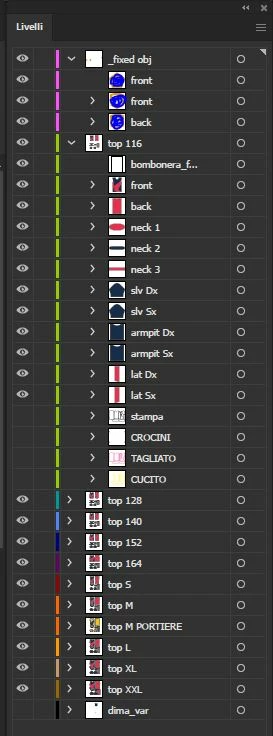
Here's the screenshot of the starting layers composition:


After the script it's like this:
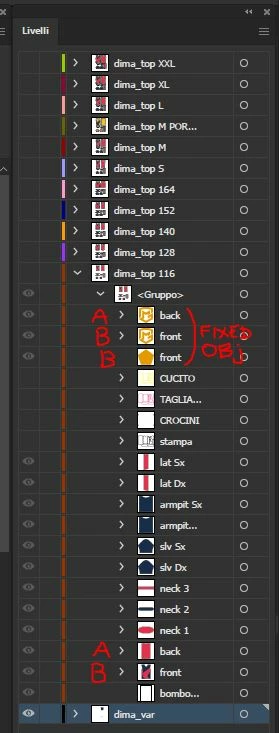


I'd like if those fixed objects will be place inside the relative group.

So the groups of fixed objects named "back" will go into the group named "back", the ones named "front" will go into "front" and so on.


Note: every layers ("dima_top_X") will have the same items structure inside of it, whit the same names.


Is it possible?

Please tell me if i need to provide more info to hele me.

Thanks.

This topic has been closed for replies.
Correct answer m1b

Hi @m1b don't worry, i don't mind at all, please be my guest and do whatever adjustments you want!

As mentioned, the script was like that and unfortunately i'm not expert enough to see nor to correct those unwanted side effects, so thank you for that!

One good advantage of that script tho was that i didn't have to select the layers with the templates, it recognized it cause the name started with an underscore.

Is it possible to have something like that?

Also i have to get rid of the fixed obj layer ater all so i guess i could add this

app.activeDocument.layers.getByName('_fixed obj').remove();

at the end of the script. Unless you find a more elegant way to do it 😉


Thank you a lot, waiting for your reply!


Here's a version that gets the template layer first and doesn't need a selection.

- Mark


/**
 * Duplicates *template* items (all page items
 * in templateLayerName) into groups named to
 * match name of template item. For example,
 * an item "front" (in layer "_fixed obj") will
 * be duplicated into every GroupItem named "front"
 * and that has clipping mask called "front".
 * @7111211 m1b
 * @version 2022-12-06
 * @discussion https://community.adobe.com/t5/illustrator-discussions/merge-fixed-content-inside-specific-groups/m-p/13396929
 */

var settings = {
    templateLayerName: '_fixed obj',
    protectedLayerNames: ['_fixed obj', 'dima_var'],
    showResults: true,
};


(function () {

    if (app.documents.length == 0) {
        alert('Please open a document and try again.');
        return;
    }

    var doc = app.activeDocument,
        results = { __total: 0 };

    // get the template item layer
    try {
        var templateLayer = doc.layers.getByName(settings.templateLayerName);
    }
    catch (error) {
        alert('Could not find layer "' + settings.templateLayerName + '". Aborting.');
        return;
    }

    // collect template items
    var templateItems = [];

    for (var i = templateLayer.pageItems.length - 1; i >= 0; i--) {
        templateItems.push(templateLayer.pageItems[i]);

        // set up the results counters
        results[templateLayer.pageItems[i].name] = 0;
    }

    // take note of layer status
    var layers = [];
    for (var i = 0; i < doc.layers.length; i++) {
        var layer = doc.layers[i];

        if (indexOf(settings.protectedLayerNames, layer.name) != -1)
            continue;

        layers.push(
            {
                layer: layer,
                visible: layer.visible,
                locked: layer.locked,
            }
        );

        // show and unlock layer
        layer.visible = true;
        layer.locked = false;

    }

    // find clipping items with same name as templates
    for (var i = 0; i < doc.groupItems.length; i++) {

        var grp = doc.groupItems[i];

        for (var j = 0; j < templateItems.length; j++) {

            var templateItem = templateItems[j];

            if (
                grp.name != templateItem.name
                // || indexOf(settings.protectedLayerNames, grp.layer.name) != -1
            )
                continue;

            if (
                grp.clipped == true
                && grp.pathItems.length > 0
                && grp.pathItems[0].name == templateItem.name
                && grp.pathItems[0].clipping == true
            ) {

                var hidden = grp.hidden,
                    locked = grp.locked;

                grp.hidden = false;
                grp.locked = false;

                // duplicate the templateItem into the group
                var dup = templateItem.duplicate();
                dup.move(grp.pathItems[0], ElementPlacement.PLACEAFTER);
                dup.selected = false;

                grp.hidden = hidden;
                grp.locked = locked;

                results[templateItem.name]++;
                results.__total++;

            }

        }

    }

    // reset layer visibility
    for (var i = 0; i < layers.length; i++) {
        $/*debug*/.writeln('setting layer ' + i + ' "' + layers[i].layer.name + '" visible = ' + layers[i].visible);
        layers[i].layer.visible = layers[i].visible;
        layers[i].layer.locked = layers[i].locked;
    }

    templateLayer.remove();

    // show results
    if (settings.showResults) {

        var resultsMessage = 'Results:\n';

        for (var i = 0; i < templateItems.length; i++)
            resultsMessage += templateItems[i].name + ': ' + results[templateItems[i].name] + '\n';


        resultsMessage += '\nTotal : ' + results.__total;
        alert(resultsMessage);
    }


    // helper function
    function indexOf(array, obj) {
        for (var i = 0; i < array.length; i++)
            if (array[i] == obj)
                return i;
        return -1;
    };


})();


Edit 1: added handling for hidden and locked layers and group items.

Edit 2: fixed bugs introduced in edit 1! Also added show results setting.

1 reply

m1b
Community Expert
Community Expert
December 5, 2022

Hi @Delresto, there's a lot going on here. To make it easier for us to understand, can you make a stripped-down test file that only has the fixed objects and one other layer, with just the necessary page items? And show screen shots of the layers panel showing how you would like it to look before and after? Make sure all layers are visible in the screenshots. This will help us a lot.


For example it looks like the fixed object named "front" should actually replace the items named front in the other layers? Also why does the script reverse the order of all the items in the layer? Is that desirable?

- Mark

DelrestoAuthor
Known Participant
December 5, 2022

Hi @m1b and thank you for your reply.

Here's you can find a file test as requested: file test

This is the ""before" layers panel:


Here's the "after" layers panel:


As you can see the elements inside the layer "_fixed obj" are now inside the groups in the layer "dima_top 116"

Of course those elements has to be duplicated into all the others layers's group.

So, if the element is called "front" it goes in every "front" named group in each layers.. and so on.

In this example there are fixed elements called "front" and back" only but it could happen that i have some fixed elements called "slv Sx" or "slv Dx"... the point is these elements have to go into the group with the same name contained in all layers (except "dima_var" layer but the script already prevent it).

The items or layers you see hidden have to stay that way.


quote

Also why does the script reverse the order of all the items in the layer? Is that desirable?


Actually, not ;).. i found this script as it is. I mean i've just modified the layers names and in  the end i replaced


PLACEATBEGINNING


with


PLACEATEND


'cause the fixed objects have to stay on top of the items in the group and finally i added

app.activeDocument.layers.getByName('dima_dima_var').remove();


I don't know if those modifications caused the reversing or not.. but it would be better without the reversing for sure, can you make it happen?


If you need more info, just ask.

Thank you in advance!

m1b
Community Expert
Community Expert
December 5, 2022

Hi @Delresto, the script you are using seems to have a lot of unwanted side effects. I hope you don't mind but it was much easier for me just to write a new script that directly does what you are asking. Maybe you can learn from what I've done here and adapt to your specific needs. Let me know if it helps.


To use script, select the template items (ie. the items that will be duplicated).

- Mark


/**
 * Duplicates selected *template* items into
 * groups named to match name of template item.
 * For example, a selected item "front" will be
 * duplicated into every GroupItem named "front"
 * and that has clipping mask called "front".
 * @author m1b
 * @version 2022-12-06
 * @discussion https://community.adobe.com/t5/illustrator-discussions/merge-fixed-content-inside-specific-groups/m-p/13396929
 */
(function () {

    // must have something selected

    var doc = app.activeDocument;

    if (doc.selection == undefined) {
        alert('Please select the template items and try again.');
        return;
    }

    // collect template items and names
    var templateItems = [];

    for (var i = doc.selection.length -1; i >= 0 ; i--)
        templateItems.push(doc.selection[i]);


    // find clipping items with same name as templates
    for (var i = 0; i < doc.groupItems.length; i++) {

        var grp = doc.groupItems[i];

        for (var j = 0; j < templateItems.length; j++) {

            var templateItem = templateItems[j];

            if (
                grp.hidden !== true
                && grp.name == templateItem.name
                && grp.clipped == true
                && grp.pathItems.length > 0
                && grp.pathItems[0].name == templateItem.name
                && grp.pathItems[0].clipping == true
            ) {

                // duplicate the templateItem into the group
                var dup = templateItem.duplicate();
                dup.move(grp.pathItems[0], ElementPlacement.PLACEAFTER);
                dup.selected = false;

            }

        }

    }

})();