
Copy link to clipboard
Copied
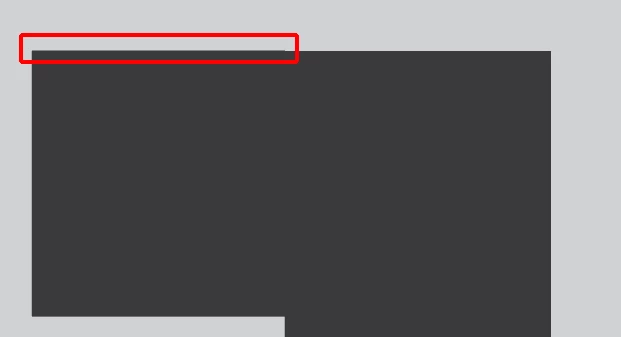
I had 2 rectangular boxes that I created, and I "Top aligned" both of them so that they are on the same height.
However, when I combine the two shapes using the Pathfinder "Merge" or "Unite" tool, when i zoom in and out at different percentages, i can see that it's not perfectly aligned.
Is this just a glitch? or is there a way to fix this? Please see attached screen shot. At some %'s, it looks fine, but then i'll zoom out, and i can see it.
Any help on this would be greatly appreciated. Thanks everyone!
It could be a GPU preview glitch, try Cmd or Ctr E to switch between CPU and GPU Preview.
Or check the Pathfinder precision settings in the Pathfinder Options and make them very small.
Copy link to clipboard
Copied
It could be a GPU preview glitch, try Cmd or Ctr E to switch between CPU and GPU Preview.
Or check the Pathfinder precision settings in the Pathfinder Options and make them very small.
Copy link to clipboard
Copied
Thank you so much. I changed the precision settings to 0.001 and it fixed everything.
Cheers!
Copy link to clipboard
Copied
Good to hear that helped.
Find more inspiration, events, and resources on the new Adobe Community
Explore Now