
Participant
June 19, 2023
Question

Mesh in illustrator not working on text, help please!

  • June 19, 2023
  • 3 replies
  • 953 views

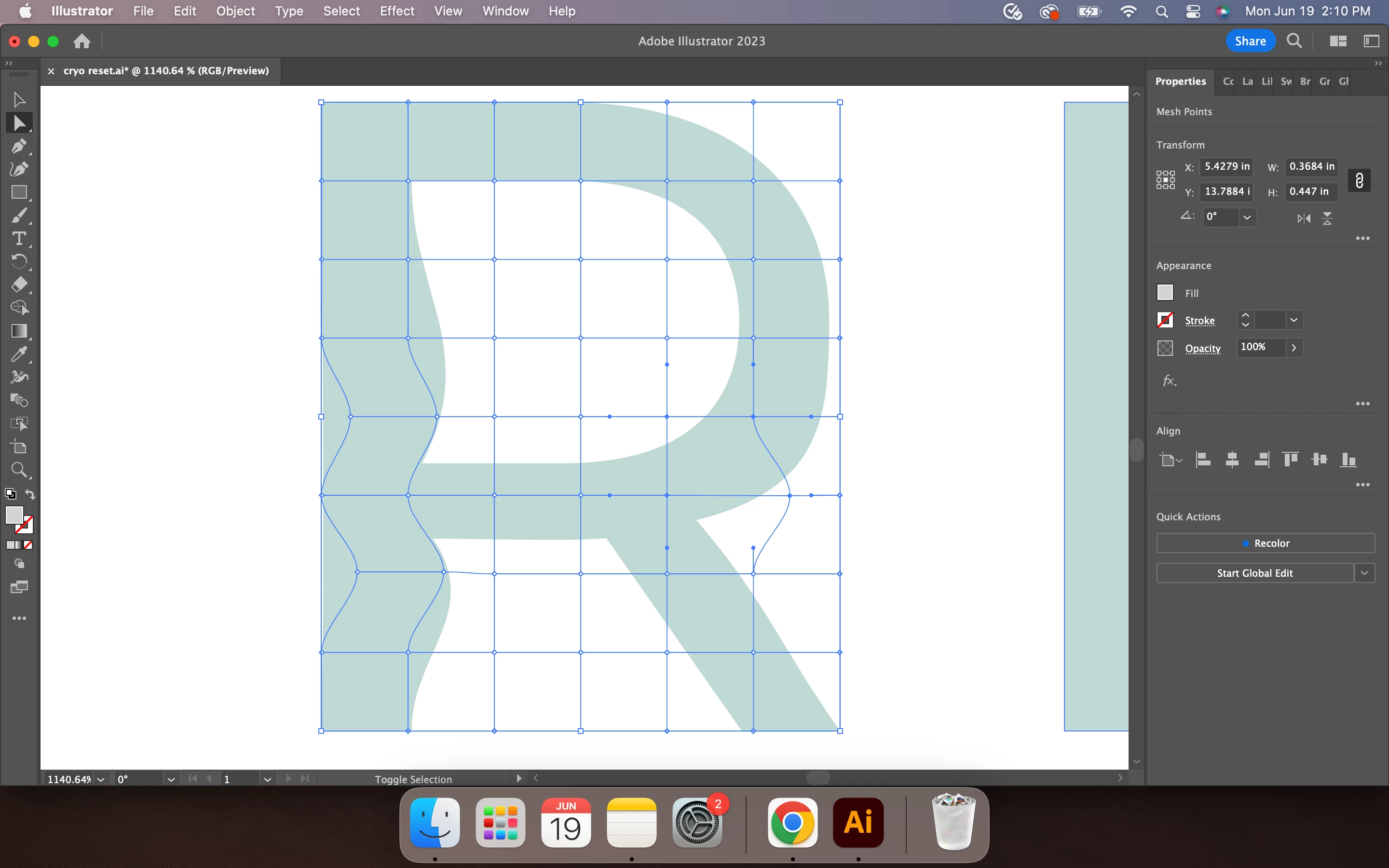
Mesh tool in illustrator won't let me create a simple wavy text. I've created outlines for the text but it seems like the mesh won't connect to the outer edge of the text when I go to manipulate it into a wavy shape. See pic below! Thanks in advance for any help you can give me!!
 

This topic has been closed for replies.

3 replies

Ton Frederiks
Community Expert
Community Expert
June 20, 2023

Did you select your outlined text and use Object > Envelope Distort > Make with Mesh?

Participant
June 20, 2023

Yes!

Ton Frederiks
Community Expert
Community Expert
June 20, 2023

I cannot replicate that. Can you share a .ai file that shows the problem? CC file sharing, Dropbox, Google, WeTransfer or similar sharing apps.

Community Expert
June 20, 2023

It sounds like you need to use an Envelope effect or perhaps turn the text into an Art Brush and apply it to a wavy path.

Monika Gause
Community Expert
Community Expert
June 19, 2023

The mesh doesn't connect to specific points. If you need a precise result, then you would need to edit the paths directly.