
Participant
February 20, 2024
Question

Missing fonts & text aligment in PDF file

  • February 20, 2024
  • 1 reply
  • 1176 views

Hi beautiful people i am working as desktop support. A user prefers to open PDF text files using AI.

Upon opening the file a prompt show " The document uses fonts that are currently not available on your computer." I have tried all methods found on youtube such as download fonts from 3rd party websites , Install and placing the font files in program folders of adobe. Please advice the resolution to this.
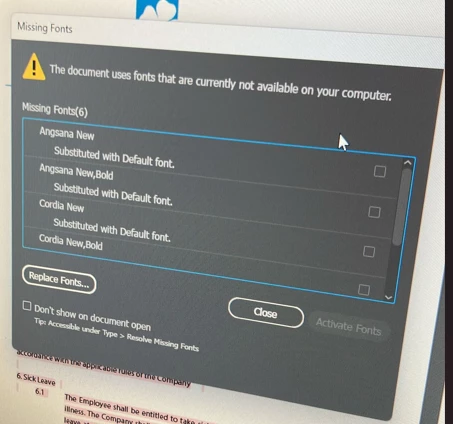


Secondly. There's a comparison in text alignment between opening a PDF file in AI & Adobe reader.
Example spacing between text can be abit far off in AI. Please advice on these.

Gracias


This topic has been closed for replies.

1 reply

Mike_Gondek10189183
Community Expert
Community Expert
February 20, 2024

Editing PDFs in Illustrator is not a good idea. Edits should be done to the original file that created the PDF. When you create a PDF if you do not understand the settings intimately, you can create all sorts of problems. Converting Colro space, compressing images, losing layers, losing editability, etc.


The user should edit the file in the original software that exported to PDF, or they will need to learn how to manage fonts and images. 

If you still want help trying to fix this in Illustrator, we will need to see the screenshots of the exact fonts you downloaded to help you with using Type >> Find/Replace Fonts. Rather than load the fonts in Adobe would be better if you loaded them for all programs. we will have extra troubleshooting to ensure you load them correctly into Illustrator. Instead use fontbook on mac, or the control panel called Fonts in windows. 

AZ-MannyAuthor
Participant
February 20, 2024

Hi Mike thank you for your response. May i know which part of the screenshot should i add here? is it the exact text of the font or lists of fonts that i've downloaded?

Anshul_Saini
Community Manager
Community Manager
February 29, 2024

Hi @Azman35562898gyrx, regarding the missing fonts issue in Adobe Illustrator when opening PDF files, it's generally recommended to edit PDFs in their original software to avoid compatibility issues. However, if you still wish to resolve this in Illustrator, please share screenshots of the exact fonts you downloaded or the lists of fonts you've tried, as Mike asked. Additionally, consider managing fonts system-wide using Font Book on Mac or the Fonts from the control panel on Windows for better compatibility across all programs.


Best regards,

Anshul Saini