
D.U.I.
Known Participant
June 4, 2021
Answered

Moving objects in illustrator to Photoshop

  • June 4, 2021
  • 5 replies
  • 2244 views

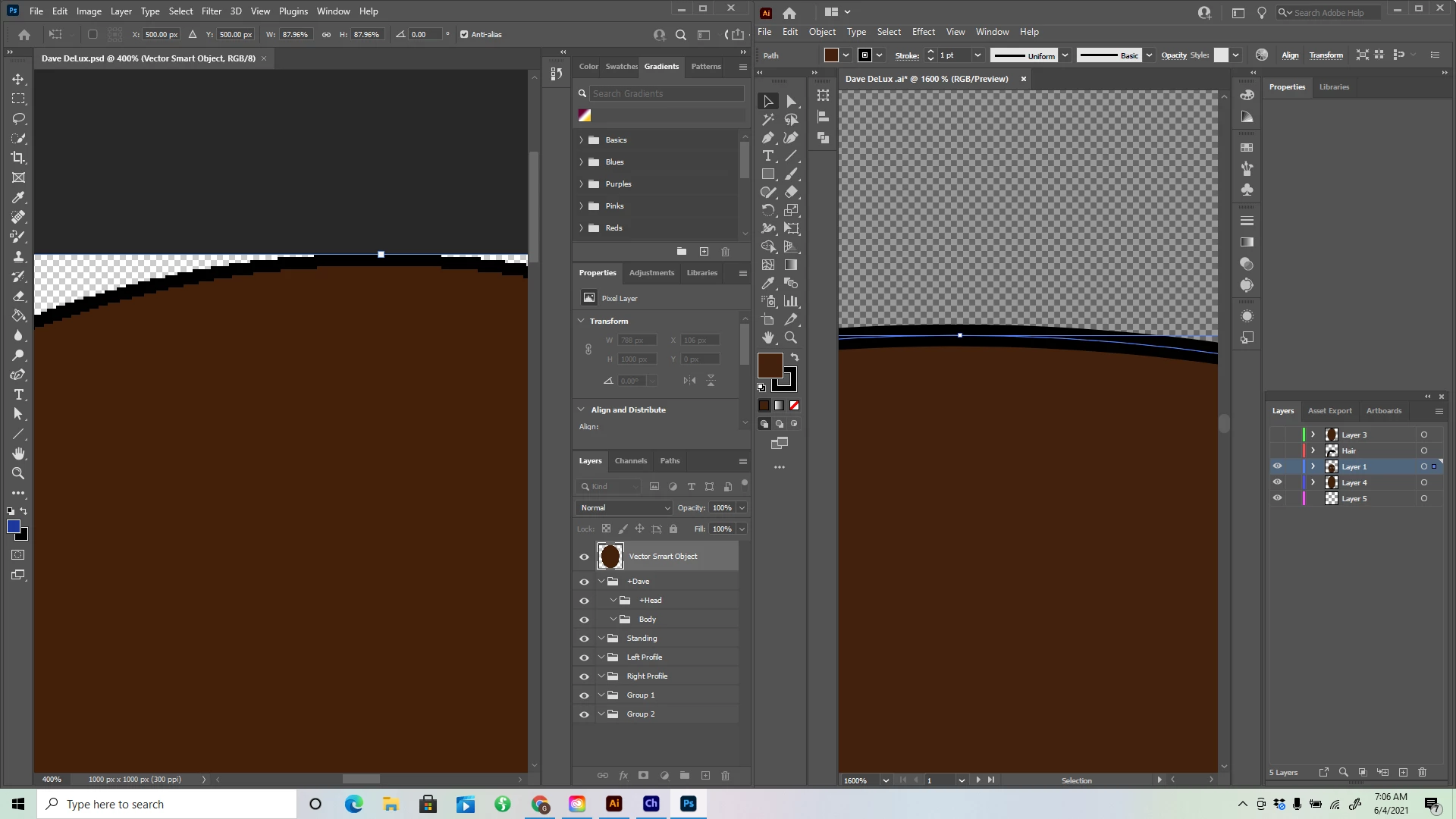
So I dont know how small this is but I am creating characters in Illustrstor and moving them over to photoshop to be organized more thoroughly for Character Animator. When I created my 1st character I mover everything over to photoshop with objects and images retaining vector shape. Now when I move them to Photoshop doesn't retain vector image but they still say "Vector Smart Object" but going into PS I know it is not Vector, What did I do wrong between that and the 1st character. Greg I appreciate your help in advance. The photo on the left is the PS file (non vector) and the one on the right is AI (in vector).
This topic has been closed for replies.
Correct answer Mike_Gondek10189183

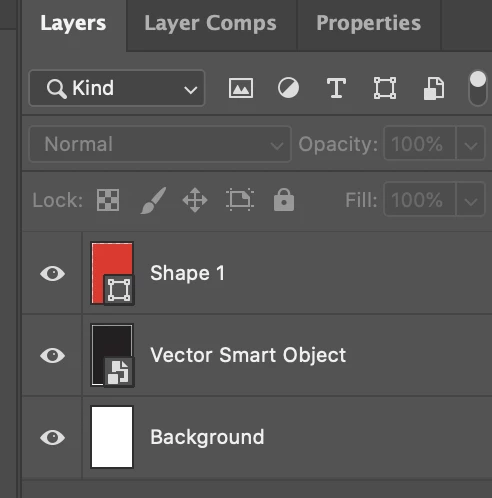
Your layer name appears to be a smart object, but the icon is wrong. When you paste you can either choose smart object or shape layer if your vector shape is 1-color, to do your project, as per Lukas screenshot. The shape layer wil require you to set the color, and you can make edits to vector shape in Photoshop, but I think you want to stick with vector object as then you can have multiple colors. Anyway explained shape layers so you can do some troubleshooting.


Try again as something went wrong take a look at my icons. Let us knwo if you seen the screen Lukas posted and what you chose.


Your icon is missing the part in bottom right, so looks like you may have done a rasterize layer afterwards, as that layer name is correct but it is s bitmapped layer by the icon,

5 replies

Kurt Gold
Community Expert
June 6, 2021

Mike spotted the issue. It's not a smart object (anymore).


You will have to rebuild it.


Mike_Gondek10189183
Mike_Gondek10189183Correct answer
Community Expert
June 5, 2021

Your layer name appears to be a smart object, but the icon is wrong. When you paste you can either choose smart object or shape layer if your vector shape is 1-color, to do your project, as per Lukas screenshot. The shape layer wil require you to set the color, and you can make edits to vector shape in Photoshop, but I think you want to stick with vector object as then you can have multiple colors. Anyway explained shape layers so you can do some troubleshooting.


Try again as something went wrong take a look at my icons. Let us knwo if you seen the screen Lukas posted and what you chose.


Your icon is missing the part in bottom right, so looks like you may have done a rasterize layer afterwards, as that layer name is correct but it is s bitmapped layer by the icon,

Lukas Engqvist
Community Expert
June 5, 2021

When you paste an illustrator object in photoshop you can paste as pixels, smart object (linked to an illustrator object), path or vector object (Shape layer). Shape layer is for maximum editability since it retains anchor points and lets you edit them in Photoshop. 


If the object is more complex there may be that path and vector object is not presented as a choice. A vector object is still rendered as pixels, but photoshop sotes it for editability as a vector and it is rendered live. (In fact many illlustrator objects can be vector based but live rendered as pixels, this is why there is a setting to under effects callled "raster efffects setttings")

If you are using Character Animator why not use Illustrator directly, you can create illustrator Puppets for Characeter animator. Also if you have many layers, an Ai file can be "Export as…"  a photoshop file so you don't have to copy paste so many layers. (As far as I recal it is only the main layers that are Photoshop layers, so you will need to do some testing to see how to best handle sublayers in your workflow)

Kurt Gold
Community Expert
June 4, 2021

Thank you.


D.U.I.
D.U.I.Author
Known Participant
June 5, 2021

The two that are higlighteed in the picture 

Kurt Gold
Community Expert
June 4, 2021

Which version of Illustrator and Photoshop are you using?


Can you share sample Illustrator (and Photoshop) files?


D.U.I.
D.U.I.Author
Known Participant
June 4, 2021

It is the latest versions