Participant
August 8, 2015
Answered

MSVCP120.dll is missing

  • August 8, 2015
  • 2 replies
  • 115956 views

I just download the Adobe Illustrator and tried to run a 30-day trial program. However, after installation, when I run it for the first time, I was told "The program can't start because MSVCP120.dll is missing from your computer. Try reinstalling the program to fix the problem ". I am using the Windows 10 operating system. Any solution here? Thank you!

    This topic has been closed for replies.
    Correct answer Srishti Bali

    Thank you for sharing, Dave.

    I hope you will report on Illy as well.


    MSVCP120.dll is missing, this error on windows might crash Illustrator and InDesign

    Download Visual C++ Redistributable for Visual Studio 2012 Update 4 from Official Microsoft Download Center

    and download Visual C++ Redistributable for Visual Studio 2012 Update 4

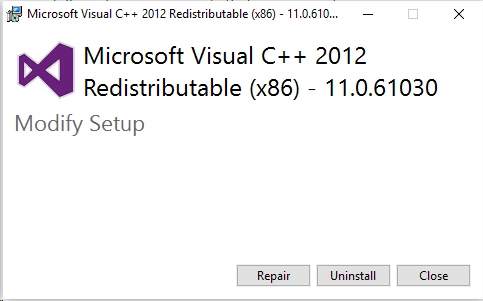
    select VSU_4\vcredist_x64.exe(if you are on 64 bit OS) and VSU_4\vcredist_x86.exe (on both 64 bit and 32 bit OS)

    once downloaded run these files

    and click repair on both
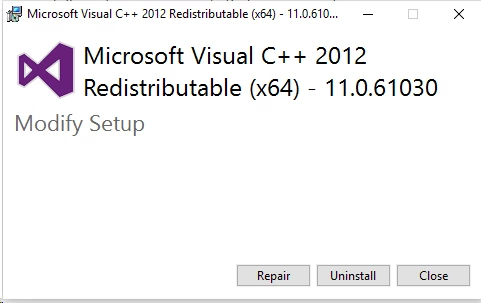
    then it will ask you to restart , do not restart and download the next update

    Download Visual C++ Redistributable Packages for Visual Studio 2013 from Official Microsoft Download Center

    and follow the same steps

    next step will be removing(delete/ rename) preferences folder(indesign/ Adobe Illustrator/Adobe Illustrator 20 Settings/Adobe Illustrator 19 Settings) from below mention locations

    C:\Users\usernameAppData\Local\Adobe

    C:\Users\usernameAppData\Roaming\Adobe

    then restart the system

    after the system is rebooted relaunch the application

    Regards

    Srishti

    2 replies

    October 9, 2015

    Very useful and interesting information! Thank you so much for this article! As far as I know, dll error is easily tackled by downloading it from http://fix4dll.com and saving it to a specific folder.

    Jacob Bugge
    Community Expert
    Community Expert
    August 8, 2015
    Participating Frequently
    October 2, 2015

    Jacob,
    What is the appropriate course of action if the vcredist_x64.exe is not in the location your article references?   I am running Create Cloud version 2.3.0.151.  However when i go to the location your article talks about, all i see is this..

    Participating Frequently
    October 10, 2015

    You are welcome, Dave.

    I believe this is one for our forum staff friends. Hopefully one of them will see this soon.

    I will try to keep an eye out and alert the first one turning up in the forum.


    I reached out to tech support and after a little bit of poking around, they determined that the issue was regarding how the Visual Studio runtime package was running on my pc.  They recommended that i contact Microsoft for support.  There was no way I was going to call them, so fearing that I did have some level of corruption at the OS level, I wiped out my OS partition and reinstalled windows.  So far I only put back the PhotoShop CC program and it boots.  So I guess Adobe Tech support was right!

    Just wanted to update on my issue.

    Dave