


Known Participant
June 26, 2023
Question

Multiple Illustrator issues on M2 Macbook Pro

  • June 26, 2023
  • 10 replies
  • 8665 views

I recently got an M2 MBP and I'm having some issues with Illustrator which I recently installed the latest version (27.6.1).


I'm not using old preferences. I have disabled dictation features which some users in other posts seem to believe affected Illustrator performance. This is a fresh install of macOS and the Adobe apps.


I'm on macOS Ventura 13.4.1.
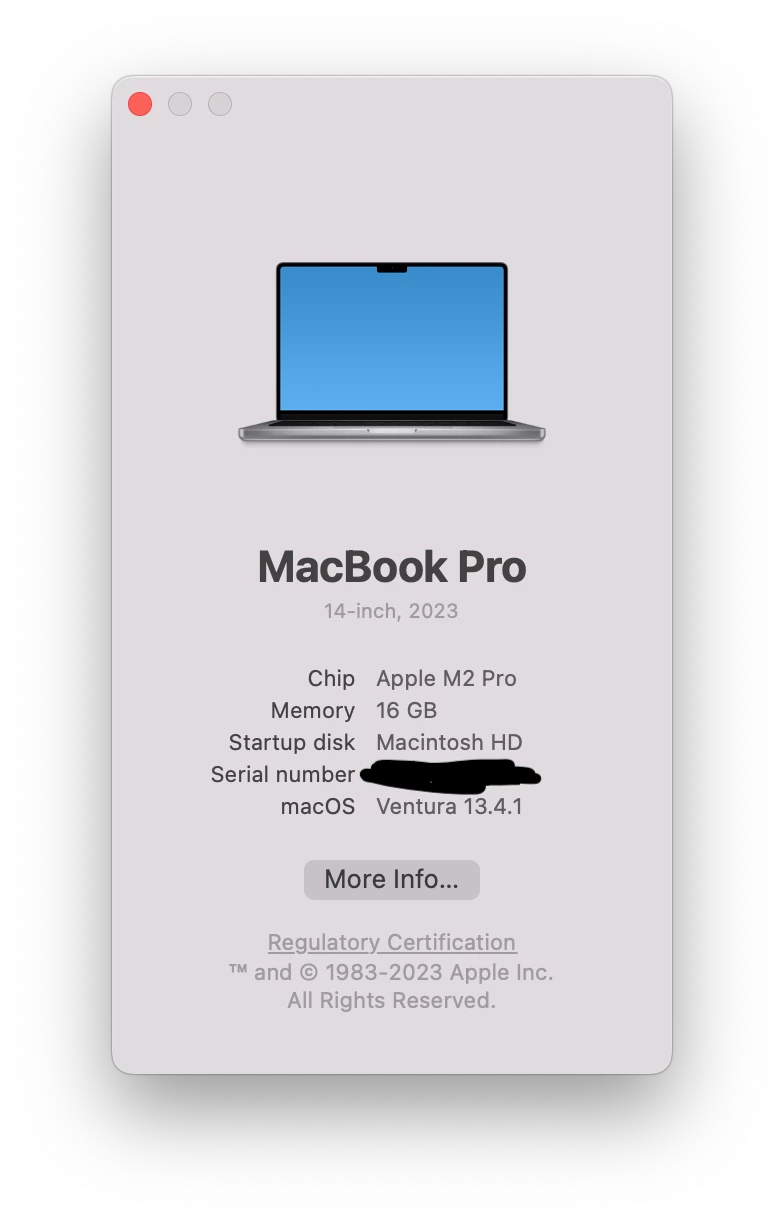
 

Lag and stuttering when moving objects

Randomly when dragging objects the canvas seems to freeze for a second or two and then finally updates itself. This happens even on emptuy projects with nothing but a rectangle.


I disabled the Pro Motion feature of my laptop's monitor which changes framerates depending on what the user is doing. This seems to have alleviated the issue even though I'm using an external monitor connected to a Thunderbolt port.


Lag when writing

There's another random issue which is not really consistent. When writing text it seems text doesn't render as I type it. Sometimes the characters I've typed take 1-2 seconds to appear in the screen. This is extremely frustrating and is slowing me down considerably.


I've disabled GPU performance in the settings which solves the issue but now the rendering performance slows down to a crawl (as expected). Sometimes if I re-enable GPU performance the issue goes away momentarily and then comes back.


Inititally I thought this could be caused by my BT keyboard but it happens with the internal keyboard too. Even when using the BT keyboard I don't see this this behavior in any other app (I write a lot of code).


For some strange reason, the issue seems to go away when recording the screen with Quicktime so I recorded these videos with my phone.


With GPU performance enabled you can see how when I keep the E key pressed it take a while for text to appear:

https://youtu.be/uSujR7dGqZw


With CPU rendering the issue disappears and text renders as it should:

https://youtu.be/PXSV0P_LckQ


This topic has been closed for replies.

10 replies

timp7533729
Participant
June 14, 2024

I'm having the same issue for 3 days now. Is there any new solution?

Monika Gause
Community Expert
Community Expert
June 14, 2024

@timp7533729  schrieb:

I'm having the same issue for 3 days now. Is there any new solution?


Which issue exactly do you have?

On which system?

With which version of Illustrator?

Participant
April 22, 2024

Hello, I'm experiencing the same issue on a MB Pro with an M3 Pro chip. I noticed that the Mac screen resolution might be related to the problem. I usually use it at 1080x1169, but when I lower it, for instance, to a lower resolution like 1525x982, the issue disappears! Also, I moved Illustrator to a secondary screen with a resolution of 1920x1080, and it doesn't have that problem there. I'm not sure why this is happening, but it's my humble observation. I'm forced to use the 1525x982 resolution, which isn't ideal, but at least it works fine!

Participant
April 23, 2024

Update! It seems that the issue disappears from the MacBook when you disconnect the secondary monitor and work solely with the Mac's monitor.

MonicaMPAuthor
Known Participant
April 23, 2024

I just tested this quickly and yes it does seem to make a difference in the latest version of Illustrator 2024 (28.4.1). I can write text fluidly, I can move objects without lag, etc.


Hopefully this information will help the Adobe team nail down this bug.

mbtassino
Participating Frequently
March 12, 2024

Same Here. I'm with a brand new Macbook Pro M2 Max, 64gb, 12-Core CPU/30-Core GPU and it is impossible to work with, incredible slow... is there any solution? 

Ton Frederiks
Community Expert
Community Expert
March 12, 2024

Which OS, Sonoma? Did you migrate the CC apps? Can you install Ventura? 

mbtassino
Participating Frequently
March 12, 2024

Sonoma, yes. I didn't migrate them, it was a fresh install. I might be able to install Ventura, but I've read that some people encountered similar errors with Ventura too. Do you think it's worth a shot? I've been having a lot of issues with Sonoma in general, but I lack a point of comparison since I haven't used macOS in 12 years.

Known Participant
February 27, 2024

Just want to add into this thread I'm experiencing a feezing bug when attempting scroll fonts, which also DOES NOT happen whilst recording my screen:

https://community.adobe.com/t5/illustrator-discussions/illustrator-28-2-0-freezing-when-scrolling-fonts/m-p/14440525#M398394

obergim
Participant
January 25, 2024

Any fix? still happening MBP 14 m2.

MonicaMPAuthor
Known Participant
February 5, 2024

Same. I'm still having the same issues and just installed the latest version of Illustrator.


It's like when using the GPU it just stops rendering randomly and dropping frames.

Participant
February 23, 2024

Experiencing this too, using an M3 Pro, 18GB, Sonoma 14.2.1. In Illustrator, if I click to type I get the Apple loading icon for about 30 seconds! Dragging artboards or artwork around has about a 5 second delay, and these aren't hi-res images either. Whilst its doing this nonesense I can switch to Adobe PS or any other program and it works just fine with no lag.


Idk what is wrong with Illustrator but it is absolutely F'ed. I am seeing the strangest stuff happen. My artboard tool just creating artboards inside artboard when I am trying to click and drag one. Illustrator also straight up just deleted a file I HAD OPEN. It's gone. Happened after I had left Illustrator open while my laptop was sleeping but it wasn't a not saved issue bc I have the cloud. It's nowhere to be found. 

Random things won't work, like today I wasn't able to edit a gradient in a simple 1 layer file just because? Illustrator is very quickly losing my trust. Who is a legit competitor does anyone have ideas?

Participant
January 15, 2024

Reporting the same issue with Macbook Pro M2 Max

Monika Gause
Community Expert
Community Expert
January 15, 2024

And is it also gone when you boot into Safe Mode?

MonicaMPAuthor
Known Participant
December 6, 2023

I thought these issues were exclusive to Apple Silicon but the other day I saw someone with an Intel 5K iMac using the latest Illustrator version and suffering from the exact same issues. Severe lag when editing text, clicking, etc. Switching to CPU rendering solved the issues but the overall performance is worse.

Monika Gause
Community Expert
Community Expert
December 6, 2023

@MonicaMP  schrieb:

suffering from the exact same issues


They might experience the same consequences, but those aren't necessarily the same issues causing this.


That's why it's important to have Customer Care inspect the system - the alternative will be to search all the threads in this forum about these issues and try out everything that helped someone else. Or go through the usual troubleshooting steps.


And if working in Safe Mode actually helps, then that is a sign, that something inside your system is causing it. You only have to find that something.

Participant
November 22, 2023

I am using a Mac Studio M2 MAX with 64GB RAM, and I am experiencing the same issue as everyone else. When using Illustrator, there is significant lag when dragging objects and typing.

Monika Gause
Community Expert
Community Expert
November 22, 2023

Can you boot into Safe Mode and try again?

Papia
Participant
December 6, 2023

Can you fix the issue and try answer again ?

Participant
October 13, 2023

I'm having the exact same issue. Brand new MacBook with an M2 Pro, now running Sonoma (but I doubt that the OS matters in this case), fresh install of Illustrator, no Preferences taken from other systems.


The fact that this hasn't been resolved since June doesn't give me hope that it will happen anytime soon. Do something about this, Adobe!

Monika Gause
Community Expert
Community Expert
October 13, 2023

There hasn't been an official statement yet that Adobe apps are ready for Sonoma. In June Sonoma was still in beta. https://helpx.adobe.com/download-install/kb/macos-sonoma-compatibility-common-issues.html 

Participant
October 13, 2023

The original poster pierBover, who started this thread in June, did not use Sonoma, so this clearly has nothing to do with the OS version.

MonicaMPAuthor
Known Participant
June 27, 2023

I've disabled this option and I've been able to re-enable GPU for rendering. So far this has solved my previous issues.

It's not ideal but it makes Illustrator usable again. Hopefully Adobe will fix these issues asap.


MonicaMPAuthor
Known Participant
June 28, 2023

Hmmm no disabling the "realtime editing" option didn't fix the text rendering lag problem.


The problem is back.