
Exit
  • Global community
    • Language:
      • Deutsch
      • English
      • Español
      • Français
      • Português
  • 日本語コミュニティ
  • 한국 커뮤니티
0

Multiple issues with converting to compound path

Explorer ,
Nov 18, 2021 Nov 18, 2021

Hi,


I'm facing a couple of issues with converting to compund path for creating svg icons.


1) I have expanded all strokes into a path by expanding each section. And I selected all and converted them to a compund path. But there are some overlapping areas that are becmoing transparent. The 2 images below are i) after expanding and ii) after coverting to compound path.
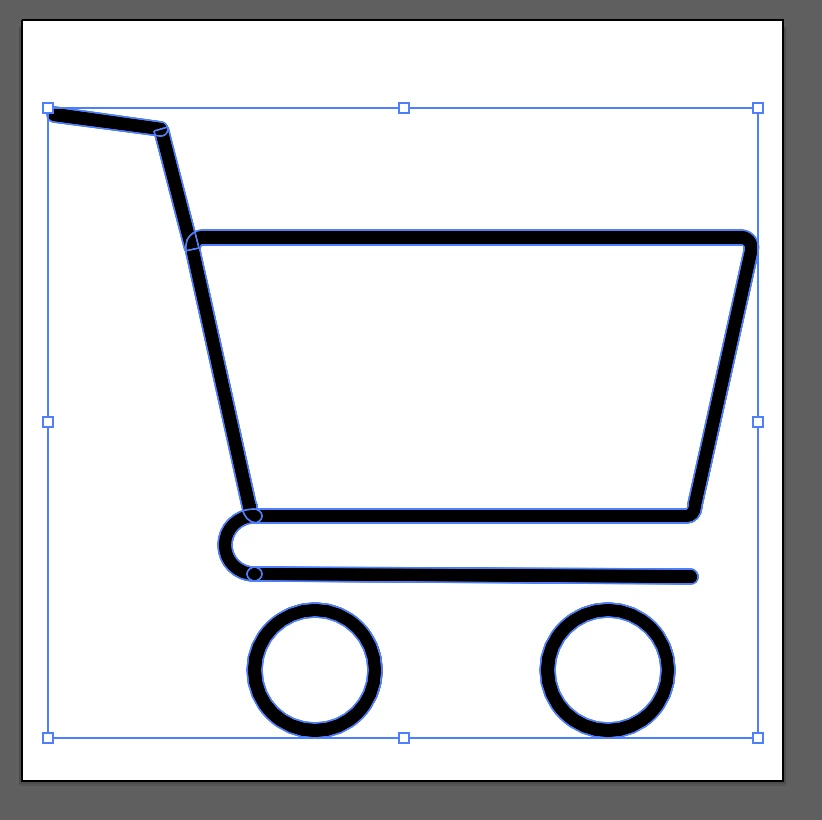
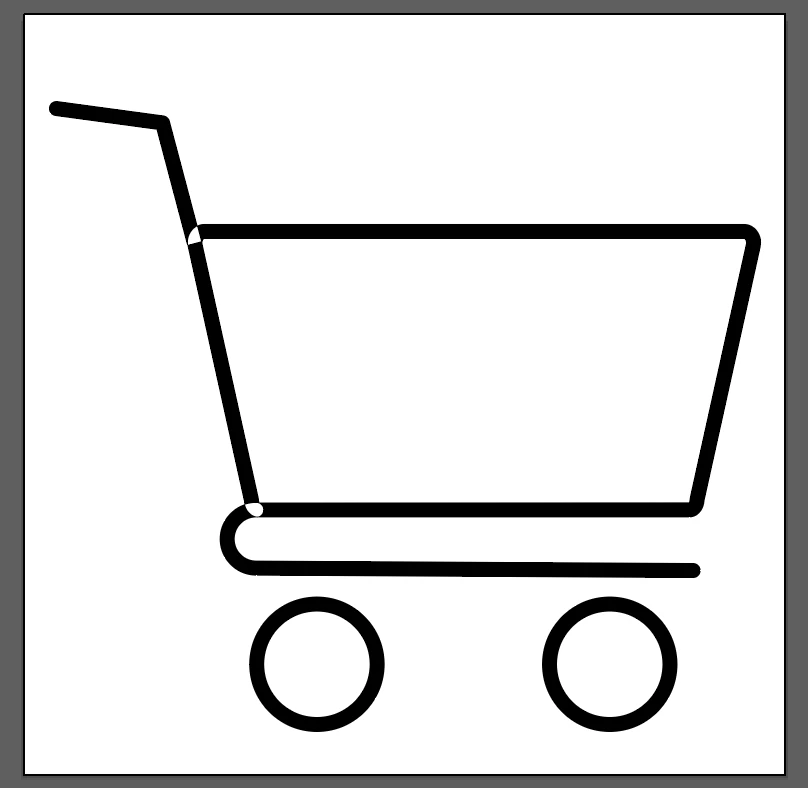
 

Screenshot 2021-11-19 at 12.46.36 PM.png 

Screenshot 2021-11-19 at 12.46.51 PM.png

2) Again all parts are expanded but when I create compound path, the whole icon becomes all black. I wanted the lines to be transparent. The 2 images below 1) after expanding to path & ii) after converting.
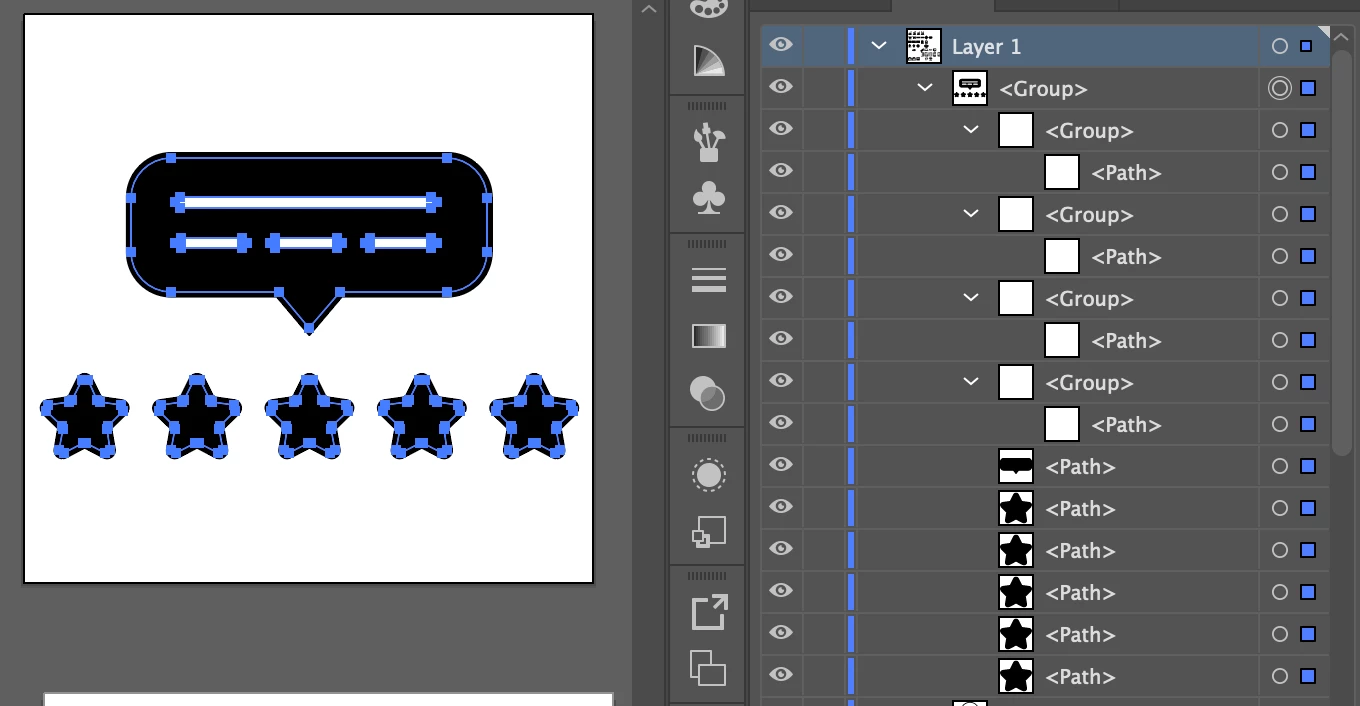
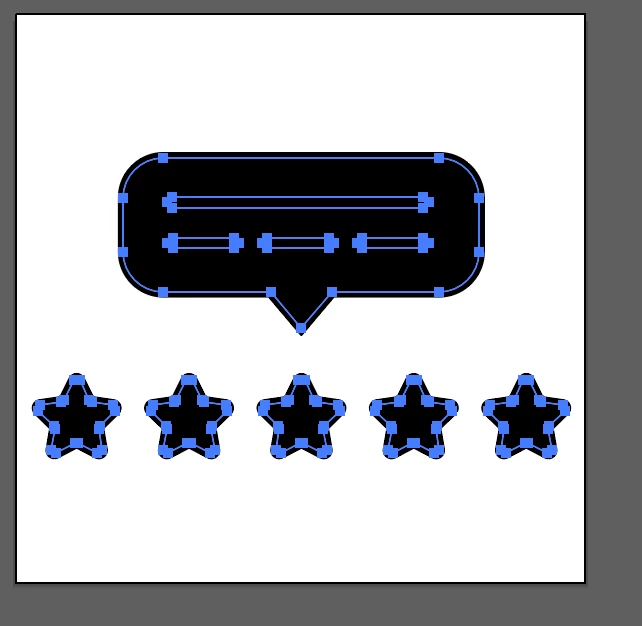
Screenshot 2021-11-19 at 12.52.23 PM.png

Screenshot 2021-11-19 at 12.52.48 PM.png

There are other icons I have created where I follow the same process and the results are fine. I'm not able to understand the technical differences/mistakes I'm making. Please help!


Thanks.
TOPICS
Draw and design
1.4K
Translate
Report
Community guidelines
Be kind and respectful, give credit to the original source of content, and search for duplicates before posting. Learn more
community guidelines

correct answers 1 Correct answer

Advocate , Nov 19, 2021 Nov 19, 2021

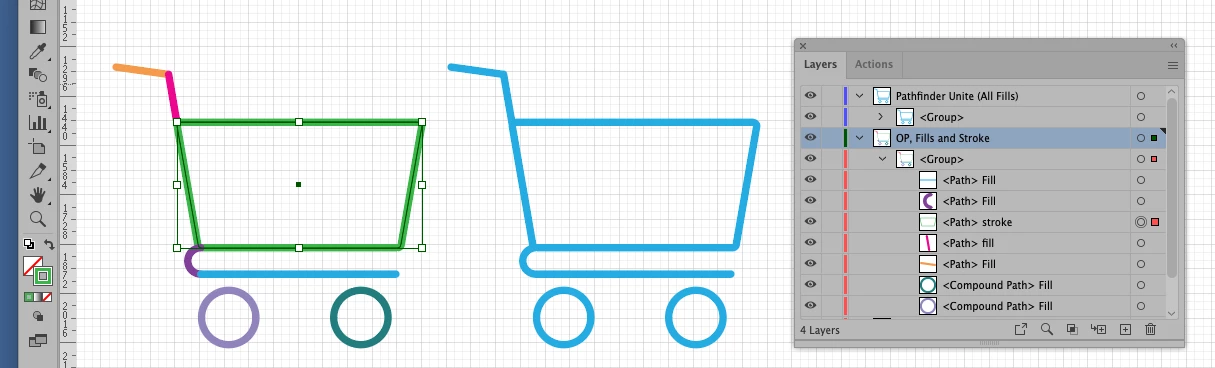
Need Outline .png


Doh18, Thank you for your Illustrator file.

You have a mixture of Strokes and Fills. (I random color to see)

Your center shape is still Strokes.(shown in green)

Outline that shape, so you have all Fills.


Then do Pathfinders>Unite.

You should be good to go. 😀

(Shown in Cyan.)

Translate
Adobe
Community Expert ,
Nov 19, 2021 Nov 19, 2021

1) Have you tried using the Pathfinder? 

Can you provide the file? 

2) Check the Stroke. 

Translate
Report
Community guidelines
Be kind and respectful, give credit to the original source of content, and search for duplicates before posting. Learn more
community guidelines
Explorer ,
Nov 19, 2021 Nov 19, 2021

Hi @c.pfaffenbichler 

1) I have tried pathfinder, nothing works 😞 I cant attach the ai file, so attaching a screenshot with layers info. Please have a look.

2) What do I check in stroke?


Screenshot 2021-11-19 at 2.38.24 PM.png


Translate
Report
Community guidelines
Be kind and respectful, give credit to the original source of content, and search for duplicates before posting. Learn more
community guidelines
Community Expert ,
Nov 19, 2021 Nov 19, 2021

1) There are lines – didn’t you say you expanded them? 


2) The uncompounded »lines« have no Stroke, the other elements and the resulting compound path apparently do. 

So I guess you need to expand that before creating the compund path. 

Screenshot 2021-11-19 at 10.23.10.pngScreenshot 2021-11-19 at 10.23.19.pngScreenshot 2021-11-19 at 10.23.32.png

Translate
Report
Community guidelines
Be kind and respectful, give credit to the original source of content, and search for duplicates before posting. Learn more
community guidelines
Explorer ,
Nov 19, 2021 Nov 19, 2021

I had just shared the non-expanded layers to show what it was originally. 


1) I expanded the cart icon again and now the rounded edges are gone (circled in red)

2) The star & text box icon still has the same issue after compound path


Screenshot 2021-11-19 at 3.20.27 PM.png


Translate
Report
Community guidelines
Be kind and respectful, give credit to the original source of content, and search for duplicates before posting. Learn more
community guidelines
Community Expert ,
Nov 19, 2021 Nov 19, 2021

1) Please provide the file. 


2) Did you compound the black elements before using »Minus front« or »exclude« to knock out the lines? 

Translate
Report
Community guidelines
Be kind and respectful, give credit to the original source of content, and search for duplicates before posting. Learn more
community guidelines
Explorer ,
Nov 19, 2021 Nov 19, 2021

Hi @c.pfaffenbichler 


1) The platform does not allow me to attach AI file. Otherwise I would have shared the file.

2) Only the wheels (2 circles) are compund paths. The others are not.


Translate
Report
Community guidelines
Be kind and respectful, give credit to the original source of content, and search for duplicates before posting. Learn more
community guidelines
Community Expert ,
Nov 19, 2021 Nov 19, 2021

Can you provide a link to the file on some file transfer platform? 

Translate
Report
Community guidelines
Be kind and respectful, give credit to the original source of content, and search for duplicates before posting. Learn more
community guidelines
Explorer ,
Nov 19, 2021 Nov 19, 2021

https://we.tl/t-39rvftsP8y


Here you go. I have made changes here and there, feel free to play around and let me know!

Translate
Report
Community guidelines
Be kind and respectful, give credit to the original source of content, and search for duplicates before posting. Learn more
community guidelines
Advocate ,
Nov 19, 2021 Nov 19, 2021

Dohj18, Hi,


Here I recreated your icon.

Drew the different Stroked Paths, Round Cap

Object>Path>Outline Stroke.

Now all Fills


Select all your Fill Paths

Pathfinders>Unite.

(colored Orange here. No problems.)


If you selected all your Fill Paths and used Object>Compound Path>Make, then yes you get those funky transparent areas where the paths were overlapping.

(Colored Blue here)


K

Pathfinder Unite.png

Translate
Report
Community guidelines
Be kind and respectful, give credit to the original source of content, and search for duplicates before posting. Learn more
community guidelines
Explorer ,
Nov 19, 2021 Nov 19, 2021

Hi @kphotopage 


Thanks for the detailed response!


I outlined all the paths. And selected all the elements (paths) to create the final compound path. The transparent parts are gone but the middle cart area now gets filled with black, and the outer lien seems to have disappeared making the cart look slightly smaller.

Screenshot 2021-11-19 at 7.37.24 PM.pngScreenshot 2021-11-19 at 7.39.54 PM.png


Translate
Report
Community guidelines
Be kind and respectful, give credit to the original source of content, and search for duplicates before posting. Learn more
community guidelines
Advocate ,
Nov 19, 2021 Nov 19, 2021

Dohj, for members to help you better, please upload your Illustrator file.

You have to use Dropbox  or whatever.


K

Translate
Report
Community guidelines
Be kind and respectful, give credit to the original source of content, and search for duplicates before posting. Learn more
community guidelines
Community Expert ,
Nov 19, 2021 Nov 19, 2021

They did in their last post. 

Translate
Report
Community guidelines
Be kind and respectful, give credit to the original source of content, and search for duplicates before posting. Learn more
community guidelines
Mentor ,
Nov 19, 2021 Nov 19, 2021

You should remove the fill (no fill), but you don't need compound path for these items, but unite in pathfinder. (or use the shape builder tool). You can use compound but it's not the best tool in the box for this particular scenario, you are essential joining these "tubes", you are not making compounds (which is essential a knockout tool, not a joining tool).

Translate
Report
Community guidelines
Be kind and respectful, give credit to the original source of content, and search for duplicates before posting. Learn more
community guidelines
Advocate ,
Nov 19, 2021 Nov 19, 2021

Need Outline .png


Doh18, Thank you for your Illustrator file.

You have a mixture of Strokes and Fills. (I random color to see)

Your center shape is still Strokes.(shown in green)

Outline that shape, so you have all Fills.


Then do Pathfinders>Unite.

You should be good to go. 😀

(Shown in Cyan.)

Translate
Report
Community guidelines
Be kind and respectful, give credit to the original source of content, and search for duplicates before posting. Learn more
community guidelines
Explorer ,
Nov 20, 2021 Nov 20, 2021

THANK YOU @c.pfaffenbichler @kphotopage @Met1 for your suggestions.

Pathfinder>Unite option works!

Translate
Report
Community guidelines
Be kind and respectful, give credit to the original source of content, and search for duplicates before posting. Learn more
community guidelines
Advocate ,
Nov 20, 2021 Nov 20, 2021
LATEST

You're welcome. Glad we could help.

Please mark this thread as answered.

K

Translate
Report
Community guidelines
Be kind and respectful, give credit to the original source of content, and search for duplicates before posting. Learn more
community guidelines