
New Participant
January 7, 2020
Answered

Multiple shapes behaviour in the Shape Builder Tool

  • January 7, 2020
  • 4 replies
  • 7143 views

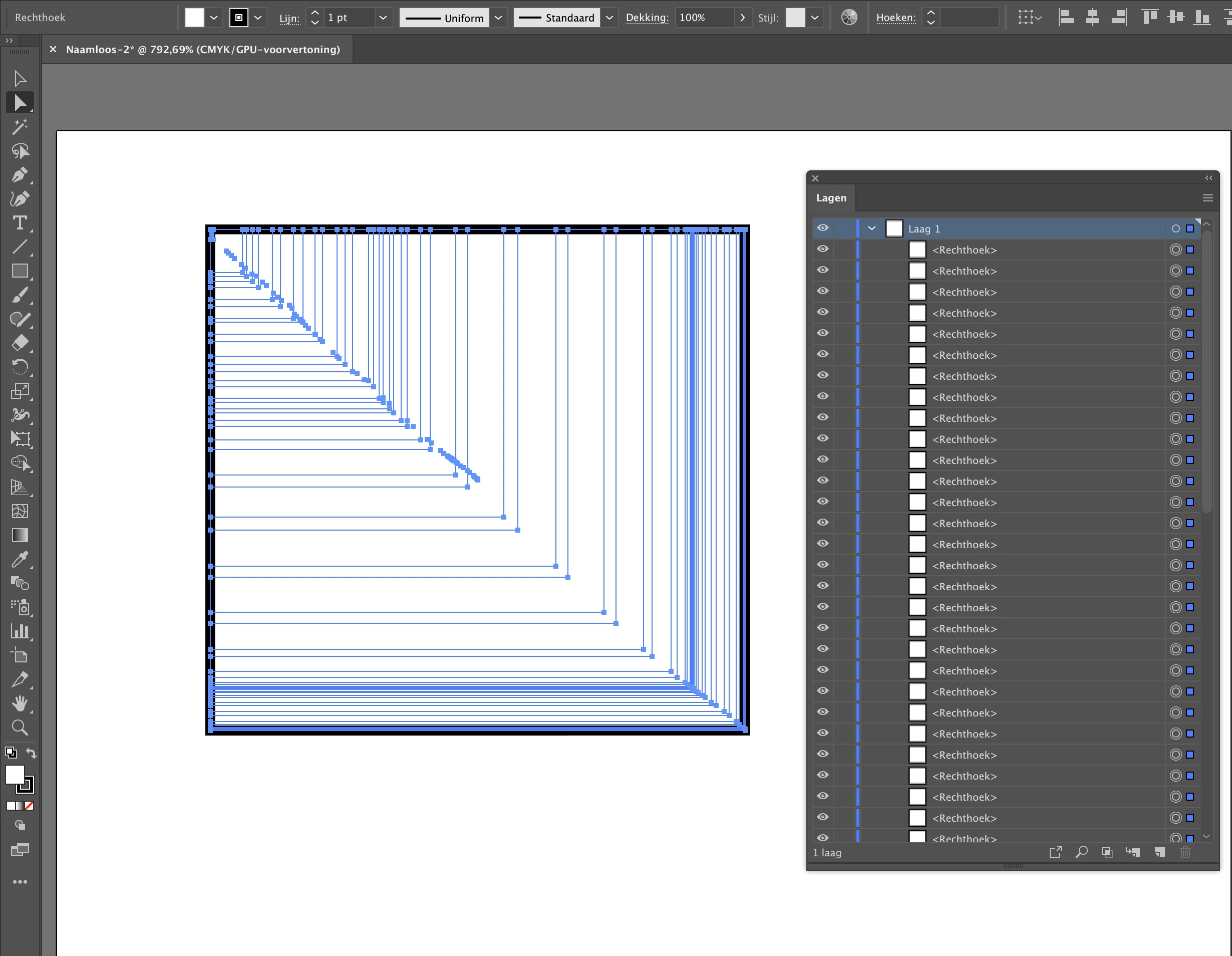
Does anyone know how to get rid off the multiple shapes behaviour in the Shape Builder Tool? I only draw one rectangle (or circle, line, etc.) and it results in multiple shapes. I tried to reset the default settings and I also reinstalled Illustrator, but unfortunately it didn't work out and I still have the same problem. This behaviour appeared "suddenly".


I also restarted my computer, attached antother keyboard but nothing solved the problem so far.

Anybody had the same problem in the past? If so, what have you done to get rid off it??
Correct answer Jacob Bugge

Bob,


There are rare cases where Illy (job description Adobe Illustrator) believes that the Tilde key is stuck.


I am afraid the cure is to replace the preferences; it could have been solved by your uninstalling, but only if you ticked the box to delete the preferences.


You may (excerpts from a longer list):


4) Close down Illy and press Ctrl+Alt+Shift/Cmd+Option+Shift during startup (easy but irreversible);


5) Move the folder (follow the link with that name) with Illy closed (more tedious but also more thorough and reversible), you may find the folder here:

https://helpx.adobe.com/illustrator/kb/preference-file-location-illustrator.html


6) Follow the instructions here: https://helpx.adobe.com/illustrator/using/setting-preferences.html


4 replies

Monika Gause
Braniac
January 7, 2020

What else is running? Other apps might interfere. Brwsers, screensharing apps, whatever.

Jacob Bugge
Jacob BuggeCorrect answer
Inspiring
January 7, 2020

Bob,


There are rare cases where Illy (job description Adobe Illustrator) believes that the Tilde key is stuck.


I am afraid the cure is to replace the preferences; it could have been solved by your uninstalling, but only if you ticked the box to delete the preferences.


You may (excerpts from a longer list):


4) Close down Illy and press Ctrl+Alt+Shift/Cmd+Option+Shift during startup (easy but irreversible);


5) Move the folder (follow the link with that name) with Illy closed (more tedious but also more thorough and reversible), you may find the folder here:

https://helpx.adobe.com/illustrator/kb/preference-file-location-illustrator.html


6) Follow the instructions here: https://helpx.adobe.com/illustrator/using/setting-preferences.html


New Participant
February 5, 2021

Thank you so much Jacob!!!


Solution 4 finally worked for me: "Close down Illy and press Ctrl+Alt+Shift/Cmd+Option+Shift during startup" (i clicked before and holding until open).

Jacob Bugge
Inspiring
February 5, 2021

You are welcome, Jack.


Ton Frederiks
Braniac
January 7, 2020

Check if the Tilde key (~) is stuck.

New Participant
January 7, 2020

Already attached another keyboard. Problem continues.

Tilde is working ~~~~~

Doug A Roberts
Braniac
January 7, 2020

In what way are you using the shape builder tool on a single shape?

New Participant
January 7, 2020

Clicked on rectangle tool. Drew a rectangle only with mouse, without any keyboard button pressed.

But line, oval, polygon, and star also behave the same. Every shape results in multiple shapes as in the attached printscreen.