
Participant
September 20, 2018
Answered

Multiple shapes - converted into single lines ?

  • September 20, 2018
  • 3 replies
  • 976 views

Hello, Working on a map, and I have ZIP code boundaries. where each ZIP has it own shape (fill and stroke). So multiple shapes are touching since their borders line up against one another. My goal is to just take the outline of the boundaries and create a single dashed outline. Problem, everywhere borders line up against each other the dashed borders loose there constancy in dash lines since its overlapping another boundary's dash line.

Now I have done this in the past and can't figure out what it was I did, so I know it possible. How can I make all those shapes and just create a single line where the borders match up?
This topic has been closed for replies.
Correct answer Ray Yorkshire

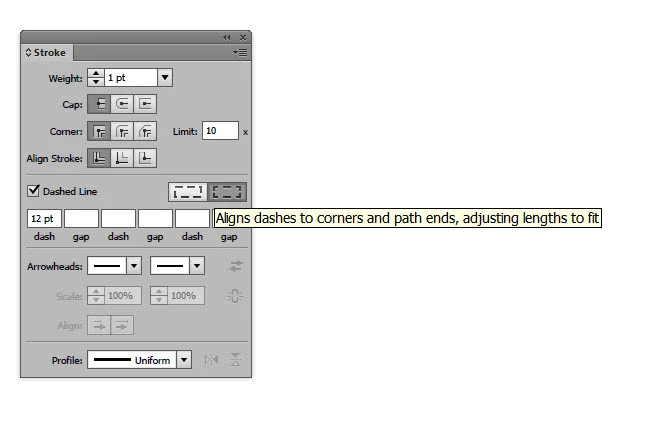
Jered , does changing the  dash option help?

3 replies

Participant
September 20, 2018

Here is a zoomed in screen grab of boundaries.

Mike_Gondek10189183
Community Expert
Community Expert
September 20, 2018

can we see a screenshot with the shapes selected?

Ray Yorkshire
Ray YorkshireCorrect answer
Participating Frequently
September 20, 2018

Jered , does changing the  dash option help?

Participant
September 20, 2018

Yes that does help, but there are still some areas that have issues. Thank you.

lambiloon
Community Expert
Community Expert
September 21, 2018

Hi try to break the lines where you want to apply any dashed effect so it not disturb you....thanks.

Ali Sajjad / Graphic Design Trainer / Freelancer / Adobe Certified Professional