
Inspiring
June 5, 2020
Answered

Multiple textFrames with same name, always select only the last one.

  • June 5, 2020
  • 1 reply
  • 1581 views

Hello!


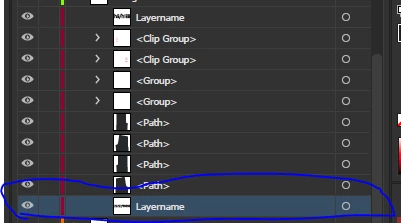
In my files, sometimes i have multiple textFrames with the same layer name("Layername"). 


Is it possible for a  script to always select only the last one( in the array of "Layernames")  in the document? 


I put together something, but the following script selects all of the textFrames with the same name.  I think i have to add another loop, which adds .length -1 to get only the last "Layername" object from the array of "Layernames" but i am not sure where should i put it. all my attempts have resulted in null.

var doc = app.activeDocument;  


doc.selection = null; //ensure there is nothing in the document selected already. this way you only get the selection you want.  
for(var a=0;a<doc.textFrames.length;a++){

     if (doc.textFrames[a].name == "Layername"){
        doc.textFrames[a].selected = true;  
     
    }
}

just for reference, incase i am getting the index of layers wrong. I always want to change only the last one, marked in blue on the picture.
This topic has been closed for replies.
Correct answer Mrprintalot

I have edited the code snippet i gave, give it a try again. It had some issues as the outer loop was starting with the wrong index, and also using activeDocument while saving was wrong.


-Manan


Loop worked, but only on the last file. BUT i got it to work by changing documents[i] to documents[0]. I dont know why this works, but I think this way the script always takes the first document from the array and makes changes to it and when the document is closed, the next open document will become [0] ? The correct code ( that works for me) is: 


for (var i = documents.length - 1; i >= 0; i--) {
    

   var doc = documents[0] // changed this to [0], previously was [i]
   
for(var a= doc.textFrames.length - 1;a >= 0;a--){ 

     if (doc.textFrames[a].name == "LayerName1" ){
         doc.textFrames[a].contents = "NewLayerName1" ;     
      doc.close(SaveOptions.SAVECHANGES) ;
         break;
         
    }  
    
}

}


 It seems impossible, but could this loop be run without closing or saving the files ?


1 reply

Community Expert
June 5, 2020

Try the following


var doc = app.activeDocument;  
doc.selection = null; //ensure there is nothing in the document selected already. this way you only get the selection you want. 
for(var a= doc.textFrames.length - 1;a >= 0;a--){

     if (doc.textFrames[a].name == "Layername"){
        doc.textFrames[a].selected = true;  
		break;
    }
}


-Manan

-Manan
Inspiring
June 5, 2020

Thanks, works like a charm!