
Participant
December 1, 2018
Answered

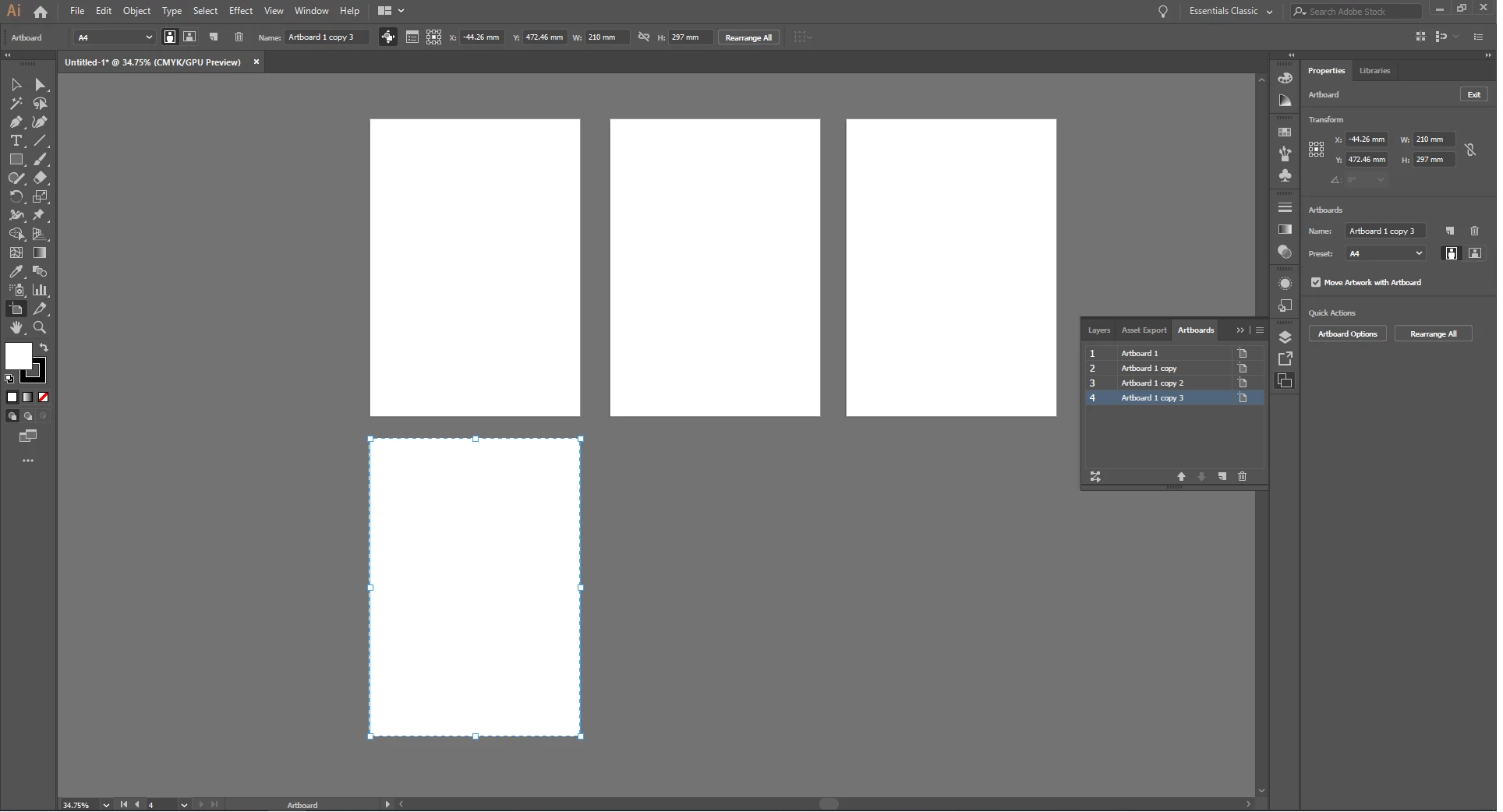
My artboard name/number label disappeared.
  • December 1, 2018
  • 2 replies
  • 12185 views

My computer is Windows 10 and i use latest version of Illustrator CC now.

There should be an label on upper left side of artboard that shows artboard's number/name,

and X label on upper right side of artboard. But nothing shows in my Illustrator.

I tried everything to solve this problem.

I uninstalled and redownloaded Illustrator countless times, restarted computer, found AIPrefs file and removed it.

But nothing worked. I did all of solutions exist in internet.

What should I do?

    Correct answer Mike_Gondek10189183

    Another person fixed this by creating a new user on the mac. What this tells me is that one of the prefs was corrupt. Mac and win are similar in their storing of prefs, and the basic reset does not reset as much as creating a new user. Now rather than create a new user will give you a more thorough & other method of testing the prefs. Not sure fo the location on windows for more thorough,but you might find based upon mac location.


    PREFS  RESET MAC (thorough method)

    Quit Illustrator

    Finder >> Shift Command G

    ~/Library/Preferences/Adobe Illustrator 27 Settings/en_US/Adobe Illustrator Prefs

    rename Adobe Illustrator 27 to Adobe Illustrator 27old


    PREFS  RESET MAC (other)

    Quit Illustrator

    Finder >> Shift Command G

    ~/Library/Application Support/Adobe/Adobe Illustrator 26/

    rename Adobe Illustrator 27  to Adobe Illustrator 2 old


    PREFS  RESET WIN (other)

    Press Win+R -> appdata -> Roaming -> Adobe -> rename folder "Adobe Illustrator 27 Settings"  to anything else like "Adobe Illustrator 27 Settings_old"


    2 replies

    Participant
    May 16, 2023
    I'm having the same problem.
    
    Does anyone have a solution?
    chanaart
    Community Expert
    Community Expert
    December 1, 2018

    You probably not on the arboard tool.

    Here are 2 screenshot one 6 artboards no name....

    I am not on the Artboard tool

    Second one I am on the Arboardtool and I see the names.

    I also showing you the tools bar so you can see the tool that was selected.

    hmusk7Author
    Participant
    December 1, 2018

    Thank you for your answer.

    But as you see in my screenshot I selected artboard tool.

    and I tried it again right before but my artboard labels are gone.

    Inspiring
    February 9, 2022

    Hi there! Did you solve this problem?

    I have the same and nobody could fix it. 
    I need help for this cause my work is most hardly to do with this problem.


    Thanks!