

iReneT
Participant
March 4, 2021
Answered

My pattern has a huge gap. Why?

  • March 4, 2021
  • 2 replies
  • 5029 views

I have an issue with my pattern. It seems to be a huge gap that I need to correct manually in order to have the seamless repeat otherwise ther is a huge gap. Please see screenshot attached. I have checked my document and there  are no element outide the board. I have also tried to make a clipping mask and trim what is out of the voard but still have the same gap that you see in the screenshot. I would like to know what I am doing wrong and how to fix it.
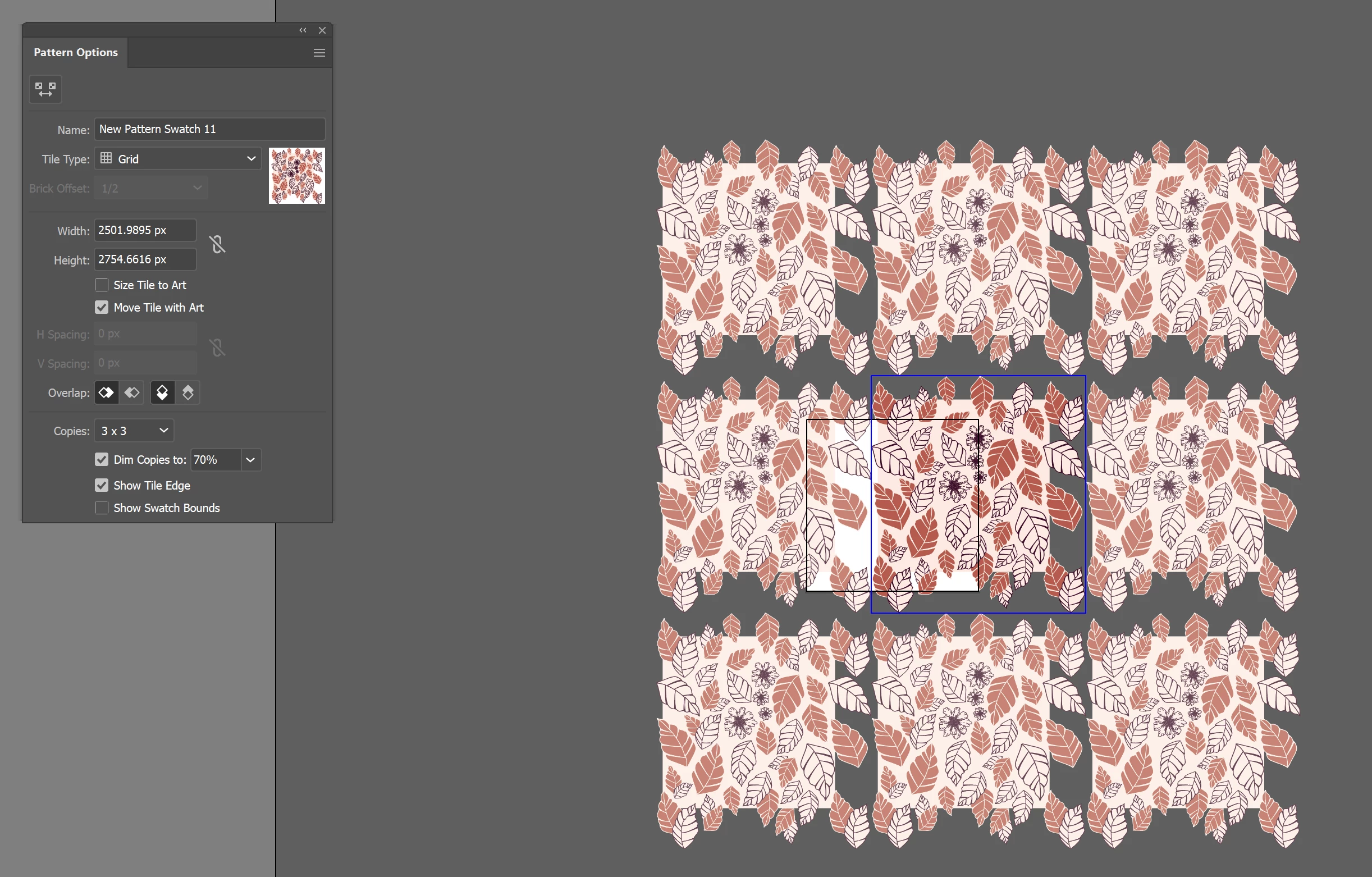
Thanks!

Correct answer Ton Frederiks

The blue box you see is defining the size of your pattern tile.

Try to scale it with the Pattern Tile Tool (to be found in the upper left corner of the Pattern Options panel)

And try to make your pattern tile size rounded pixel values.

2 replies

Ton Frederiks
Community Expert
Community Expert
March 5, 2021

You could have started from the background rectangle only to set the size of your pattern in the pattern maker (no fractional pixels to avoid white lines) and copy paste the leaves from another document in the pattern maker.

Participant
March 26, 2024

I am getting this issues as well. I have set mey document to the same settings as previous patterns but still no joy. I have even watched several videos and followed along step by step and I am still getting huge gaps. Any Solution?

Monika Gause
Community Expert
Community Expert
March 26, 2024

Did you use the pattern editing mode?


Please show your pattern.

Ton Frederiks
Community Expert
Ton FrederiksCommunity ExpertCorrect answer
Community Expert
March 4, 2021

The blue box you see is defining the size of your pattern tile.

Try to scale it with the Pattern Tile Tool (to be found in the upper left corner of the Pattern Options panel)

And try to make your pattern tile size rounded pixel values.

iReneT
iReneTAuthor
Participant
March 5, 2021

Hi Ton, 

Thanks for your help.

I am doing this but I cannot understand what I am doing wrong.

In some patterns I design I do not have this issue. In others, like the one attached, I need to adjust the tile manually. 

I am wondering what it is wrong with the artwork as I use the same method.