Participating Frequently
February 7, 2014
Answered

Need a developer for script: Distribute symbols on a path and rotate

  • February 7, 2014
  • 3 replies
  • 4314 views

Dear all,

I need an Illustrator script for distribute a collection of diferent symbols along a path. The symbols should be distributed from the beginning to end of path and separated a proportional space each other. Additionally each symbol should be rotated pointing to a "look at" object.

Please look at the attached image for further info.
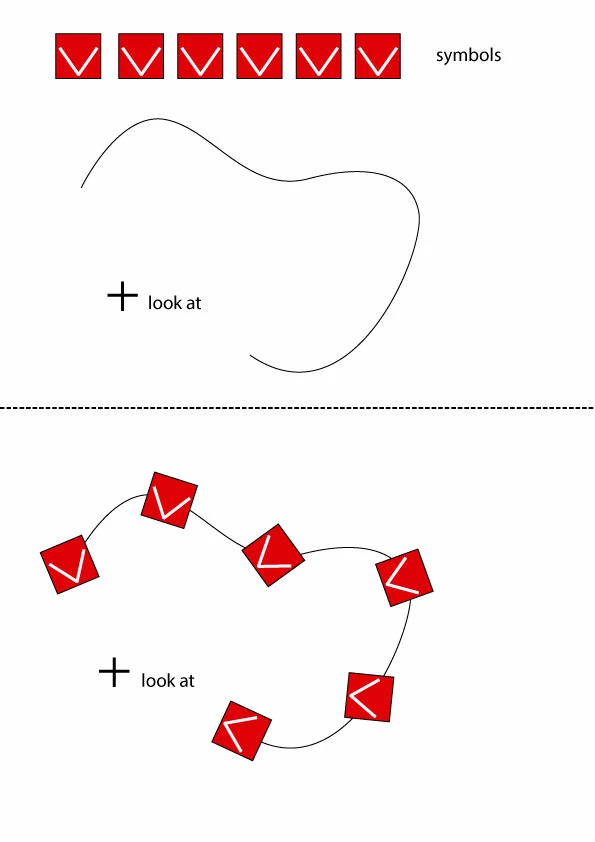
Any help will be appreciated. I know that nobody is here for develop scripts for free so let's talk

This topic has been closed for replies.
Correct answer femkeblanco

Your script seems to be very useful to me, but it seems that your website can't download the script anymore, is there any other way to download it? Thank you very much!


I think the scripts are available from here 

3 replies

Participating Frequently
February 7, 2014

It needs these processes.

1. creates an array of symbols sorted from left to right by their positions

2. distributes them on the path

3. rotates them toward the target point

The 2nd part needs so complicated process.

The 3rd part is relatively simple as follows.

// ------------------------------------------------------

function main(){

    var sels = activeDocument.selection;

    // gets the center of the foreground object.

    // the other objects are rotated toward this point.

    var point = getCenter( sels[0] );


    for(var i = 1; i < sels.length; i++){

        var t = getAngle( point, getCenter(sels));

        sels.rotate( t - 90, true, true, true, true, Transformation.CENTER );

    }

}

function getCenter(p){

    return [p.left + p.width / 2, p.top - p.height / 2];

}

function getAngle(p1, p2){

    return Math.atan2(p2[1] - p1[1], p2[0] - p1[0]) * 180 / Math.PI;

}

main();

// ------------------------------------------------------

Participating Frequently
February 7, 2014

Dear Hiroyuki,

I've just test your script and works awesome!

By the moment I'm going to use circles and arcs as paths so I guess the second process can be solved using your script "Divide (length)" to add anchor points to the path as much as symbols in the array of the first process.

Thanks a lot!

Participating Frequently
February 8, 2014

@carlostelemaco

I'm glad.

But "Divide(length)" script works for each segment.

So it is not usable for the purpose that divides the whole path that has different length of segments.

I wrote a script for the process 1 and 2.

Though it is a bit rough implementation for now.

Please try this.

http://shspage.com/aijs/af_distributeOnThePath.zip

@W_J_T, @pixxxel schubser, @CarlosCanto

Thanks. Let's have fun with the scripting!

Inspiring
February 7, 2014

I know this is not what you are looking for, but here is what you could use when working with very SIMPLE paths (such as part of regular circle):

  • insert your object and its copy

  • create intermediate objects using Blend Tool

  • draw your path ( in my case this is 3/4 of a regular circle)

  • select your regular path and the Blend Assembly, go to Object > Blend > Replace Spin

  • the result

hope this helps,

Regards,

Pawel Kuc, ccmutants.com


Participating Frequently
February 7, 2014

Dear Pawel,

Thanks for your wonderful answer about the "blend" tool, but I need to use "symbols" instead of shapes and as far as I know this option is inpossible with "blend" so I think this issue only can be solved with a script.

Thank you!

Inspiring
February 10, 2014

just to clarify: the Blend Tool works on symbols as well

tested with CS6 and CC...

Regards,

Pawel Kuc, ccmutants.com

Participating Frequently
February 7, 2014

The "Dup At Selected Anchors" of Hiroyuki Sato is a great beginning but it only works with an object (duplicate it) and I need an array of symbols instead.

http://shanfan.github.io/Illustrator-Scripts-Archive/