Participant
February 10, 2019
Answered

Need help making lines in eye

  • February 10, 2019
  • 3 replies
  • 410 views

Hey guys,

I'm needing help with creating the black lines in this eye. Not sure what would be the best way of creating them since they are of different lengths. I don't want to have to create each line individually. I was trying the transform effect, but was having trouble. Is there any other way? Also just tried doing a trace, but didn't turn out that great.

Appreciate any help.

Thanks.

This topic has been closed for replies.
Correct answer barbara_a7746676

You could probably get close to that look.

Draw a circle that has a stroke color and no fill color.

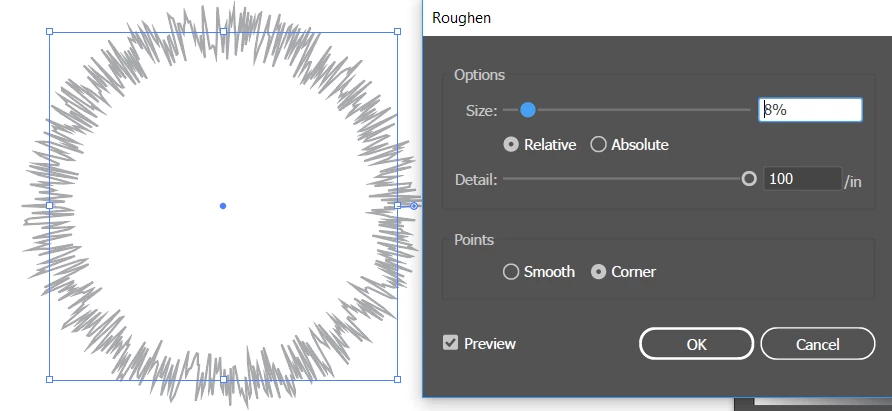
Choose Effect > Distort & Transform > Roughen. Increase the Detail, and Size.

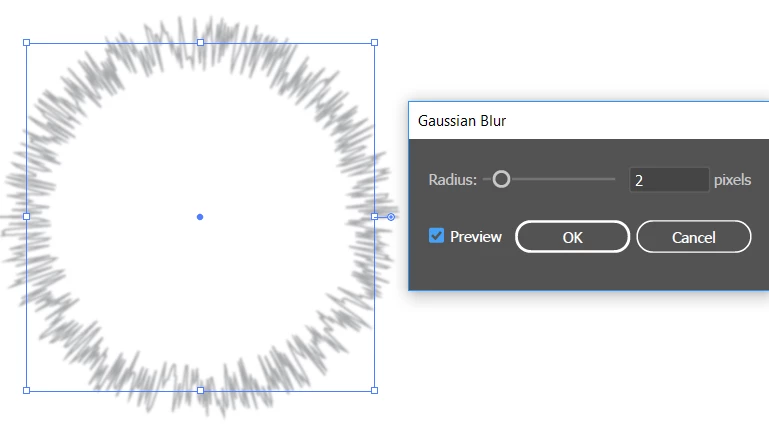
Since the lines are not real crisp, you could Effect > Blur  > Gaussian Blur to make then a little softer.

Or you could use two circles , one on top of the other, each adjusted with variations of the effects and possibly with one having a darker or lighter stroke color.

3 replies

lambiloon
Community Expert
Community Expert
February 10, 2019

hi check following video hope that helps you more...Thanks.

Ali Sajjad / Graphic Design Trainer / Freelancer / Adobe Certified Professional
Participant
February 10, 2019

I watched that video earlier, but it was a bit too detailed for what I was looking for. Thank you though!

barbara_a7746676
Community Expert
barbara_a7746676Community ExpertCorrect answer
Community Expert
February 10, 2019

You could probably get close to that look.

Draw a circle that has a stroke color and no fill color.

Choose Effect > Distort & Transform > Roughen. Increase the Detail, and Size.

Since the lines are not real crisp, you could Effect > Blur  > Gaussian Blur to make then a little softer.

Or you could use two circles , one on top of the other, each adjusted with variations of the effects and possibly with one having a darker or lighter stroke color.

Participant
February 10, 2019

That was exactly what I was needing. Thank you!

barbara_a7746676
Community Expert
Community Expert
February 11, 2019

Glad that worked for you!

Monika Gause
Community Expert
Community Expert
February 10, 2019

You could try and create a pattern brush

Or multiple pattern brushes that you then apply to one path.