Exit
  • Global community
    • Language:
      • Deutsch
      • English
      • Español
      • Français
      • Português
  • 日本語コミュニティ
  • 한국 커뮤니티
0

Need help with cuting paths

New Here ,
Jan 25, 2021 Jan 25, 2021

Cheers everyone,


could someone quickly let me know how to cut the path of a rectangle for example and how to round the corners afterward? Just to get a similar result like this:


Thanks a lot in advance! 🙂

TOPICS
Draw and design
266
Translate
Report
Community guidelines
Be kind and respectful, give credit to the original source of content, and search for duplicates before posting. Learn more
community guidelines

correct answers 2 Correct answers

Community Expert , Jan 25, 2021 Jan 25, 2021

Round corners.png

Translate
Community Expert , Jan 25, 2021 Jan 25, 2021

Fel,


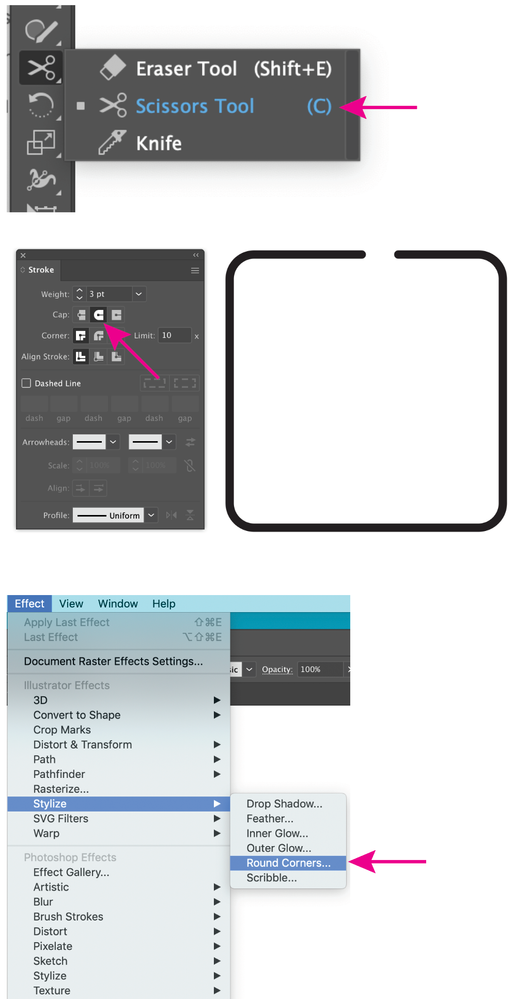
You can get the round corners simply by choosing Round Cap in the Stroke palette, and you can make the cutting as follows:


1) Click the rectangle with the Scissors Tool outside the gaps (half a Stroke Weight outside on either side corresponding to where you wish the roundings to end/ reach full Stroke Weight);

2) Select the cutout path (which will overlap the ends of the remining part of the former rectangle), then shorten it by twice the sum of the desired gap and the Stroke Weight; yo

...
Translate
Adobe
Community Expert ,
Jan 25, 2021 Jan 25, 2021

Round corners.png

Translate
Report
Community guidelines
Be kind and respectful, give credit to the original source of content, and search for duplicates before posting. Learn more
community guidelines
Community Expert ,
Jan 25, 2021 Jan 25, 2021
LATEST

Fel,


You can get the round corners simply by choosing Round Cap in the Stroke palette, and you can make the cutting as follows:


1) Click the rectangle with the Scissors Tool outside the gaps (half a Stroke Weight outside on either side corresponding to where you wish the roundings to end/ reach full Stroke Weight);

2) Select the cutout path (which will overlap the ends of the remining part of the former rectangle), then shorten it by twice the sum of the desired gap and the Stroke Weight; you can subtract that from the W value in the Tranform palette (if the centre Reeference Point is ticked).

 

Translate
Report
Community guidelines
Be kind and respectful, give credit to the original source of content, and search for duplicates before posting. Learn more
community guidelines