


Inspiring
May 9, 2025
Answered

Need to flatten multiple objects into single shape while turning white to transparency

  • May 9, 2025
  • 5 replies
  • 1536 views

I have an image which is composed of multiple overlapping objects and clipping masks. I need to take this image and create a single, solid-color object based on only the colored portions, turning white to transparency, essentially creating a stencil.  I'm blanking out on how to do this. Can someone please help me? Image is below:
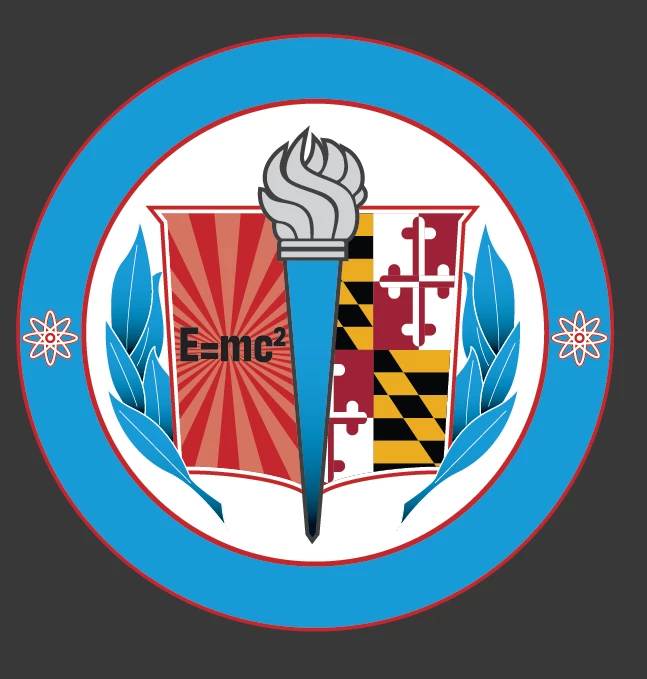
Thank you.

Correct answer AR_MD

Thanks again for everyone's help.  What finally worked was taking the b/w template I posted earlier, changing the black objects to white and vice versa, then creating a group and turning it into a mask with a flat circle behind the whole thing.

5 replies

AR_MDAuthorCorrect answer
Inspiring
May 16, 2025

Thanks again for everyone's help.  What finally worked was taking the b/w template I posted earlier, changing the black objects to white and vice versa, then creating a group and turning it into a mask with a flat circle behind the whole thing.

kphotopage
Legend
May 10, 2025

Image Trace worked well here.  Black with transparent areas. (I put a cyan color behind to check.)

K

Brad @ Roaring Mouse
Community Expert
Community Expert
May 10, 2025

You could also try something a bit more brute force. 1. Make sure all strokes are expanded, 2. Select All and Use Pathfinder > Divide. 3. You can then select all the white objects that result and delete them. 4. The rest, you can Pathfinder > Unite and change to Black.

Kurt Gold
Community Expert
Community Expert
May 10, 2025

Unfortunately, in this case, based on the coloured version, that brute force way won't work accurately.


In more simple cases it would work, of course.

Kurt Gold
Community Expert
Community Expert
May 9, 2025

A knouckout group may be a good starting point, but it indeed depends on how the entire emblem is built.

Can you share this Illustrator file?

AR_MDAuthor
Inspiring
May 9, 2025

For some reason it's throwing an error when I upload as a .ai, but let me try an EPS.

Kurt Gold
Community Expert
Community Expert
May 9, 2025

Thank you for providing the sample file.


Yes, it's possible to fuse the emblem and get a black version. It's not a one-whack solution, but you can use a knockout group and combine it with flattening transparency. Some fine-tuning may be required, depending on the desired accuracy.


Are you familiar with using knockout groups and flattening them?

pixxxelschubser
Community Expert
Community Expert
May 9, 2025

Do you already know which colours you want to eliminate (this is probably the most difficult part)? After all, your image should only contain black and white elements.


AR_MDAuthor
Inspiring
May 9, 2025

This is effectively what I need.  Everything that has color would be turned black, and the white would be knocked out exactly how it appears.  The reason I'm having trouble doing that is that the white is sandwiched between objects and is not the exact shape.  I can't just bring it all to the top and combine it to create a knockout shape.


Closest I can think to do is to turn this into a large raster image and live trace it, but there has to be a more elegant solution than that, no>