


Participant
December 15, 2024
Question

Nepali Font not showing when copy pasted in Illustrator

  • December 15, 2024
  • 3 replies
  • 794 views

Hi all, 


I volunteered to design for a Nepali non-profit organization. Some of the fonts should be used in Nepali. I typed Nepali words using the Nepali-type website on Google, but the words changed when I pasted them in Illustrator. See the screenshot attached. How can I solve this issue? I installed the font (Preety) itself and changed it in Illustrator, but it didn't work. Please help. Thank you in advance.
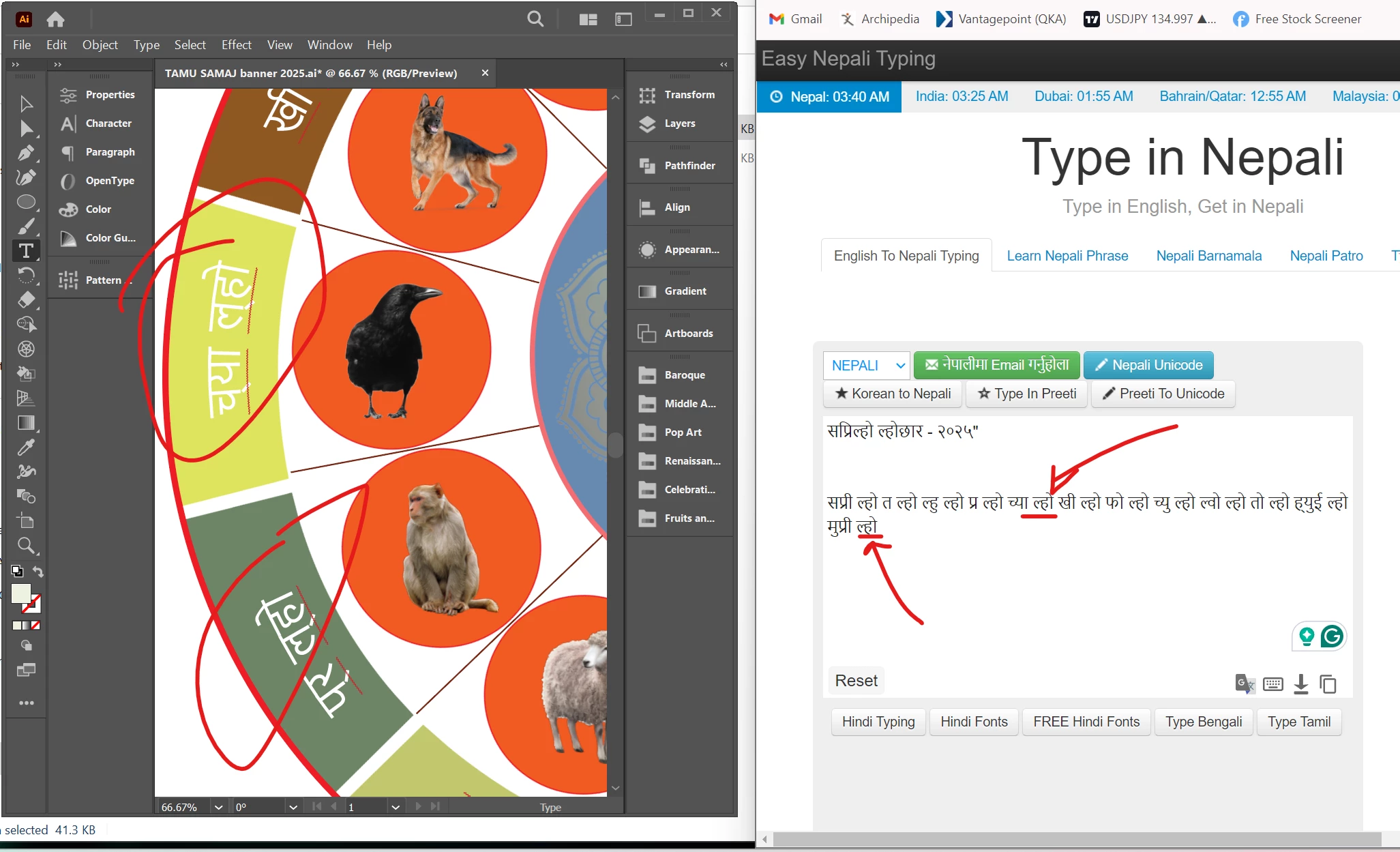
 

This topic has been closed for replies.

3 replies

Monika Gause
Community Expert
Community Expert
December 16, 2024

This depends a lot on ligatures and such working correctly, right?


Can you try if it works better in InDesign?

Kurt Gold
Community Expert
Community Expert
December 15, 2024

Are you talking about the red wavy underlining?


If so, that's just the (automatic) spell checker. You can disable it in the Edit menu.

Participant
December 15, 2024

Hi Kurt, 

no, I am not talking about the red underlining... I am taking about the words itself. Thank you for the reply tho.

Community Expert
December 15, 2024

Is the website where the Nepali text is being created generating the text in Unicode? My guess is there is a mismatch between how the type is coded on the web site versus how the Pretty font is being rendered in Adobe Illustrator.

Participant
December 15, 2024

Hi thanks for a quick response. The website is https://www.easynepalityping.com/ I think it's similar to Unicode but not exactly. Maybe that's the case, how do I solve the issue? I just need the words to reflect as exactly as in the illustrator. 

Community Expert
December 16, 2024

On the web site, did you press the "Pretti to Unicode" button above the text area when writing the copy? It looks like that button is not pressed in the default setting. If the text was set in Unicode it might copy and paste into Illustrator successfully.