


New Area Text

Copy link to clipboard
Copied
Hello everyone, on this occasion I have a scrit, It can create a new text area, that is selected, ready for editing.
like this
This script:
var myPathItem1 = myDoc.pathItems.rectangle(200,75,500,300);
var myTextFrame1 = myDoc.textFrames.areaText(myPathItem1);
creates the area text but not selected for editing.
Any suggestions?
Thanks...



Explore related tutorials & articles
 7
Replies
7
7
Replies
7


Copy link to clipboard
Copied
Wow, I tried to mess with it- and couldn't find a solution at this time. It looks like the only way to get your cursor is to explicitly have the type tool active and clicking on the text box.

Copy link to clipboard
Copied
i found the same result, silly.
I suppose one solution would be to set a variable to the result of a prompt or some other type of user input and then just set the contents of the area text frame to the variable.
var myPathItem1 = myDoc.pathItems.rectangle(200,75,500,300);
var myTextFrame1 = myDoc.textFrames.areaText(myPathItem1);
myTextFrame1.contents = prompt("Enter the text for myTextFrame1","");
Copy link to clipboard
Copied
okay. I try to do is something like "JoinTextFrames", but this time I have a group with texts, when I copy and paste the group in a area text.
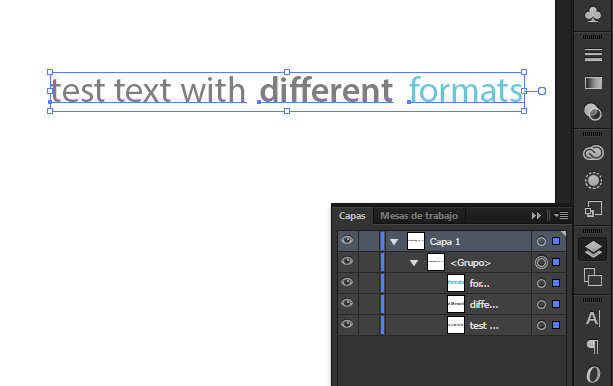
the texts come together.
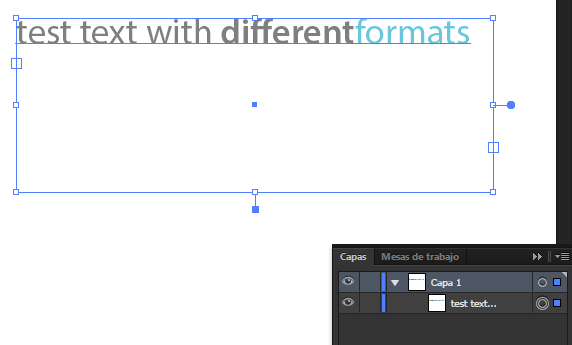
and I have many groups of text, I thought about creating a script to join texts
For the moment this is my script..
//////////////////////////////////////////////
copy();
var myDoc = app.activeDocument;
var width=app.activeDocument.selection[0].width;
var height=app.activeDocument.selection[0].height;
var xy=app.activeDocument.selection[0].position;
xy=xy.toString();
var re = /(.*\d+\.*\d*),(.*\d+\.*\d*)/;
var str = xy;
var newstrY = str.replace(re, "$2");
var newstrX = str.replace(re, "$1");
alert(newstrY+newstrX+width+height)
var myPathItem1 = myDoc.pathItems.rectangle(newstrY,newstrX,width,height);
var myTextFrame1 = myDoc.textFrames.areaText(myPathItem1);
//////////////////////////////////////
what it does is copy the text group, and as is selected, acquires its property (x, y, w, h) and uses them to create an area text, but I can not paste the text in the new area text.
then would have to find a way to select text groups, one at a time and insert them into the new area texts, that script have created.
Thanks...

Copy link to clipboard
Copied
It`s quite another question for the new topic.


Copy link to clipboard
Copied
Hmmh?
I think this based on the same question.
Djos, you can do something like this
var myDoc = app.activeDocument;
if (myDoc.selection.length > 0) {
var aSel = myDoc.selection[0];
var wdt = aSel.width;
var hgt = aSel.height;
var xy = aSel.position;
if (aSel.typename == "TextFrame") {
var aCon = aSel.contents;
var newX = xy[0];
var newY = xy[1];
//alert(newY+newX+ wdt+ hgt);
var myPathItem1 = myDoc.pathItems.rectangle(newY, newX, wdt, hgt);
var myTextFrame1 = myDoc.textFrames.areaText(myPathItem1);
myTextFrame1.contents = aCon+ " [[copied text frame]]";
//aSel.remove();
}
}
Have fun

Copy link to clipboard
Copied
thanks for the help, for the moment, I thought of another solution, but need to add a selection more:
The following script creates a new text area with dimensions of a group of selected text, at the end, the group still is selected text but the new area text is not selected,
/////
var myDoc = app.activeDocument;
var width=myDoc.selection[0].width;
var height=myDoc.selection[0].height;
var xy=myDoc.selection[0].position;
var newX = xy[0];
var newY = xy[1];
var myPathItem1 = myDoc.pathItems.rectangle(newY,newX,width,height);
var myTextFrame1 = myDoc.textFrames.areaText(myPathItem1);
////
Is it possible also select the new area text?

thus would have the group and the area text selected.
PD: I tryed to select by layer name, but I presents the error:
No such element
https://forums.adobe.com/message/8095749#8095749
var myLayer = layers["Target Layer"];
Copy link to clipboard
Copied
You never declared the variable "layers". On it's own, 'layers' isn't an element. It's a property of the document object. try this:
var docRef = app.activeDocument;
var layers = docRef.layers;
var myLayer = layers["Target Layer"];
I don't know whether that will fix your selection issue, but that's likely why you got the "No Such Element" error.


Get ready! An upgraded Adobe Community experience is coming in January.
Learn more
 AdChoices