
Inspiring
February 13, 2019
Question

New Bug: double ruler

  • February 13, 2019
  • 2 replies
  • 2161 views

Double Ruler appears at random times.  When the double ruler appears, the cursor is offset by about the same space as is between the two rulers.  So if you click and drag, the selection will appear a quarter inch or so below the cursor.  This issue is resolved instantly by hiding the ruler.
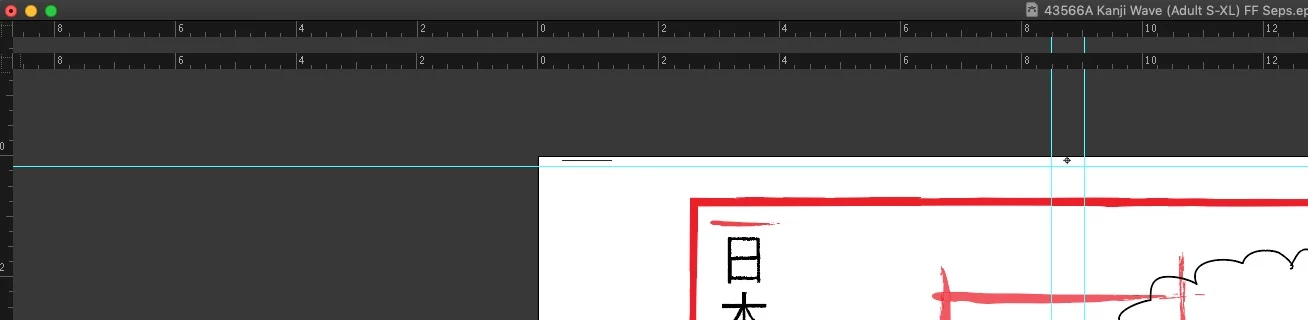
[Title edited by moderator for clarity. Was: “new bug”.]

    This topic has been closed for replies.

    2 replies

    KuttyjoeAuthor
    Inspiring
    November 27, 2019

    This double ruler bug is still unresolved in 2020 update.  I actually have some more details about how it happens.  It happens constantly when you switch from overprint preview back to normal view. That's what triggers it immediately.  On Windows, it doesn't produce a double ruler, but it creates a different problem.  Exit Overprint preview and everything looks normal.  But use the hand tool to pan and the screen is garbled.  It happens 100% of the time on MacOS.

    Participant
    October 2, 2022

    Just googling this issue as I seem to have come accross the same issue. New macbook Pro M1 ultra, latest photoshop. I get the issue when I connect to a screen that has larger/different resolution and aspect ratio. The second ruler shows up just after the aspect ratio of the macbook. Note that if you resize the 'double ruler' version and bring it back to the main desktop, it will 'just' be too big to fit the screen.  I also note that manually dragging the size of the Photoshop window to be larger than the macbook screen, the second ruler shows up. Maybe coding issue that 'repeats' the ruler after a certain size (equal to max main screen size) is reached.... just my 2 cents. Kinda annoying. I've had to play with the magnification of the second screen so that I can get it to 'fit within' the two rulers.

    Participating Frequently
    November 16, 2022

    Same issue, M1 Max MacBook Pro (where did you get the M1 Ultra version?!). Also when switching between big screen and laptop. 

    Mike_Gondek10189183
    Community Expert
    Community Expert
    February 13, 2019

    What computer and video card model do you have.

    Try Command E on Mac to turn off GPU.

    KuttyjoeAuthor
    Inspiring
    February 13, 2019

    I'm running an iMac from around 2013, NVIDIA GeForce GTX 780M

    I can't turn off GPU.  Illustrator performance is nearly unusable at this point if I view using CPU.  This problem pops up probably once every 2 days or so.

    Mike_Gondek10189183
    Community Expert
    Community Expert
    February 13, 2019

    Have not seen this before. Are you running CC2019 and a intenational verions? Don't update to  Mac OS Mojave, as there are a number of issues with that. mostly photoshop though.